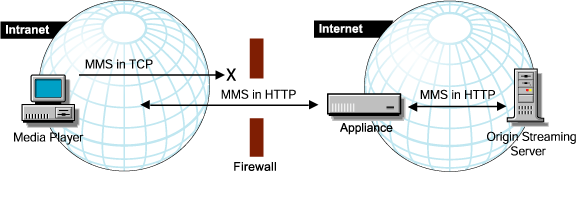


Most firewalls and NATs will not support the MMS-UDP protocol, which uses dynamically allocated UDP ports. Your firewall may or may not support the MMS-TCP protocol, which uses TCP port 1755. Most firewalls will support the MMS-HTTP format, which uses the standard HTTP port 80.
There are two common configurations which may be used in a firewall or NAT situation.
In this configuration, the firewall is used to force all players to use the MMS-HTTP protocol. If a player is configured to use TCP/UDP, it will make an initial attempt to connect to TCP port 1755. This will be blocked by the firewall, causing it to connect to the appliance using the MMS-HTTP protocol, as shown in Figure 12.
Figure 12
In this scenario, all appliance IP addresses, the default gateway, and the DNS server are on subnets outside the firewall.
NOTE: This approach does not apply to players configured to only use the UDP/TCP transport option.
In this configuration, players can connect to the appliance using any of the MMS protocol options (HTTP, TCP, UDP). The firewall must be able to pass both MMS-HTTP and MMS-TCP packets. Because MMS-UDP packets cannot pass through the firewall, the appliance must be configured to only use TCP for filling. This is done by ensuring that the Allow UDP Upstream option is not checked when configuring the MMS service. This option is not checked by default.
If a player connects to the appliance using MMS-HTTP, the appliance will use MMS-HTTP to communicate with the origin server. If a player connects to the appliance using MMS-TCP or MMS-UDP, the appliance will use MMD-TCP to communicate with the origin server. This is illustrated in Figure 13.
Figure 13 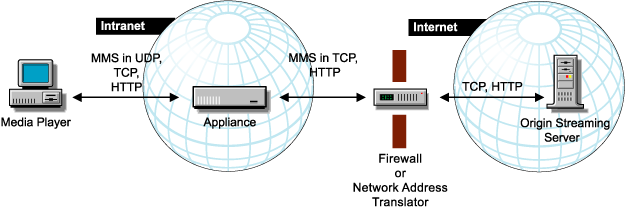
In these scenarios, the appliance IP addresses, the default gateway, the DNS server, and the proxy service on the firewall or network address translator would all be on subnets inside the firewall.
If neither of the previous two options is possible for your network, you can configure the appliance as a firewall component by doing the following:
Figure 14 illustrates this scenario.
Figure 14 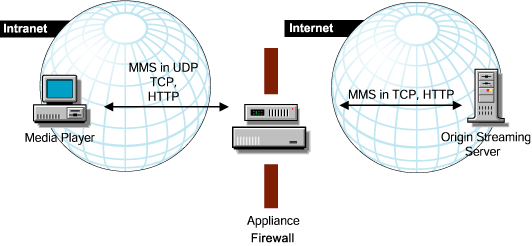
In this scenario, the appliance has two adapters: one adapter inside the firewall and one outside. An advantage of this is that the firewall does not interfere with the appliance. The appliance IP addresses would be both inside and outside the firewall, depending on the network cards to which they were assigned. The default gateway and the DNS server would be on subnets outside the firewall.
For more information on protocols, see Overview of Windows Media Player Protocols .