Setting Up a MAPI Profile
Setting up a MAPI profile provides login information so the Migration Utility can access a specific Exchange server. You need to create a MAPI profile for each Exchange server in your system so that the Migration Utility can access it.
-
In the Windows Control Panel, double-click Mail, click Show Profiles, then click Add.
-
Provide a name for the new profile, then click OK.
-
Select Add a New E-Mail Account, then click Next.
-
Select Microsoft Exchange Server, then click Next.
-
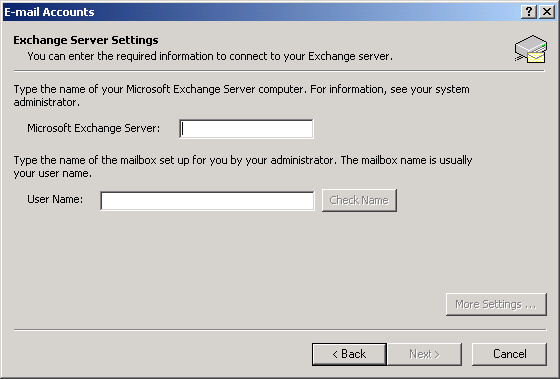
Provide login information for the Exchange server:
-
Specify the name of the Exchange server from which you are migrating users.
-
Specify a mailbox name on that server.
You can use your mailbox name, your username, or someone else's as long as the mailbox resides on that Exchange server.
-
Click Check Name to make sure that the login information is accurate.
If the name check fails, the Migration Utility cannot access your Exchange system.
-
Click Next.
-
-
Click Finish.
The new profile now appears in the profile list.
-
Select Prompt for a Profile To Be Used, then click OK.
-
Repeat Step 1 through Step 7 for each Exchange server in your system.