1.3 High-Level Architectural Overview
The Identity Manager user application relies on a number of independent components acting together. The core components, and their fundamental responsibilities, are described in the following table.
In terms of information flow, the above-mentioned components are logically linked in the manner depicted in the diagram below. Physically, the individual components may be (and in most cases will be) located on more than one machine. For example, although the identity vault (and its main administration tool, iManager) will be collocated on the machine that hosts the Identity Manager engine, JBoss (and the user application) will typically be hosted on a separate machine (or group of machines, if clustered). Likewise, for reasons not only of performance but also for security and disaster recovery, the database (MySQL) will typically be on its own machine.

1.3.1 Identity vault
The identity vault is used to store identity data and abstraction layer definitions of various kinds. An instance of eDirectory (running on Windows, Solaris, or Linux) is used for this purpose. By using eDirectory, Identity Manager is able to leverage a well-proven, massively scalable enterprise-class LDAPv3 directory with partitioning and replication capabilities, plus a flexible Web-based management and configuration tool (iManager) which offers an all-in-one administrative integration point between Identity Manager and eDirectory itself.
1.3.2 JBoss
The user application is packaged as a Java Web Application Archive, or WAR file. The WAR is deployed into JBoss, the popular open-source Java application server (which uses Tomcat as its servlet engine; not shown in the diagram). The use of JBoss as an execution environment brings many advantages, including the following:
-
The source code is freely available.
-
Starting with version 4.0.3, JBoss is clusterable.
-
JBoss is fully J2EE compliant, which means any J2EE application can run on it. You can host additional applications (for example, Web Services) on the same instance of JBoss that the user application runs on.
-
JBoss supports standard JAAS and JACC Java security and authorization services (which the user application relies on for identity vault access).
-
JBoss runs on many different platforms, including popular versions of Windows and Linux.
The user application WAR contains executable code for the user application, which in turn is built using a Model-View-Controller (MVC) architecture, for separation of concerns. The user-facing interfaces run as modular portlets within the user application. Separate portlets exist for viewing org charts, conducting searches, viewing user details, resetting passwords, and so forth.
For more information on the various aspects of deploying Web applications to JBoss, consult the JBoss documentation at http://www.jboss.org/products/jbossas/docs.
1.3.3 Database
The user application relies on a database (MySQL by default; see the Installation Guide for a list of supported databases) to store several kinds of information:
-
User application configuration data: for example, Web page definitions, portlet instance registrations, and preference values.
-
If the Provisioning Module is installed, workflow state information is persisted in the database. (The actual workflow definitions are stored in the identity vault.)
-
Novell Audit logs
1.3.4 Identity Manager Engine
The Identity Manager product consists of a runtime engine, drivers, and policies. The Identity Manager engine responds to events in the identity vault and manages the flow and transformation of data to and from the vault. Driver objects encapsulate executable code and artifacts (such as policy documents) designed to provide data-handling behaviors specific to a particular connected system. The Identity Manager user application is a connected system. Communication between the identity vault, the user application’s abstraction layer and Workflow Engine occurs via the User Application Driver (see below).
Because the user application relies on various directory objects for storage of abstraction layer artifacts, it’s necessary to extend the eDirectory schema to accommodate the custom LDAP objects and attributes required by the user application. Extension of the schema occurs automatically as part of the Identity Manager installation process. Population of custom objects and attributes with default values does not occur, however, until the User Application Driver is installed and activated.
1.3.5 User Application Driver
The User Application Driver is an important enabling piece of the user application. One of the responsibilities of the User Application Driver is to notify the abstraction layer when important data values change in the identity vault, so that the abstraction layer knows to update its cache.
If the Provisioning Module is installed, the User Application Driver can be configured to kick off workflows automatically in response to changes of attribute values in the identity vault.
The User Application Driver is not only a runtime component but a storage wrapper for directory objects (comprising the user application’s runtime artifacts). A typical representation of the directory artifacts associated with the User Application Driver is shown below.
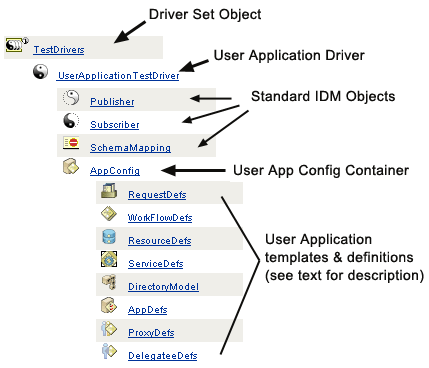
NOTE:The names shown represent LDAP common-name (cn) values. The actual schema naming of the various objectclasses is discussed elsewhere.
These artifact categories are discussed in greater detail below.
Driver Set Object
Every Identity Manager installation requires that drivers be grouped into driver sets. Only one driver set can be active at a time (on a given directory server). The drivers within that set can be toggled on or off individually without affecting the driver set as a whole. The User Application Driver (like any other IDM driver) must exist inside a driver set. The driver set is not automatically created by the user application; you must create one ahead of time and then create the User Application Driver within it.
User Application Driver
The User Application Driver object (which can be given any arbitrary name) is the container for a variety of artifacts. As with all Identity Manager drivers, the User Application Driver implements Publisher and Subscriber channel objects and policies. The Publisher channel is not used by the user application, although it is available for custom use cases.
App Config Object
The AppConfig object is a container for various user application configuration objects:
RequestDefs
This is a container for Provisioning Request Definitions, the administrator-configured request definitions available to the user application runtime (if the Provisioning Module exists). The definitions stored here (as XML) represent the classes of requests that end users with appropriate rights can instantiate via the user application. The RequestDef associates a WorkFlowDef (below) with a ResourceDef.
WorkFlowDefs
A container for Workflow objects, including design-time descriptions plus any template or unused flows.
ResourceDefs
A container for Provisioned Resource definitions, including design-time descriptions plus any templates or unused targets.
ServiceDefs
A container for Service Definition objects, which wrap Web Services called by Workflows.
DirectoryModel
Abstraction layer meta-level objects (ChoiceDefs, EntityDefs, RelationshipDefs), which represent different types of content (some user-definable, others administrator-set) of the directory that can be exposed by the Identity Portlets.
AppDefs
A container for configuration objects used to initialize the runtime environment, such as cache config information and e-mail notification properties.
ProxyDefs
A container for proxy definitions.
DelegateeDefs
A container for delegate definitions.
1.3.6 Directory Abstraction Layer
Portlets get their identity data via queries into the directory abstraction layer, which is a code layer that isolates details of identity-data access from client processes. When a portlet needs to perform a search on identity data, for example, the abstraction layer makes the appropriate LDAP queries against the target container in the identity vault, on behalf of the portlet. At no time does any portlet make direct queries into the identity vault.
The abstraction layer is also the code layer through which abstraction layer definitions, as specified by administrators or other qualified users of the system, are created or changed. To make such changes, the system expert uses the Designer application’s directory abstraction layer editor, which is described later in this guide, in Section 4.0, Configuring the Directory Abstraction Layer.
At runtime, the abstraction layer caches a wide variety of configuration and entity-definition data obtained from the identity vault. The various caches maintained by the user application can be managed at a detailed level by the administrator. For additional information on caches and cache management, see Section 13.0, Caching Configuration.
1.3.7 Workflow engine
The workflow engine (available with the Provisioning Module) is the set of runtime classes responsible for executing the steps of a workflow as specified by a process definition (a runtime artifact created when a workflow is instantiated) and keeping track of state information, which is persisted in a database, such as MySQL or Oracle; see Section 1.3.3, Database, above.
Additional details about the Workflow System, including how to create workflows, can be found in the chapter called Section 21.0, Introduction to Workflow-Based Provisioning, later in this guide.
1.3.8 User interface
The Identity Manager user interface is comprised of a collection of JSR168-compliant portlets (and, in the case of the Provisioning Module, some Java Server Pages) that run within a Java Web application on JBoss. The portlet architecture provides for a high degree of modularity, content customization, and user control over page appearances. The user application framework provides container services of various sorts. It manages window state, portlet preferences, persistence, caching, theming, logging, and so forth, and acts as a security gatekeeper. The application server on which the user application runs in turn provides various services to the application as a whole, such as scalability through clustering, database access via JDBC, and support for certificate-based security.
The high degree of encapsulation afforded by this architecture provides for a robust and secure presentation-tier environment for the Identity Manager user application. It also guarantees a high degree of administrative control over all aspects of the user interface.
For more information about administration of the various pieces of the user interface, consult the various chapters in this guide under Section III, Administering the User Application.