6.1 About Forms
The tab of the provisioning request definition editor lets you define the section of the user application’s provisioning request definition forms. You use the Forms page to define:
-
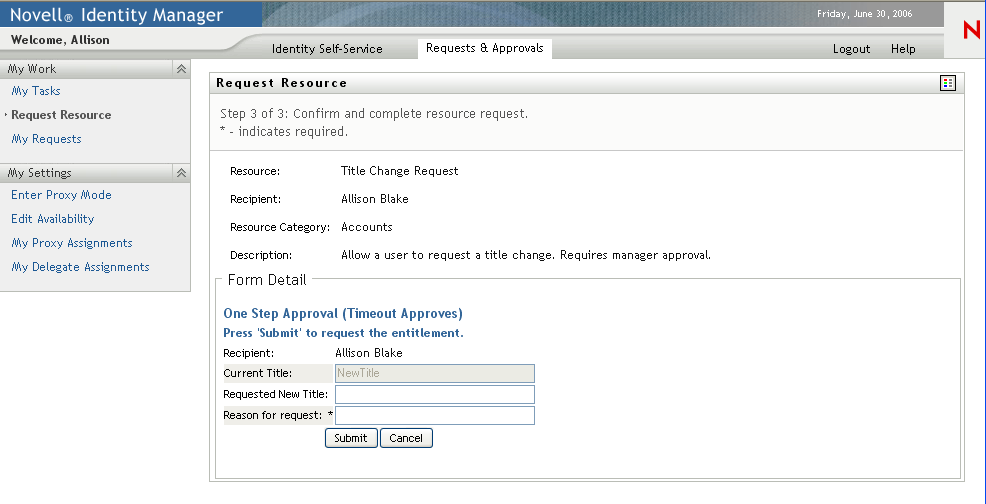
Request forms—Allows users to initiate a resource request.
-
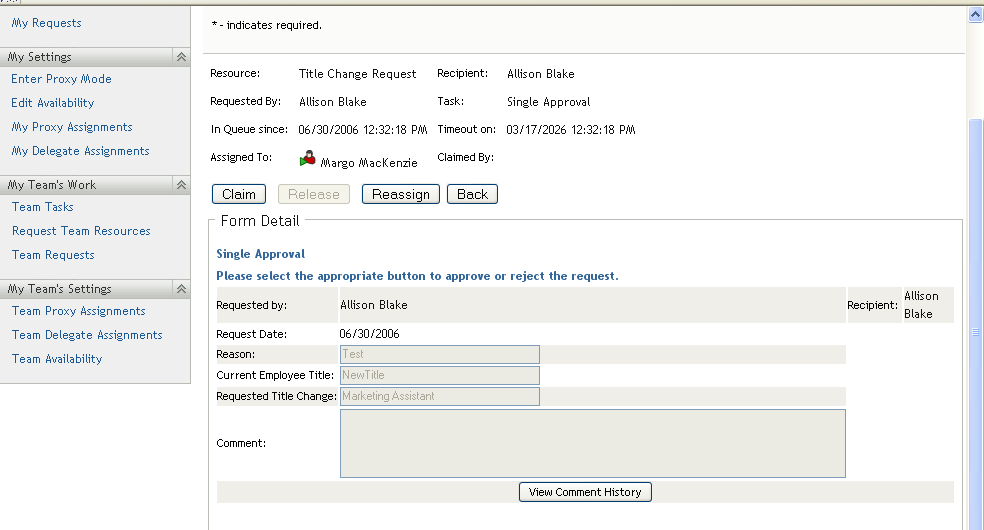
Approval forms—Allows users to approve or deny resource requests.
6.1.1 About Request Forms
You can create one request form for a provisioning request definition.The request form is associated with the workflow’s start activity.
Figure 6-1 Sample Resource Request Form
6.1.2 About Approval Forms
You can define multiple approval forms for a provisioning request definition, but only one form per approval activity. You link an approval form to an approval activity in the properties for the activity.
Figure 6-2 Sample Resource Approval Form
6.1.3 About Form Control Data Binding
All of the fields you define for a form are automatically available for data binding in the Data Item Mapping property sheet. Two bindings, or mappings, are possible for each form field: a pre-activity mapping to initialize or pre-load a form field with data, and a post-activity mapping to move modified form data into the work flow data-item called flowdata. For more information on data item mappings, see Section 7.2.2, Defining the Data Item Mappings.
Some form controls allow you to initialize their values from data sources other than workflow data. For example, some list controls allow you to specify the initial value as a property of the control. For more information about defining initial values, see Section 6.5, Form Control Reference.