Server Status
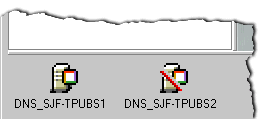
Server status is represented by the server icons displayed in the lower pane of the DNS/DHCP Management Console. Figure 13 shows icons representing two DNS servers. The server icon on the left indicates that this server, DNS_SJF-TPUBS1, is operational. The red slash through the server icon on the right indicates that the server might not be operational.
Figure 13
Server Status
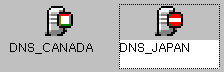
Even though the server icon has a red slash through it, the server might still be operational. If the DNS/DHCP Management Console is unable to establish communications with the server, perhaps because of telecommunications problems, the utility displays the red slash through the server icon. In Figure 14, the operation of the DNS server on the right, DNS_JAPAN, has been suspended.
Figure 14
Server Operation Suspended