How Virtual Office Works
Novell® Open Enterprise Server include Virtual Office, a Web portal that provide access to OES services for your customers, employees and partners---anytime, anywhere.
This section contains
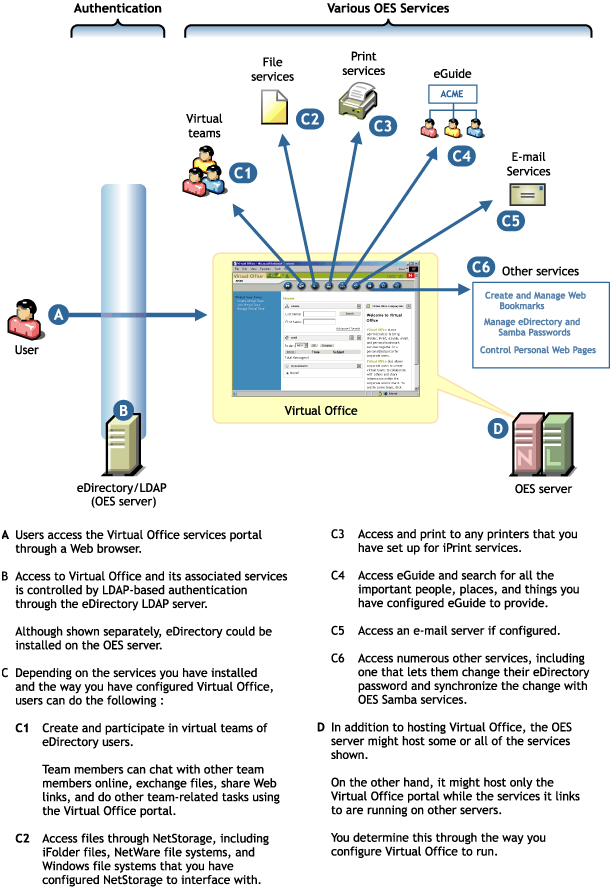
Figure 12 illustrates the OES services that Virtual Office makes accessible through a Web browser.
Figure 12
How Virtual Office Works
If you have not already done so, print the PDF version of the "NNLS Planning Worksheet" located in the Novell Open Enterprise Server (OES) on Linux Installation Guide.
On the worksheet, record the eDirectoryTM address on the server that Virtual Office will use and the admin name and password the install script will use to install Virtual Office.
Record the NetStorage information on the worksheet.
This information will be used to create:
(Optional) Although not included on the installation planning worksheet, if you plan to configure Virtual Office to provide links to file, print, e-mail, or other services that are not installed on the same OES server as Virtual Office is, you might want to identify the IP address and other information for those services.
For information on what is needed to configure Virtual Office, see the Novell Virtual Office Configuration Guide.
NetStorage and eGuide are automatically installed as part of Virtual Office. If NetMailTM and iPrint are installed on the same OES server, they are also made accessible through the Virtual Office interface.
Of these four services, only eGuide requires no further configuration before it can be used. Instructions for preparing the other services for use are included in their respective sections in this guide.
Although Virtual Office doesn't require additional configuration, you can easily change the default settings using iManager. For example, you can
For information on getting started with Virtual Office, see the Novell Virtual Office Configuration Guide and the online help installed with Virtual Office.
As your network grows and changes over time, you can use iManager to change your Virtual Office installation so that it continues to provide single-point access to network services. For more information, see the Novell Virtual Office Configuration Guide.