Express Installation Overview
The first time you run the installation script on a new server, you must choose an installation type, either Express or Custom. Both options are explained in this section.
NOTE: After successfully installing at least one product, should you run the install again, you are not prompted for a type. Rather, you are prompted to choose between uninstalling NNLS components or installing components that are not currently installed.
For more information, see Uninstalling NNLS Components and Running install.sh after Initial Installation.
An Express installation requires only minimal input:
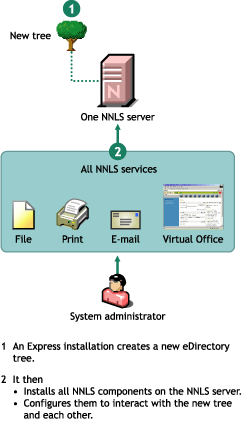
An Express installation then does the following:
Figure 1 illustrates an Express installation.
Figure 1
Express Installation Overview
A Custom installation lets you fully customize your NNLS installation and requires specific answers regarding such things as
NOTE: Most NNLS product components have cross dependencies to other NNLS support components, such as eDirectory and the Apache server installed with NNLS.
The installation script ensures that the configuration you select includes all required cross dependencies.
Figure 2 illustrates a custom installation.
Figure 2
Custom Installation Overview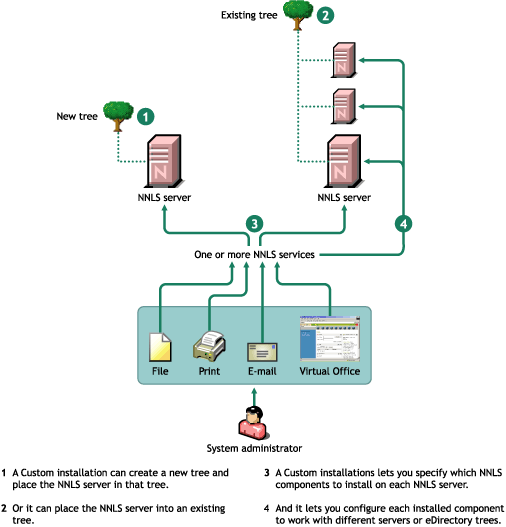
After you select an Express installation and answer the four required questions, you are shown a summary of the installation and asked if you want to make changes.
At this point you can change the configuration for any of the components. Some administrators find this a useful way to streamline the Custom installation process.
But because each NNLS installation is unique, guidelines for choosing between the Express and Custom options cannot be easily quantified. Generally, if your installation requires only minor changes from the Express defaults (same Admin/Context/Password for all services, standard ports, etc.), starting with the Express option and then modifying the few parameters that need to change would be a more efficient approach.