7.7 Connection and Authentication Issues
This section provides various troubleshooting scenarios and frequently asked questions that you might encounter while using the Linux Access Gateway, and suggests appropriate actions.
7.7.1 Connection Details
To obtain connection information:
7.7.2 Network Socket Issues
This section lists various issues related to network sockets and provides information on how to verify bind and connection issues:
Socket Listener Bind
To verify whether the socket listener is bound to the required port:
-
Log in as the root user.
-
At the bash prompt, enter the following command:
netstat -anp | grep LISTEN
All ports are displayed.
-
Search for the desired port.
If the required port is not visible in the list, a bind failure has occurred.
Issues with Outgoing Connections
To verify that the Access Gateway is able to make outbound connections:
-
Log in as the root user.
-
At the bash prompt, view the following log file:
/var/log/ics_dyn.log
-
Search for a connection message. If the service is unavailable, the file contains messages similar to the following:
ERROR Connection FAILED with peer
7.7.3 Authentication Issues
This section provides information related to authentication:
User Details
To check the details about the users logged in to the Linux Access Gateway:
-
To access the console, enter the following command:
netcat localhost 2300
-
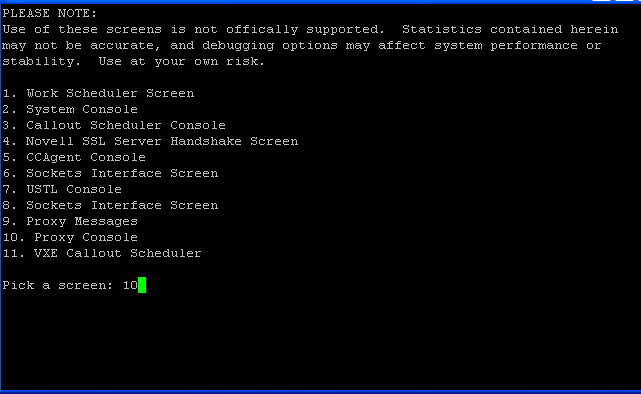
Press Enter at the Please enter terminal type prompt.
This displays the Linux Access Gateway console screens.
-
Enter the option number at the prompt.
The Linux Access Gateway Console screen is displayed.
-
To select the option, enter the option number at .

The Identity Agent Console screen is displayed.
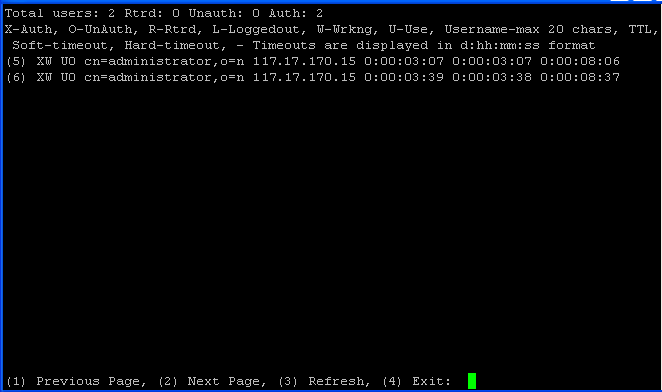
The user information contains the following items:
-
X: An authenticated user.
-
O: An unauthenticated user.
-
R: A retired user; the user session has timed out. The default time-out is 3 minutes. In this state, the user session is deleted. If the user makes another request from the browser session, the Linux Access Gateway requires the user to authenticate.
-
L: The user has logged out of the session.
-
W: The user session is functional.
-
U: The use count is more than zero.
-
Username: The full distinguished name of the user. The username can contain a maximum of 20 characters.
-
TTL: The time remaining before the user session goes to the retired state if the user session remains idle.
-
Timeout: The session timeout is displayed in d:hh:mm:ss format.
The screen displays 20 users at a time. The screen also displays the browser IP address. The following options are available at the bottom of the screen:
-
Previous Page: Lets you go to the previous page.
-
Next Page: Lets you go to the next page (to view the next set of users).
-
Refresh: Refreshes the page to reflect the latest user status.
-
Exit: Exits the console.
-
Error Codes
The following error codes indicate authentication problems:
500 Internal Server Error
Possible Cause: Authentication failed because of a system error.
Action: Contact Novell Support.
504 Gateway Timed Out
Possible Cause: The authentication back-end channel is not working.
Action: Check to see if the Embedded Service Provider is listening on the loopback address 127.0.0.1 at port 8080: Use the following command:
netstat -na | grep 8080
If the Embedded Service Provider is down, restart the service provider from the Administration Console.
If the issue persists, contact Novell Support.