2.6 Specifying Authentication Defaults
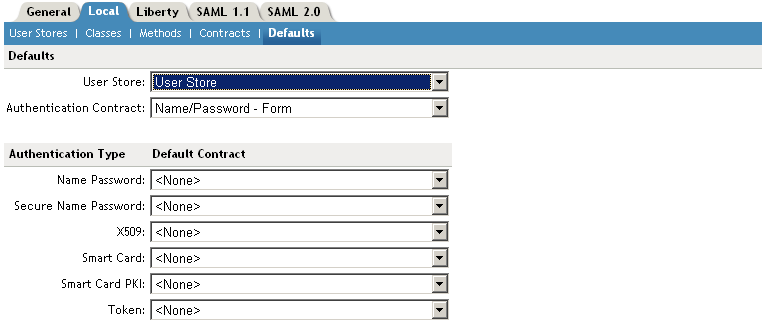
You can specify default values for how the system processes user stores and authentication contracts. The default contract is executed when users access the system without a specified contract, and when the Access Gateway is configured to use any authentication.
Additional default contracts can be specified for each authentication type that might be required by a service provider. These contracts are executed when a request for a specific authentication type comes from a service provider.
-
In the Administration Console, click > > > > >
-
Configure the following fields as necessary:
User Store: Specifies the default user store for local authentication. If you selected when configuring an authentication method, the system uses the user store you specify here.
Authentication Contract: Specifies the default authentication contract to be used when users access the Identity Server directly or a protected resource is configured to use . If you create a new contract and specify it as the default one, ensure that you update the Access Gateway configuration if it has protected resources configured to use . See
Configuring Protected Resources
in the Novell Access Manager 3.1 SP1 Access Gateway Guide.Authentication Type: Specifies the default authentication contracts to be used for each authentication type. When a service provider requests a specific authentication type, rather than a contract, the identity provider uses the authentication contract specified here for the requested authentication type.
You must create the authentication contracts prior to assigning them as defaults. (See Configuring Authentication Contracts.)
-
Click .
-
Update the Identity Server.