2.2 Traditional Novell SSL VPN
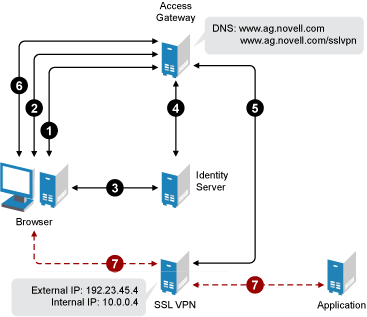
The following figure shows the Novell Access Manager components and the process involved in establishing a secure connection between a client machine and traditional Novell SSL VPN server. In this type of deployment, the Linux Access Gateway accelerates and protects the SSL VPN server.
Figure 2-1 Traditional Novell SSL VPN
-
The user specifies the following URL to access the SSL VPN server:
https://<www.ag.novell.com>/sslvpn/login
<www.ag.novell.com> is the DNS name of the Access Gateway that accelerates the SSL VPN server, and /sslvpn/login is the path of the SSL VPN server.
-
The Access Gateway redirects the user to the Identity Server for authentication, because the URL is configured as a protected resource.
-
The Identity Server authenticates the user’s identity.
-
The Identity Server propagates the session information to the Access Gateway through the Embedded Service Provider.
-
The Access Gateway injects the SSL VPN policy for that user into the SSL VPN servlet. The SSL VPN servlet processes the parameters and sends the policy information back to the Access Gateway.
-
The SSL VPN checks if the client machine has sufficient security restraints. For more information on client integrity checks, see Section 14.1, Configuring Policies to Check the Integrity of Client Machine.
-
One of the following actions takes place depending on the mode of SSL VPN connection:
-
In Enterprise mode, a tunnel interface is created and is bound with the tunnel IP address assigned by the SSL VPN server. A secure tunnel is established between the client machine and the SSL VPN server and the routing table is updated with the protected network configuration.
-
In Kiosk mode, a secure tunnel is established between the client machine and the SSL VPN server and the protected network configuration is pushed to the client.
-
-
When the user accesses the applications behind the protected network, the connection goes through the secure tunnel formed with the SSL VPN server and not through the Access Gateway.
-
Keep the browser open throughout the SSL VPN connection to allow the keep-alive packets to go through the Access Gateway.
-
When the user clicks the logout button to close the SSL VPN session, all the client components are automatically uninstalled from the workstation.