1.3 Kiosk Mode - Overall Architecture
The Kiosk, or Stunnel Mode of operation is based on the open source project at http://www.stunnel.org/.
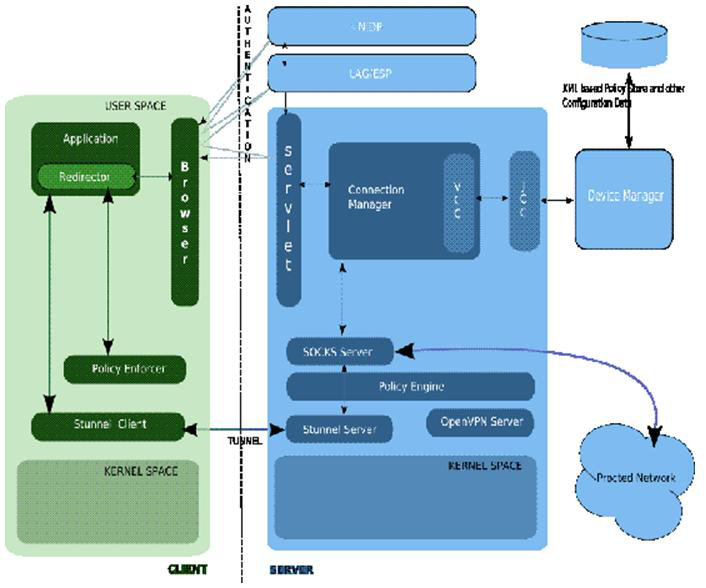
The diagram below shows the components associated with the Kiosk Mode and briefly describes each of the components found in the solution:
Figure 1-2 Kiosk Mode Architecture
1.3.1 SSLVPN Kiosk Mode - Server-side Components
Servlet: The SSLVPN servlet component can be run on any tomcat or servlet engine, and it need not be installed on the actual SSLVPN server itself. If not installed on the SSLVPN server, administrators must modify the config.txt file in the /var/opt/novell/tomcat5/webapps/sslvpn/WEB-INF/ directory. For more information see Configuring Load Balancing Through Servlets' under http://www.novell.com/documentation/novellaccessmanager/adminguide/index.html?page=/documentation/novellaccessmanager/adminguide/data/b6820mb.html. This servlet package name is novl-sslvpn-servlet-3.* (Note: * depends on version). For the most part, this includes the /var/opt/novell/tomcat5/webapps/sslvpn/* files required by the servlet environment.The servlet receives the authenticated users sessions specific informatio n from the Access Gateway. The goal of the servlet is to:
-
Handle incoming HTTP requests from the Access Gateway destined for the SSLVPN login (/sslvpn/login) page.
-
Run individual communication channel with applet for the direct control of the client session, making sure that the session is open and valid, or closed and cleared.
-
Send/receive control messages to/from SSLVPN connection manager. For example, this would include sending the user credentials, sending roles to the connection manager components, and processing the traffic policies coming back for that user.
Connection Manager: This is a TCP-based application running on a SLES server that listens out on TCP port 2010 and communicates with the above servlet. This component, as well as the others below, are all part of the novl-sslvpn-3.* (* depends on version). The connection manager service is in /opt/novell/sslvpn/bin/connman. It's main functions include the following:
-
Managing a server socket (UNIX domain) to communicate with:
-
Admin Console to synchronize the configuration changes
-
Socks and stunnel servers pushing changes out
-
Monitoring and Auditing module for interfacing into the NSure Auditing system
-
-
Dynamic connection management, such as:
-
Pulling out the policies from configuration database for a particular identity.
-
Communicating the change in data for Socks Server.
-
Policy Engine: There is a policy enforcer component at the server as well as on the client. Given a specific request passed to it by the socks server, this component checks against the policies saved in the policy.txt file at /etc/opt/novell/sslvpn. Depending on whether a match is found, the traffic is either allowed or denied.
Socks Server: This is a TCP-based application running on a SLES server that listens on TCP port 1080. The socks service is in /opt/novell/sslvpn/bin/sockd. The SOCKS 5 Server acts as a generic proxy between the SOCKS Client and the end host, which resides in the protected network. This component, together with Stunnel stack, provides the core SSL VPN functionality.
Stunnel Server: This is a TCP-based application running on a SLES server, listening on TCP port 7777 by default. The stunnel service is in /opt/novell/sslvpn/bin/stunnel. The stunnel program is designed to work as an SSL encryption wrapper between the remote client and a local (socks) server. The concept is that by having non-SSL aware daemons running on your system you can easily setup them to communicate with clients over a secure SSL channel
VCC/JCC: This is the protocol used to interface into the Access Manager configuration store so that all changes to the configuration are synchronized with the SSLVPN server components via the Connection Manager.
1.3.2 SSLVPN Kiosk Mode - Client-Side Components
Browser: The browser is initially required to contact the SSLVPN servlet via the Access Gateway. Once connected, keep-alive probes are continuously sent from the browser to the SSLVPN servlet to make sure that the existing session remains valid.
Application Redirector: On the workstation, all the outgoing traffic needs to be intercepted and treated differently, if it is destined for SSLVPN protected network. The mechanism used to intercept this traffic will be implemented differently for Linux and Windows workstations. On a Linux workstation, the LD_PRELOAD environmental variable is modified to load our own libsock.so library to handle the connect socket calls. On windows workstation, a similar approach of hooking into library is used.
Policy Enforcer: When the redirector intercepts the application level request, it checks with the policy enforcer to determine whether the request needs to out through the SSLVPN tunnel. This component checks the policies associated with this authenticated and checks whether the outgoing request conforms to the policies allowed for that user. Depending on the response, it allows or denies them.
Socks Client: Assuming that the policies allow the authenticated user access the remote application, the application level request is sent to the socks client on the workstation. This socks client appends a socks v5 header and proxies the application data within the socks payload. Once done, the request is passed to the Stunnel client on the same host.
Stunnel Client: With the socks data ready to be sent to the remote application server, the final step involves encrypting this data and packaging it within a new seat of headers. This is the role of the stunnel client. The stunnel client simply encrypts the socks data passed to it and adds information required to build transport and network layer headers. The main transport layer headers include the TCP destination port of 7777 by default. The corresponding IP header includes the IP address of the SSLVPN server external IP address, and not the IP address of the application server we are trying to communicate with. The stunnel client listens on both TCP and UDP. If the client host has been configured to use port X, it spawns a listener on both TCP and UDP port X. This avoids connection issues later if the transport layer has been changed on the SSLVPN server side.
1.3.3 Kiosk Mode Authentication Flow
The Kiosk mode authentication flow is based on the assumption that you are authenticated and have accesses to SSLVPN login page.
-
Proxy sends a request to the SSLVPN servlet (cookie and authenticated identity information are passed to the Servlet through this message).
-
The Servlet informs Connection Manager of a successful connection and awaits the user policies and client binaries.
-
At this time, Connection Manager becomes aware that a user has been successfully authenticated for SSL VPN session by an external authenticating agent (Access Gateway). The info it gets from the servlet at this stage includes the following:
-
User identity
-
Cookie for the http session between authenticating agent and browser
-
Client/browser identity (IP address and port ), which can also be the dynamic NAT’s identity.
-
Time of connection.
-
-
The Connection Manager validates such a connection request and the does the following:
-
Checks for the duplication of connection from the same client machine.
-
Builds the policy list (traffic and cic) for this particular user.
-
Sends the policies back to the servlet.
-
-
The servlet, upon receiving the above information from the connection manager
-
Generates a web page with Active-X controls or a Java Client applet (depending on whether client browser is IE or not). It includes the user policies and client binaries as a self-extractable download. The client binaries depend on the platform the client is running on (Windows, Linux, MAC) and include such things as an openssl, socks, stunnel client. The files may be found under the /var/opt/novell/tomcat5/webapps/sslvpn/ directory of SSLVPN server.
-
Sends a 200 OK HTTP response back to the browser via the Access Gateway proxy, with the contents of the above web page.
-
-
The Access Gateway proxy sends the response back to the browser.
-
The browser processes the response and runs the self- extractable image it downloaded. The Client components are installed and Java Applet or Active-X controls starts running. Assuming everything initializes correctly, the Socks client will try to communicate with the Socks server. As this is a secure path, stunnel initiates the SSL negotiation.
-
The Stunnel client does not do the the SSL negotiation (exchanging certs, generating session keys) with the server to form the SSL channel until data is sent. In Kiosk mode, when the Java applet (UI) indicates that the SSL VPN connection is established, it's just an indication that the services have initialized successfully. The Enterprise mode client below works very differently at this stage.
1.3.4 Kiosk Mode Data Transfer Flow
The kiosk mode data transfer flow is when the application data sent to remote host. When data is sent from the client application to the remote server, this application data is tunneled by the Kiosk mode SSLVPN client. Looking at the packet types visible on the network, when such a client tries to talk to a remote application server in Kiosk mode, you can see that the default transport layer protocol is TCP.
In the example below, a user on the workstation running the SSLVPN Kiosk mode client has tried to initiate an SSH session to the SSH server at 11.0.0.1, which is located on an internal network only accessible behind the SSLVPN private interface. The 147.2.36.147 is the IP address of the SSLVPN workstation where the client application is running. The SSLVPN server has two interfaces: the publicly accessible interface at 147.2.16.109, and the private interface 10.0.0.1 that is the next hop to all SSLVPN protected networks.
Packet 373 shows the SSH data being tunneled from the workstation to the public IP address of the SSLVPN server (147.2.16.109). The default SSLVPN configuration parameters are used, so the data is sent within a TCP segment destined for port 7777.
Figure 1-3 Packet 373, Port 7777

With tcpdump on a SLES host, you can trace packets on the loopback interface (e.g., using 'tcpdump -i any -n -s 0'). What we can see in packet 374 is the resulting packet after the SSLVPN server has unencrypted the packet (the Socks v5 data). The latest versions of Wireshark will decode the Socks headers and show the authentication process. An example of the Socks authentication process that goes on between the SSLVPN client and server would show the following: The client offers various authentication modes and server chooses most appropriate (username/pwd below). The client then sends the credentials specific for this users session and assuming that the Socks server can validate, then the client and server are authenticated, as shown below:
Socks Client <--------------------> Socks Server
Figure 1-4 Socks Server credentials Validation

Once Socks authentication has been validated between the socks client and server, the socks payload (the ssh application data) can then by proxied to the remote host.
Figure 1-5 Proxying the Socks Payload to the Remote Host

Packet 374 shows the data passed to the Socks server from the stunnel server. This is the SSH client request to the remote SSH server at 11.0.0.1 on TCP port 22. Note that this request is sent via the loopback interface to the SOCKS server on TCP port 1080.
Figure 1-6 Packet 374: Data Passed to the Socks Server from the Stunnel Server

Packet 377 now shows the TCP connect request at the application layer (triggered by packet 374) - visible through a TCP SYN from 10.0.0.1 (private interface of SSLVPN server) to 11.0.0. Because it is proxied, all outgoing requests to application servers on the private network will have a source IP address in the outgoing requests of 10.0.0.1. This is very different from the Enterprise mode client, which we will describe later.
Figure 1-7 Packet Data Transmission

When the response comes back from the SSH server (packet 378), we need to reverse the process before sending it back to the client. We need to pass it to the Socks application first (packet 380); then the Socks server builds the Socks data and passes it to the Stunnel server. The stunnel server encrypts the data and builds the response to send back to the SSLVPN client. This is shown in packet 382 above where the SSLVPN server (147.2.16.109) sends the tunneled data back to the SSLVPN client at 147.2.36.147.
Communication continues in this mode until the application client or server terminates the connection. If the application server terminates the connection via a TCP FIN, a corresponding Socks close request will be issued from the SSLVPN server to the client. This allows the TCP session on the client for this application session to be closed. If the application client terminates the request, the Socks close request will be sent to the Socks server side, so that the back-end application server is eventually notified of the close request. Note that this only terminates the session at the application layer – the SSLVPN client connection to the server still remains.