

The OnDemand Services environment consists of many different software components, as explained in Verifying Software Requirements and illustrated in the following diagram.
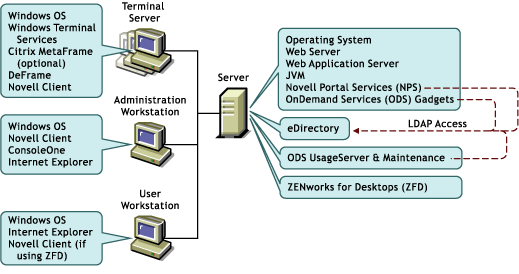
All software components included in a shaded box must be installed on the same machine, but software components in different boxes (on the server) do not necessarily need to be installed on the same server. Below are some sample configurations you could use.
In this configuration, all software components are installed on a NetWare 6 server.
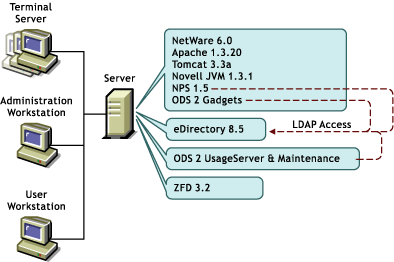
This configuration saves on hardware but might sacrifice performance. Users will be accessing NPS and the ODS gadgets through the Web server, while at the same time ZfD and the ODS UsageServer and Maintenance processes will be running. This configuration is recommended only if the server has a lot of processing power or is servicing a limited number of users.
In this configuration, ZfD and the ODS UsageServer and Maintenance processes have been installed to different servers. In addition, NPS, the ODS gadgets, and the ODS UsageServer and Maintenance processes are running on Windows 2000 servers that do not have eDirectory installed. They are accessing eDirectory, located on the NetWare 5.1 server, through LDAP.

This sample configuration has Microsoft Internet Information Services being used as the Web server, ZfD and the ODS UsageServer and Maintenance processes running on the same NetWare 5.1 server, and eDirectory 8.5 installed on both the Windows 2000 server and the NetWare 5.1 server.
