1.3 Migration Scenarios
The Migration Tool supports the following scenarios:
1.3.1 Consolidate
The Consolidate scenario helps you reorganize your network by copying the service configuration and data from any number of source servers to the target server. By consolidating data on new, more powerful servers, you can simplify your network administration processes and lower your IT costs.
This section describes example scenarios of how to consolidate your data.
NetWare-to-OES 2 SP3 Linux Consolidations
For NetWare-to-OES 2 SP3 Linux consolidations, the service configuration and data from the source servers is copied to the target server.
Example Consolidation Scenarios
The benefits of the Migration Tool can be better understood through examining some sample consolidation scenarios.
Basic Server Consolidation: Many-to-One
In this scenario (see Figure 1-1), you have three existing NetWare servers. You recently purchased a multiprocessor server and installed OES 2 SP3 Linux on it. You want to copy the data from each of the three servers to the single OES 2 SP3 server. Instead of manually moving all the data or backing up the data on each of the three servers and then restoring it on the OES 2 SP3 Linux server, you can use the Migration Tool to automate the process.
Figure 1-1 Many-to-One Server Consolidation
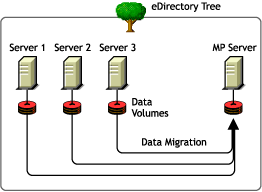
Although Figure 1-1 shows a consolidation scenario in which all servers are in the same eDirectory tree, you can also perform tree-to-tree consolidations.
Consolidating Data from Multiple Servers onto a Two-Node Cluster
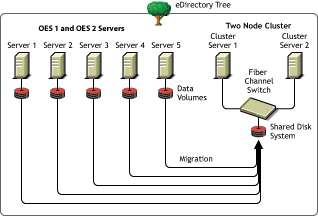
In this scenario (see Figure 1-2), you have five existing OES servers. You recently purchased two multiprocessor servers and the necessary hardware to create a two-node cluster complete with an attached Storage Area Network (SAN). You decide to install OES 2 SP3 on the two-node cluster and to copy the data from each of the five servers to the SAN on the two-node cluster. Instead of manually moving all the data and Printer Agents or backing up the data and restoring it to the SAN, you can use the Migration Tool, which automates the data migration process.
Figure 1-2 Cluster Server Consolidation
Cross-Platform Data Consolidations
The Migration Tool supports cross-platform data consolidations from NetWare, OES 1 Linux, or OES 2 Linux servers to an OES 2 SP3 Linux server.
You must use the Migrate Windows Share Utility to copy data from Windows servers in a Windows NT domain or Windows 2000/2003 mixed mode domain to OES 2 SP3 Linux servers.
1.3.2 Transfer ID
Transfer ID is a migration scenario for transferring the server identity of the source server to the target server. The identity of the server is made up of its IP address, hostname, eDirectory identity, NICI keys, and the certificates from the source server.
On successful completion of the Transfer ID migration, the target server functions with the identity of the source server and the source server goes offline.