2.5.1 Maintenance/Caching Panel
Path: Retain Server Manager > > >
Table 2-17 Using the Maintenance/Caching Panel
|
Option, Field, or Sub-panel |
Information and/or Action |
|---|---|
|
|
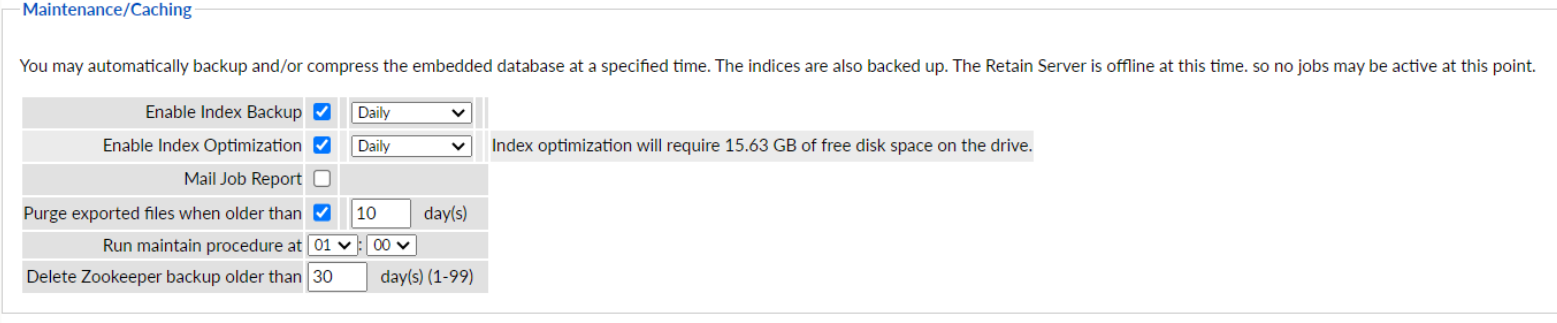
Select this to enable scheduled index backups at the interval specified. By default, the index backup is disabled. |
|
|
Select this to enable scheduled index optimization at the interval specified. |
|
|
Specify whether a Mail Job Report is generated. |
|
|
Specify how old exported files can be before they are purged. |
|
|
Specify when to run the maintenance procedure. |
Datastore Maintenance
Retain also lists a history of backups and maintenance here.
NOTE:This maintenance section does not involve backup or maintenance of the data store. You must back that up yourself with your normal backup tools.
You must backup:
-
SQL Database
-
File System where your data is stored
Zookeeper Purging and Backup
Beginning 23.4 zookeeper data will be purged and backed up when the maintenance job runs. First, the zookeeper data will be purged to maintain the last three files (snapshot<datetime> and log), then the backup of the zookeeper data will happen. The zookeeper backup will maintain the same folder structure as in the zookeeper path.
The following are the zookeeper paths
-
Default zookeeper path: <basepath>/zookeeper
-
Default zookeeper backup path: <basepath>/backup/zookeeper/snapshot<datetime>
When the maintenance runs again, it creates a new snapshot folder with DateTime (snapshot<datetime>) and backs up zookeeper data, then deletes the old zookeeper data backed up.
NOTE:Do not delete or modify the zookeeper folder data and the zookeeper backup folder data manually.