ZENWorks
Within the ZENWorks tab, the Service Desk can be configured to work seamlessly with the Configuration Management tool. In the first instance, this is achieved by using ZENWorks as the OpenID Provider for authenticating Service Desk Users and Customers. On a day to day basis, the ability to use the Remote Control and Bundle Management capability for the Configuration tool within a request, increases the efficiency of Service Desk Users when managing their workload.
Enabling OpenID for Authentication
To enable authentication of Service Desk Users through ZENWorks, the OpenID Consumer option within >> must first be enabled.
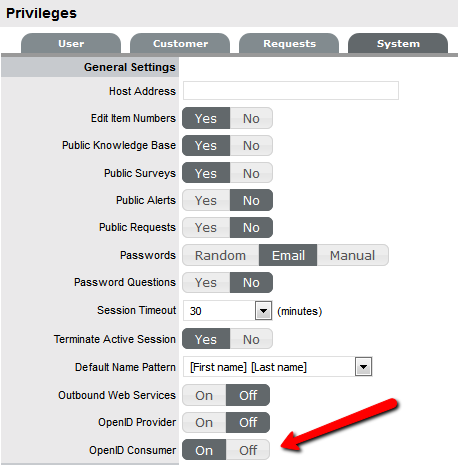
Once enabled, configure the ZENworks location details and OpenID information within the > tab.
Automatic Configuration
-
In the Micro Focus Service Desk user interface, click > .
-
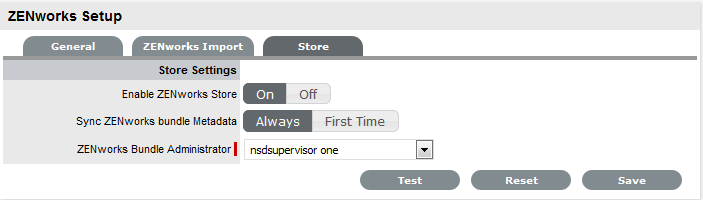
In the tab, specify the ZENworks Server address.
-
Select to automatically exchange certificates.
NOTE:
-
The Micro Focus Service Desk and ZENworks certificates need to be exchanged to complete the registration process.
-
Ensure that the system time is in sync with Micro Focus Service Desk and ZENworks Server.
-
Manual Configuration
-
In the Micro Focus Service Desk user interface, click > .
-
In the tab, specify the ZENworks Server address.
-
Select .
-
Click and store it on the local drive.
Open ID Settings
-
In the Micro Focus Service Desk user interface, click > .
-
Click tab.
-
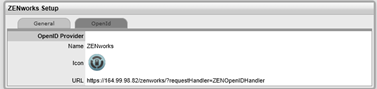
Read the information displayed in the OpenID Provider panel:
The OpenID Provider panel is displayed only if authentication of Service Desk users through ZENworks has already been enabled. For more information, see Enabling ZENworks Authentication for Service Desk Users.
Name: Displays ZENworks as the OpenID Provider name.
Icon: Displays the ZENworks icon that will be available on the Micro Focus Service Desk login page for the Service Desk customers and users accessing Service Desk.
URL: This field is initially blank. It display the OpenID Provider URL that is automatically generated based on the address specified in the option when you click .
-
Click .
The option in the OpenID Provider panel displays the OpenID Provider URL that is automatically generated based on the address specified in the option.