2.0 Endpoint Security Client 3.5 Overview
The ZENworks® Security Client secures computers from data invasion attacks at home, at work, and while traveling, through the enforcement of security policies created by the enterprise Endpoint Security Management (ESM) administrator. The firewall settings assigned at individual locations are automatically adjusted when laptop users move from the corporate network to their home networks or go on the road and log on to a public or open network.
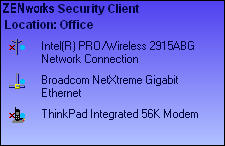
Security levels are applied to various user locations without requiring user expertise or understanding of network security, port configurations, hidden shared files, or other technical details. Immediate information on which location and firewall setting the Endpoint Security Client 3.5 is in and which adapters are presently active or permitted is available by simply mousing over the taskbar icon to view the Endpoint Security Client ToolTip (see Figure 2-1).
Figure 2-1 Endpoint Security Client ToolTip
The following sections contain additional information: