On NetWare® servers, you can monitor the TED agents (Distributor Agent and Subscriber Agent) and the Policy/Package Agent at the server console where they are running. In addition, you can monitor the agents running on any platform (NetWare, Windows, or UNIX*) from Internet Explorer using the ZfS Management role in iManager.
Managing the TED Agents from the Remote Web Console
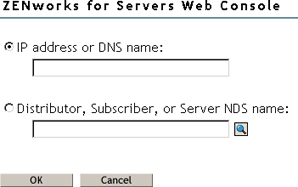
To access the Remote Web Console for a Distributor or Subscriber in iManager:
Click Roles and Tasks in the top frame > expand ZFS Management in the left frame > click Remote Web Console.
Specify the IP address or DNS host name of a server where the Distributor Agent or Subscriber Agent is running.
or
Browse to and select a Distributor or Subscriber object or the Server object representing the server where the Distributor Agent or Subscriber Agent is running.
Click OK.
In the Available Services field, select Tiered Electronic Distribution.
Tabs at the top of the Remote Web Console frame provide various types of information related to the TED agents. Additional options are available on each tab.
You can click Help on each Remote Web Console page for assistance in using the features available on that page.
The tables below summarize these tasks, detail the Remote Web Console tab and option to use for each task, and indicate whether the task can also be performed using ConsoleOne.
Managing TED Objects
TED Agent (Distributor and Subscriber) Management Task
Remote Web Console Tab and Option
In CSOne?
List all object properties of Distributor and Subscriber objects in a single list
Configuration > Configuration
No
List the object properties of any subordinate Subscriber in the routing hierarchy
Configuration > Subordinate Configuration
No
List all object properties of Distribution objects (except type-specific information) in a single list
Distributions > Distribution Information
No
List all object properties of Channel objects in a single list
Channels > Channel Information
No
Display information about the Policy/Distribution database
Configuration > Database
Yes
Be aware that if the Distributor has not been refreshed since changes were made to object properties in eDirectory, the object properties displayed in the Remote Web Console will be different from the object properties displayed in ConsoleOne.The Remote Web Console displays object information from the point of view of the Distributor Agent.
Monitoring TED Agent Status
TED Agent (Distributor and Subscriber) Management Task
Remote Web Console Tab and Option
In CSOne?
View and continuously refresh the current Distributor event log, complete with message severity levels
Events > Distributor Event Log
No
View and continuously refresh the current Subscriber event log, complete with message severity levels
Events > Subscriber Event Log
No
Display the current status of the various distribution threads started by the TED agents to perform their various functions
TED Agent (Distributor and Subscriber) Management Task
Remote Web Console Tab and Option
In CSOne?
List all Distributions currently being processed by the Distributor and/or Subscriber, along with detailed status information
Distributions > Active Distributions
No
Display status information for a selected Distribution that has been received by a Subscriber
Distributions > Received Distributions
No
Display the route that a Distribution must take through the routing hierarchy from a Distributor or parent Subscriber to any subordinate Subscriber
Configuration > Route to Subscriber
No
Forcing TED Agent Actions
TED Agent (Distributor and Subscriber) Management Task
Remote Web Console Tab and Option
In CSOne?
Immediately refresh a Distributor so that it rereads eDirectory to check for modified Distributions
Configuration > Refresh Distributor
Yes
Immediately build a Distribution
Distributions > Build Distribution
Not with one click
Immediately send to Subscribers all Distributions listed in a selected Channel
Channels > Distribute Channel
Not with one click
Managing Security Certificates
TED Agent (Distributor and Subscriber) Management Task
Remote Web Console Tab and Option
In CSOne?
List the security certificates that are available on a Subscriber
Security > Show Certificates
No
Delete security certificates from a Subscriber
Security > Show Certificates > Delete
No
Have the Distributor sign Subscribers' Certificate Signing Request (.CSR) files so that the Subscribers can receive encrypted Distributions from the Distributor
Security > Sign CSR
Yes
Managing the Policy/Package Agent from the Remote Web Console
The Policy/Package Agent always runs along with the Subscriber Agent. It is responsible for installing the software and enforcing the policies that the Subscriber Agent receives and extracts. The Remote Web Console enables you to manage the Policy/Package Agent, which is not possible using ConsoleOne.
To access the Remote Web Console for a Policy/Package Agent in iManager:
Click Roles and Tasks in the top frame > expand ZFS Management in the left frame > click Remote Web Console.
Specify the IP address or DNS host name of a server where the Subscriber Agent is running.
or
Browse to and select a Subscriber object or the Server object representing the server where the Subscriber Agent is running.
Click OK.
In the Available Services field, select Policy/Package Agent.
Tabs at the top of the Remote Web Console frame provide various types of information related to the Policy/Package Agent.
You can click Help on each Remote Web Console page for assistance in using the features available on that page.
Continue with the task that you want to perform.
The table below summarizes these tasks and details the Remote Web Console tab for each task.
Policy/Package Agent Management Task
Remote Web Console Tab
ConsoleOne
List the plug-ins that are currently loaded for enforcing server policies
Configuration
No
List all the variables that the Policy/Package Agent has values for
Configuration
No
List all the policies that the Policy/Package Agent enforces on a Subscriber server
Policies
No
Immediately enforce one or more policies on a Subscriber server
Policies
No
Remove individual policies from a Subscriber server
Policies
No
Immediately refresh one or more policies so that the Distributor Agent rereads eDirectory to check for modifications
Policies
No
List all the software packages that the Policy/Package Agent installs on the Subscriber server
Software Packages
No
Determine the current status of all software packages installed on the Subscriber server
Software Packages
No
Create and run a program or script on the Subscriber server once or repeatedly
Schedule
No
Down the Subscriber server
Actions
No
Restart the Policy/Package Agent (independent from the Subscriber Agent)
Actions
No
Opening Multiple Remote Web Console Windows
On any Remote Web Console page, click Detach in the upper right corner to display the current page in a new browser window. This enables you to access multiple Remote Web Console features at the same time. For example, you could detach one window for the TED agents and another window for the Policy/Package Agent. Or you could detach a window for the Remote Web Console and still be able to perform other ZfS Management tasks in the main Novel iManager window.