Maintenance Utility: Command Syntax Screen
The Btrieve Maintenance utility (BUTIL.NLM) is a command-line utility that allows you to create, manipulate, and recover Btrieve data files using the BUTIL commands.
The Maintenance utility runs as an NLM at the server. You can access it at the server console or at a workstation through the RCONSOLE utility. You can execute the Maintenance utility commands from the server command line or from a command file.
This section discusses the following topics:
To run the Maintenance utility, be sure that the following are installed on your server: Running NetWare Btrieve 6.1x in a NetWare 3.11 or 3.12 environment requires the AFTER311.NLM, which Btrieve loads automatically.
In addition, make sure the following files are loaded in the SYS:SYSTEM directory of the server (the NetWare INSTALL utility places them there automatically during installation):
This section provides information you need to know before using the NetWare Btrieve Maintenance utility commands. It discusses the following topics:
NOTE: If you have used the utility before, you may want to skip to the individual command discussions in NetWare Btrieve Maintenance Utility Commands. The commands are discussed in alphabetic order.System Requirements for the NetWare Btrieve Maintenance Utility
Maintenance Utility Overview
-command |
A Maintenance utility command, such as COPY. You must precede the command with a space followed by a dash ( -). |
|
parameter |
Information that the command may require. The discussions of the individual commands (in NetWare Btrieve Maintenance Utility Commands |
|
@commandFile |
Full pathname of a NetWare Command file. |
|
The commands are listed and their functions are summarized in Table 6.
The following paragraphs describe concepts you should understand before using the Maintenance utility commands. For more detailed information about these concepts, see Btrieve Concepts and Description Files
The Maintenance utility runs as an NLM. The NLM environment does not recognize drive letters or environment variables. Thus, for commands that require a filename, the name must include the full pathname, such as SYS:\NWSQL\DEMODATA\PATIENTS.DTA. If you do not specify a volume, the utility assumes SYS: is the volume.
Btrieve allows you to restrict access to a file by specifying an owner name. Since owner names are optional, the files you use with this utility may or may not require an owner name.
If the file requires an owner name, you must specify it using the /O option. (You can also use a dash with this option, as in -O.) Owner names are case sensitive; that is, Sandy and SANDY are not considered to be the same. You can follow the /O option with an owner name or an asterisk (*). If you use an asterisk, the utility prompts you for an owner name.
A description file is an ASCII file containing information that the Maintenance utility commands CREATE, INDEX, and SINDEX need to perform their operations.
Description files contain one or more elements. An element consists of a keyword, followed by an equal sign (=), followed by a value (with no space separator). Each element in the description file corresponds to a particular characteristic of a Btrieve file or key definition. For additional information, see Sample Description File for the CREATE Command.
Continuous operation is a Btrieve feature that allows you to back up files while they are in use by Btrieve applications. Two Maintenance utility commands, STARTBU and ENDBU, begin and end continuous operation on a file or set of files.
When continuous operation begins, Btrieve creates a temporary Btrieve file (called a delta file) for each data file in order to record any changes made to that file while the backup is taking place. This temporary file may surpass the size of the original data file if users make extensive changes to the file during continuous operation.
When continuous operation ends, Btrieve updates the master Btrieve files with changes stored in the delta files. Btrieve deletes the delta files as soon as all applications close the corresponding Btrieve files.
NOTE: As indicated above, when you place a Btrieve file into continuous operation mode, Btrieve creates a temporary file with the same name as the data file but with a .^^^ extension. Therefore, do not create multiple Btrieve files with the same names but different extensions. For example, do not use a naming scheme such as INVOICE.HDR and INVOICE.DET for your Btrieve files.
To back up files using continuous operation, issue the BUTIL -STARTBU command followed by the filename or set of files. Then run your backup program. To stop continuous operation, issue the BUTIL -ENDBY command. (See ENDBU for additional information about this operation.)
HINT: The best time to place Btrieve data files into continuous operation for backup is when the fewest users will be making modifications to the files.
You can use a command file to perform either of the following tasks:
Command files contain the same information as that required on the command line. Observe the following rules when creating a Maintenance utility command file: Lines longer than 130 characters could cause the server to end abnormally. For this reason, do not place long Maintenance utility commands in a server command (.NCF) file.
The following is an example command file, COPYPATS.CMD. The file calls the BUTIL -CLONE command to clone the file PATIENTS.DTA. The following command uses the COPYPATS.CMD file: This section describes the Maintenance utility commands and explains when and how to use each one. Table 6 lists each command in alphabetical order and briefly describes what each command does. Following that is a discussion of each individual command.
Command Files
Rules for Command Files
Command File Example
-clone sys:\nwsql\demodata\allpats.dta sys:\nwsql\demodata\patients.dta load butil @sys:\nwsql\demodata\copypats.cmdNetWare Btrieve Maintenance Utility Commands
Table 6. Maintenance Utility Commands
| Command | Description |
|---|---|
Creates a new, empty Btrieve file using an existing file's specifications and key definitions. |
|
Clears (drops) the owner name associated with a Btrieve file. |
|
Copies the contents of one Btrieve file to another. |
|
Creates a Btrieve file. |
|
Drops an index. |
|
Ends continuous operation on Btrieve files defined for backup. |
|
Creates an external index file. |
|
Loads the contents of a sequential file (ASCII) into a Btrieve file. |
|
Reads data sequentially from a Btrieve file and writes the results to a sequential (ASCII) file. |
|
Examines a file's Page Allocation Table (PAT) to determine if corruption has occurred and if repair is required. |
|
Reads data along a key path and writes the results to a sequential (ASCII) file. |
|
Assigns an owner name to a Btrieve file. |
|
Creates an index. |
|
Starts continuous operation on files defined for backup. |
|
Reports statistics about file attributes and current sizes of Btrieve files. |
|
Displays the version of the Btrieve NLM that is loaded at the server. |
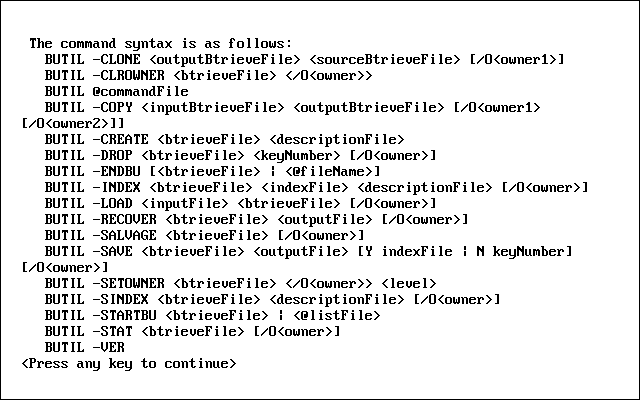
At any time while using the Maintenance utility commands, you can enter the following to display a list of these commands:
load butil
The utility responds with the screen shown in Figure 19.
The CLONE command creates a new, empty Btrieve file with the same file specifications as an existing file including any supplemental indexes, but excluding the owner name.
The new Btrieve file includes all the defined key characteristics, such as key position, key length, or duplicate key values, contained in the existing, original file.
Figure 19
Maintenance Utility: Command Syntax Screen
LOAD BUTIL -CLONE
outputBtrvFile sourceBtrvFile [/O
owner]
Format
outputBtrvFile |
The full pathname you want to use for the new, empty Btrieve file. |
sourceBtrvFile |
The full pathname of the existing, original Btrieve file you want to replicate. |
owner |
The owner name, if any, for the source Btrieve file. The new Btrieve file will not have an owner name. |
Btrieve 6.x allows a maximum of 23 key segments in a Btrieve file with a page size of 1,024 bytes. Therefore, the CLONE command sets the page size in the new Btrieve file to 2,048 bytes if the existing Btrieve file contains 24 key segments and has a page size of 1,024 bytes.
This expansion occurs if the existing Btrieve file has a format earlier than Btrieve 6.0 and the Btrieve NLM was not loaded with the Create Btrieve Files in Pre 6.x Format configuration option.
The following command creates the NEWAPP.DTA file by cloning the PATIENTS.DTA file.
load built -clone sys:\nwsql\demodata\newapp.dta sys:\nwsql\demodata\patients.dta
HINT: If you are trying to recover from receiving a Status Code 30 (The specified file is not a Btrieve file) and you suspect that the header page of the source file might be damaged, try creating the new Btrieve file by using the BUTIL -CREATE command with a description file.
The CLROWNER command clears (drops) the owner name of a Btrieve file. LOAD BUTIL -CLROWNER
btrvFile /O
owner
CLROWNER
Format
btrvFile |
The full pathname of the Btrieve file. |
owner |
The owner name to be cleared (dropped). |
The following command clears the owner name for the PATIENT1.DTA file. The owner name for the file is Sandy.
load butil -clrowner sys:\nwsql\demodata\patient1.dta /OSandy
The COPY command copies the contents of one Btrieve file to another.
COPY retrieves each record in the input Btrieve file and inserts it into the output Btrieve file. The record size must be the same in both files. After copying the records, COPY displays the total number of records inserted into the new Btrieve file.
NOTE: COPY performs in a single step the same functions as a RECOVER command followed by a LOAD command.
LOAD BUTIL -COPY
inputBtrvFile outputBtrvFile [/ O
owner1 [/ O
owner2]]
Format
inputBtrvFile |
The full pathname of the Btrieve file from which you want to transfer records. |
outputBtrvFile |
The full pathname of the Btrieve file into which you want to insert records. The output Btrieve file can contain data or be empty. |
owner1 |
The owner name of the input Btrieve file, if required. If only the output Btrieve file requires an owner name, specify /O followed by a blank for owner1 (as illustrated in the example). |
owner2 |
The owner name of the output Btrieve file, if required. |
Using the COPY command, you can create a Btrieve file that contains data from an old file but has new key characteristics.
To do so, proceed as follows:
Use the CREATE command to create an empty Btrieve file with the desired key characteristics (key position, key length, or duplicate key values).
Use the COPY command to copy the contents of the existing Btrieve file into the newly created Btrieve file.
The following command copies the records in PATIENTS.DTA to NEWPATS.DTA. The PATIENTS.DTA input file does not require an owner name, but the NEWPATS.DTA output file uses the owner name Pam.
load butil -copy sys:\nwsql\demodata\patients.dta sys:\nwsql\demodata\newpats.dta /O /OPam
If you omit the first /O from this example, the utility assumes that the owner name Pam belongs to the input Btrieve file, not the output Btrieve file.
The CREATE command generates an empty Btrieve file using the characteristics you specify in a description file.
Before you can use the CREATE command, you must create a description file to specify the new key characteristics. For more information, see Description Files
LOAD BUTIL -CREATE btrvFile descriptionFile
btrvFile |
The full pathname of the Btrieve file you want to create. If the pathname is the name of an existing Btrieve file, this command creates a new, empty Btrieve file in place of the existing Btrieve file. Any data that was stored in the existing Btrieve file is lost and cannot be recovered. However, Btrieve does not create a new Btrieve file if you specify replace=n in the description file. (For an example, see Replace Existing File in Appendix B.) |
descriptionFile |
The full pathname of the description file containing the specifications for the new Btrieve file. |
The following command creates a Btrieve file named PATIENTS.DTA using the description provided in the BUILD.DES description file.
load butil -create sys:\nwsql\patients.dta sys:\nwsql\build.des
The sample description file shown in Figure 20 creates a Btrieve file with a page size of 512 bytes (page =512). The fixed-length portion of the record is 98 bytes long (record=98).
Figure 20
Sample Description File for the BUTIL -CREATE Command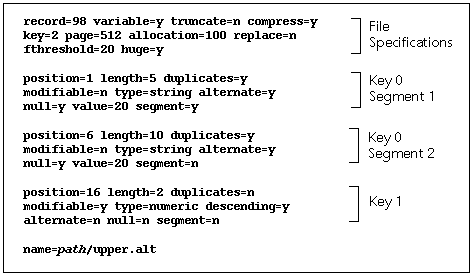
The file also specifies the following:
Btrieve preallocates 100 pages, or 51,200 bytes, when it creates the file (allocate=100). The file has two keys: Key 0 and Key 1 (key=2).
Key 0 is a segmented key with two segments. The first segment of Key 0 has the following key attributes, or characteristics:
The second segment of Key 0 has the same key attributes as the first segment, except that it begins at the sixth byte in the record (position=6), is 10 bytes long (length=10), and is not followed by another segment (segment=no).
Key 1, which begins at the sixteenth byte and is two bytes long, is a numeric, nonsegmented key that does not allow duplicates but permits modification. It is sorted in descending order.
For detailed information about file and key attributes, refer to Description Files
The DROP command removes an index from a Btrieve file and adjusts the key numbers of any remaining indexes, subtracting 1 from each subsequent key number.
If you do not want to renumber the keys, you can add a bias of 128 to the key number you specify to be dropped. This renumbering feature is available only for Btrieve 6.x files.
LOAD BUTIL -DROP btrvFile keyNumber [/O owner]
btrvFile |
The full pathname of the Btrieve file from which you are dropping the index. |
keyNumber |
The number of the index you want to remove. If you want to preserve the original key numbers, add a 128 bias to the key number you specify. |
owner |
The owner name for the Btrieve file, if required. |
In both of the following examples, PATIENTS.DTA has three keys. The original keys in the file were numbered 0, 1, and 2.
In the first example, the BUTIL -DROP command drops key number 1 from the PATIENTS.DTA file and renumbers the remaining keys as 0 and 1.
load butil -drop sys:\nwsql\demodata\patients.dta 1
In the following example, the DROP command drops key number 1 and does not renumber the keys (indicated by the number 129---key number 1 plus the 128 bias). The key numbers remain 0 and 2.
load butil -drop sys:\nwsql\demodata\patients.dta 129
The ENDBU command ends continuous operation on a Btrieve file or set of Btrieve files previously defined for backup.
Execute this command after you have issued the STARTBU command and your backup utility has finished running. (For more information on the STARTBU command, see STARTBU. For more information on continuous operation, see Continuous Operation.)
To back up Btrieve files using continuous operation, first issue the command, followed by the Btrieve filename or the name of the text file containing the list of file you want to place in continuous operation: load butil -startbu <btrvFile | @filename>]
Run your backup program.
Stop continuous operation by issuing the following command: load butil -endbu [btrvFile | @filename]
NOTE: When you place a Btrieve file into continuous operation mode, Btrieve creates a temporary file with the same name as the Btrieve data file, but with a .^^^ extension. Therefore, do not create multiple Btrieve files with the same names but different extensions. For example, do not use a naming scheme such as INVOICE.HDR and INVOICE.DET for your Btrieve files.
LOAD BUTIL -ENDBU [ btrvFile | @ filename]
btrvFile |
The full pathname of the Btrieve file for which you want to end continuous operation. |
@filename |
The name of a text file containing a list of Btrieve files for which you want to end continuous operation. The text file must contain the full pathname for each Btrieve file, separated by a space or carriage return/line feed. This list of files is typically the same as the list used with the STARTBU command. |
If you do not specify any Btrieve files when issuing the LOAD BUTIL -ENDBU command, the utility stops continuous operation on all Btrieve files initialized by BUTIL -STARTBU and currently running in continuous operation mode.
The following example ends continuous operation on the PATIENTS.DTA file.
load butil -endbu sys:\nwsql\demodata\patients.dta
The INDEX command builds an external index file for an existing Btrieve file, based on a field not previously specified as a key in the existing file.
Before you can use the INDEX command, you must create a description file to specify the new key characteristics. (For more information on description files, see Description Files)
The external index file created is a key-only Btrieve file. The records in the new file consist of the following:
NOTE: If the key length you specify in the description file is 10 bytes, the record length of the external index file would be 14 bytes (10 plus the 4-byte address).
LOAD BUTIL -INDEX
btrvFile indexFile descriptionFile [/O
owner]
Format
btrvFile |
The full pathname of the existing Btrieve file for which you want to build an external index. |
indexFile |
The full pathname of the index file in which Btrieve should store the external index. |
descriptionFile |
The full pathname of the description file you have created containing the new key definition. The description file should contain a definition for each segment of the new key. |
owner |
The owner name for the Btrieve file, if required. |
The INDEX command creates the external index file and then displays the number of records that were indexed. If you want to retrieve the Btrieve file's records using the external index file, use the SAVE command (described in SAVE).
The description file shown in Figure 21 illustration defines a new key with one segment.
The key begins at byte 30 of the record and is 10 bytes long. It allows duplicates, is modifiable, is a string type, and uses no alternate collating sequence.
Figure 21
Sample Description File for the INDEX Command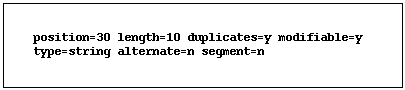
The following command creates an external index file called NEWPAT.IDX using a Btrieve file called PATIENTS.DTA. The PATIENTS.DTA file does not require an owner name. The description file containing the definition for the new key is called NEWIDX.DES. The LOAD command inserts records from an input sequential (ASCII) file into a Btrieve file. LOAD performs no conversion on the data in the input sequential file. After the utility transfers the records to the Btrieve file, it displays the total number of records loaded. Before running the LOAD command, you must create the input sequential file and the Btrieve file. You can create the input sequential file, in the required format (as explained subsequently), using a standard text editor or an application. You can create the Btrieve file using either BUTIL -CREATE or BUTIL -CLONE. LOAD BUTIL -LOAD
inputFile btrvFile [/O
owner]
Example
load butil -index sys:\nwsql\demodata\patients.dta sys:\nwsql\demodata\newpat.idx sys:\nwsql\demodata\newidx.des LOAD
Format
inputFile |
The full pathname of the ASCII sequential file containing the records to be loaded into a Btrieve file. |
btrvFile |
The full pathname of the Btrieve file into which you want to insert the records. |
owner |
The owner name for the Btrieve file, if required. |
Records in the input sequential file must be in the following format:
You can create an input sequential file using either a text editor or an application, as follows:
The following illustration shows the correct format for records in the input sequential file. For this example, the Btrieve file has a defined record length of 40 bytes.

The following example loads sequential records from the PATIENTS.ADR file into the PATIENTS.DTA file. The owner name of the PATIENTS.DTA file is Sandy. The RECOVER command extracts data from a Btrieve file and places it in a sequential (ASCII) file that has the same format as the input sequential file used by the LOAD command. This command is often useful for extracting some or all of the data from a damaged Btrieve file. The RECOVER command may be able to retrieve many, if not all, the file's records. You can then use the LOAD command to insert the recovered records into a new, undamaged Btrieve file. NOTE: The Maintenance utility performs no conversion on the data in the records. Therefore, if you use a text editor to modify an output file containing binary data, be aware that some text editors may change the binary data, causing the results to be unpredictable.
The RECOVER command performs the following actions:Example
load butil -load sys:\nwsql\demodata\patients.adr sys:\nwsql\demodata\patients.dta /OSandy RECOVER
btrvFile |
The full pathname of the Btrieve file from which you want to recover data. |
outputFile |
The full pathname of the ASCII sequential file where you want the utility to store the recovered records. |
owner |
The owner name for the Btrieve file, if required. |
If the file's PAT is damaged, a prompt similar to the following appears:
The file's Page Allocation Table seems to be damaged. BUTIL *strongly* recommends that you make a backup copy before continuing. Continue? 1=Yes 2=No
By default, the prompt displays 2 (indicating No) on the next line. This allows you to exit the RECOVER command and back up the Btrieve file before proceeding. If you have already backed up the Btrieve file, enter 1 to continue running the RECOVER command.
The RECOVER command allows you to set the Btrieve file's page size. It displays the following prompt:
Enter the page size or 0 to quit: 512
The value displayed at this prompt is the result of an attempt to determine the original page size of the Btrieve file. If this value is incorrect, enter the correct page size.
If you enter a page size that differs from the original page size, the result is unpredictable. If you are unsure of the correct page size, change the value as prompted by the utility.
NOTE: NetWare Btrieve specifies that 6.0x and 6.1x files with a page size of 512 can be no larger than 2 gigabytes in size but does not enforce this limit. Therefore, when a file grows beyond the 512 page-size limit, NetWare Btrieve returns Status Code 132 (The file is full).
If the logical disk drive containing your output sequential file becomes full before the entire Btrieve file has been recovered, the utility stops, indicates the number of records already recovered, and displays the following prompt:
The disk volume is full. Enter new file name to continue or a period to quit.
To continue running the RECOVER command using an additional output sequential file, complete one of the following steps:
In either case, enter the full pathname of the Btrieve file you want to use to continue storing records, and then press Enter. The utility continues copying records from the Btrieve file to the new output sequential file. This process creates multiple sequential files that you must load separately with the LOAD command.
If the RECOVER command receives a variable page error (Status Code 54), it places all the data it can obtain from the current record in the output sequential file and continues the recovery process.
Upon completion, the utility displays a message similar to the following:
16 records recovered. Operation completed successfully.
The following example extracts records from the PATIENTS.DTA file and writes them into the SEQPAT.DAT file.
load butil -recover sys:\nwsql\patients.dta sys:\nwsql\seqpat.dat
The SALVAGE command examines the records in a file's Page Allocation Table (PAT) to determine whether corruption has occurred. (The PAT maintains a map of the physical location of each page in the Btrieve file.) If corruption has occurred, the utility asks if you want to repair the PAT.
LOAD BUTIL -SALVAGE btrvFile [/O owner]
btrvFile |
The full pathname of the Btrieve file containing the records you want to check. |
owner |
The owner name for the Btrieve file, if required. |
If the file's PAT is damaged, the utility reminds you that you should have a backup of the Btrieve file before proceeding and asks if you want to repair the file now. If you have already backed up the Btrieve file, enter Y. If you have not backed up the Btrieve file, enter N.
After you enter Y, the utility asks you to enter a page size and provides you with the result of its attempt to determine the original page size. If you suspect that the value shown is incorrect, enter a new value.
The utility then attempts to repair the Btrieve file, using the new value. If the utility cannot repair the Btrieve file, it sends a message identifying the reason why.
NOTE: The SALVAGE command does not save the records to a sequential file. You must use the LOAD command to perform that operation.
The SAVE command retrieves records from a Btrieve file using a specified index path and places them in a sequential file that is compatible with the required format for the LOAD command. You can then edit the sequential file and use the LOAD command to store the edited data in another Btrieve file. (See LOAD for more information about the LOAD command.) SAVE generates a single record in the output sequential file for each record in the input Btrieve file. Upon completion, SAVE displays the total number of records saved. NOTE: The Maintenance utility performs no conversion on the data in the records. Therefore, if you use a text editor to modify an output file containing binary data, be aware that some text editors may change the binary data, causing the results to be unpredictable.
LOAD BUTIL -SAVE
btrvFile outputFile [Y
indexFile | N
keyNumber] [/O
owner]
SAVE
Format
btrvFile |
The full pathname of the Btrieve file containing the records you want to save. |
outputFile |
The full pathname of the ASCII sequential file in which you want the utility to store the records. |
indexFile |
The full pathname of an external index file by which you want to save records if you do not want to save records using the default of the lowest key number. |
keyNumber |
The key number (other than 0) by which you want to save records if you do not want to save records using the default of the lowest key number. |
owner |
The owner name for the Btrieve file, if required. |
If the logical disk drive containing your output sequential file becomes full before the entire Btrieve file has been saved, the utility stops, indicates the number of records already saved, and displays the following message:
The disk volume is full. Enter new file name to continue or a period to quit.
To continue the SAVE operation in another output sequential file, complete one of the following steps:
In either case, enter the full pathname of the Btrieve file you want to use to continue storing records, and press Enter. The utility continues copying records from the Btrieve file to the new output sequential file. Keep in mind that this process creates multiple sequential files that you must load separately with the LOAD command.
The following two examples illustrate how to use the SAVE command to retrieve records from a Btrieve file.
The first example uses the NEWPAT.IDX external index file to retrieve records from the PATIENTS.DTA file and store them in an unformatted text file called PATIENTS.SAV:
load butil -save sys:\nwsql\demodata\patients.dta sys:\nwsql\demodata\patients.sav sys:\nwsql\demodata\newpat.idx
The next example retrieves records from the PATIENTS.DTA file using key number 3 and stores them in an unformatted text file called PATIENTS.SAV:
load butil -save sys:\nwsql\demodata\patients.dta sys:\nwsql\demodata\patients.sav N 3
The SETOWNER command creates an owner for a Btrieve file.
LOAD BUTIL -SETOWNER btrvFile /O owner level
btrvFile |
The full pathname of the Btrieve file. |
|
owner |
The owner name to be set. |
|
level |
The type of access restriction for the Btrieve file. The possible values for this parameter are as follows: 0---Requires an owner name for any access mode (no data encryption) 1---Permits read access without an owner name (no data encryption) 2---Requires an owner name for any access mode (with data encryption) 3---Permits read access without an owner name (with data encryption) |
|
The following example creates an owner for the PATIENTS.DTA file. The owner name is Sandy, and the restriction level is 1.
load butil -setowner sys:\nwsql\demodata\patients.dta /OSandy 1
The SINDEX command creates an additional index (called a supplemental index in previous releases) for an existing Btrieve file.
The key number of the new index is one higher than the previous highest key number for the Btrieve file. An exception to this numbering occurs when a DROP command previously removed an index without renumbering the remaining keys, thus producing an unused key number. In this case, the new index receives the first unused number.
Before you can use the SINDEX command, you must create a description file to define key specifications for the index. For more information on description files, see Description Files
LOAD BUTIL -SINDEX btrvFile descriptionFile [/O owner]
btrvFile |
The full pathname of the Btrieve file for which you are creating the index. |
descriptionFile |
The full pathname of the description file containing the description of the index you want to create. |
owner |
The owner name for the Btrieve file, if required. |
The following example adds an index to the PATIENTS.DTA file. The name of the description file is SUPPIDX.DES.
load butil -sindex sys:\nwsql\demodata\patients.dta sys:\nwsql\suppidx.des
The STARTBU command places a file or set of files into continuous operation for backup purposes.
To back up files using continuous operation, first issue the LOAD BUTIL -STARTBU command, followed by the Btrieve file or set of Btrieve files. Next, run your backup program. Then, issue the LOAD BUTIL -ENDBU command to stop continuous operation.
For additional information on the ENDBU command, see ENDBU. For more information on continuous operation, see Continuous Operation.
HINT: When you place a Btrieve file into continuous operation mode, Btrieve creates a temporary file with the same name as the data file, but with a .^^^ extension. Therefore, do not create multiple Btrieve files with the same names but different extensions. For example, do not use a naming scheme such as INVOICE.HDR and INVOICE.DET for your Btrieve files.
LOAD BUTIL -STARTBU <
btrvFile | @
filename>
Format
btrvFile |
The full pathname of the Btrieve file on which to begin continuous operation for backup. |
@filename |
The name of a text file containing the full pathnames of files on which to begin continuous operation. Separate these pathnames with a space or a carriage return/line feed. |
IMPORTANT: This command begins continuous operation only on the files you specify. You cannot use wildcards with the STARTBU command.
The following example starts continuous operation on the PATIENTS.DTA file. The STAT command reports the defined characteristics of a Btrieve file and statistics about the file's contents. LOAD BUTIL -STAT
btrvFile [/O
owner]
Example
load butil -startbu sys:\nwsql\demodata\patients.dta STAT
Format
btrvFile |
The full pathname of the Btrieve file for which you want to display statistics. |
owner |
The owner name for the Btrieve file, if required. |
The following example retrieves the file statistics for the PATIENTS.DTA file. The Btrieve file does not have an owner name.
load butil -stat sys:\system\515\patients.dta
The ouput screen resulting from this command looks similar to that shown in Figure 22.
Figure 22
Example of the Statistics Report Produced by the BUTIL -STAT Command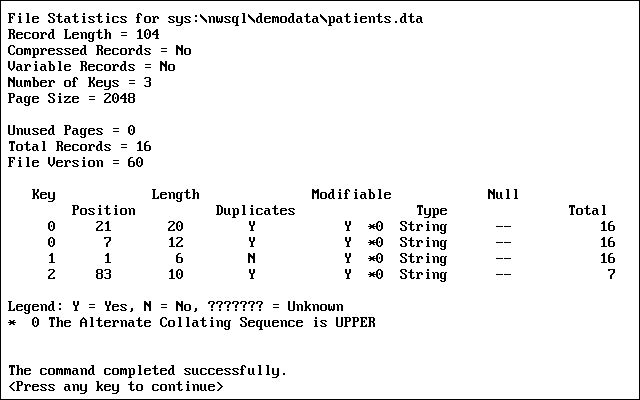
This example shows that the file called PATIENTS.DTA was defined with a record length of 104 bytes, does not allow variable-length records, has 3 keys, and has a page size of 2,048 bytes. Sixteen records have been inserted into the file. The file does not use data compression and is using all its preallocated pages.
The Btrieve file version is 6.0. (If you created the Btrieve file with VATs, multiple ACSs, local-specific ACSs, or index balancing, the STAT command displays file version 6.1. Otherwise, it displays file version 6.0.)
NOTE: The STAT command designates case-insensitive keys and key segments with the letter I, descending keys with the symbol <, manual keys with the letter M, alternate collating sequence keys with an asterisk (*), and repeating duplicatable keys with the letter R. Indexes created with SINDEX are also designated with the letter R by default unless you specified the Reserved Duplicate Pointer element.
The remainder of the screen provides information about specific keys. For example, the screen shows that Key 0 allows duplicates, is modifiable, and consists of two segments:
Key 1 consists of one segment. It starts in position 1, is 6 characters long, does not allow duplicates, is modifiable, and will be sorted as a string type. Sixteen unique key values were inserted for this key.
Key 2 consists of one segment. It starts in position 83, is 10 characters long, allows duplicates, is modifiable, and will be sorted as a string type. Seven unique key values were inserted for this key.
NOTE: The STAT command handles indexes the same whether they were created by the Btrieve Create Supplemental Index operation (in Btrieve 6.x) or the Btrieve Create operation. The information displayed by the STAT command does not differentiate between these indexes.
The VER command returns the version number of the Btrieve NLM loaded at the server. LOAD BUTIL -VER VER
Format