Server Application Using the NetWare Btrieve NLM
Figure 1 shows an application accessing Btrieve data stored on the local server. The application is making local requests to the local Btrieve NLM. Note that BSPXCOM is not loaded because there are no incoming requests to the Btrieve NLM from another server or workstation.
Figure 1
Server Application Using the NetWare Btrieve NLM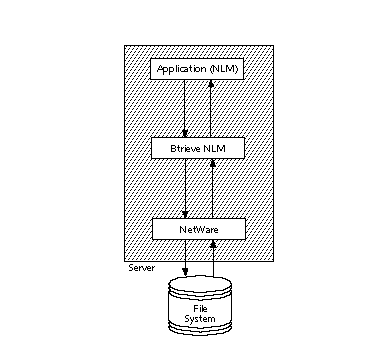
Figure 2 shows an application running on Server A. It is making requests to the local Btrieve NLM (Server A) and to a remote Btrieve NLM (Server B) via the Btrieve Message Router. The Message Router handles outgoing requests from Server A to the remote Server B. The Message Router must be loaded on Server A in order to send the requests to Server B. BSPXCOM must be loaded on Server B to accept incoming requests from the Message Router. Figure 2
Figure 3 illustrates a server application that requires both the Btrieve Message Router and BSPXCOM. In this figure, the Message Router handles outgoing requests from the local server to a remote server. BSPXCOM handles incoming requests to the Btrieve NLM from a remote source (either a requester at a workstation or the Message Router on another server). Figure 3
The server is supporting incoming requests from a remote source and outgoing requests to a remote server. Figure 4 shows an application running on a workstation. The application is accessing local data via client-based Btrieve and remote data via the requester. The requester passes requests for local data to client-based Btrieve. In this environment, the requester on the workstation performs the same function as the Message Router in Figure 3. BSPXCOM handles incoming requests to the Btrieve NLM from a remote source. Figure 4
Figure 5 shows an application running on Server A. It is accessing both local and remote data. The Btrieve Monitor utility (BTRMON.NLM) is running on Server A. To run the Monitor utility, Server A must have BSPXCOM, BSPXSTUB, or RSPXSTUB loaded. Since the Btrieve NLM on Server A is not accepting any incoming requests from workstations or remote servers, BSPXCOM is not loaded. Instead, RSPXSTUB is loaded on Server A. This allows users to see the Btrieve Message Router's communication statistics through the Monitor utility's Communication Statistics option. Figure 5
Figure 6 shows an application running on the server. The application is accessing local data. The Btrieve Monitor utility (BTRMON.NLM) is also running on the server. Since the Btrieve NLM is not accepting any incoming requests, BSPXCOM is not loaded. However, to run the Monitor utility, the server must have BSPXCOM, BSPXSTUB, or RSPXSTUB loaded. Since the Btrieve Message Router is not loaded, BSPXSTUB is the appropriate communications module to have loaded. NOTE: When BSPXSTUB is loaded, the Communication Statistics option in the Btrieve Monitor utility shows zeros for the SPX statistics, since there is no SPX activity.
Figure 6
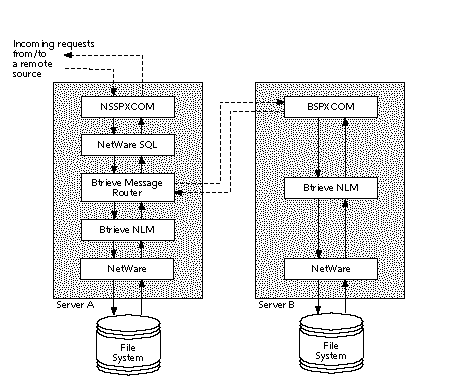
Figure 7 shows Scalable SQLTM running on Server A. Since Scalable SQL needs to access data on both Server A and Server B, the Btrieve Message Router is loaded on Server A. In addition, NSSPXCOM is loaded on Server A because Scalable SQL is also responding to requests from a Scalable SQL Requester running on a remote workstation. (NSSPXCOM provides the same functionality for Scalable SQL as BSPXCOM provides for Btrieve.) Figure 7
Server Application Using the NetWare Btrieve Message Router
Server Application Using the NetWare Btrieve Message Router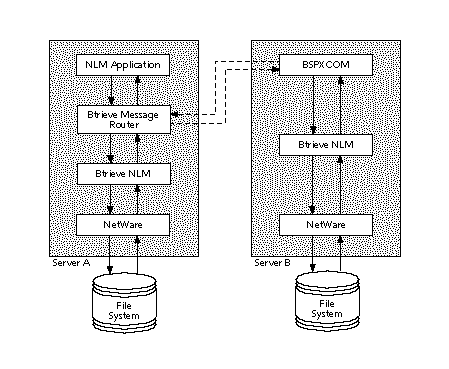
Server Application Using the NetWare Btrieve Message Router and BSPXCOM
Server Application Using the NetWare Btrieve Message Router and BSPXCOM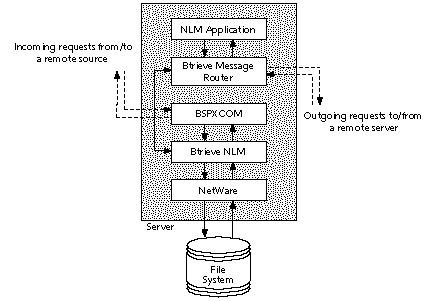
Workstation Application Using the Requester and Client-Based Btrieve
Workstation Application Using the Requester and Client-Based Btrieve
Server Application Using RSPXSTUB
Server Application Using RSPXSTUB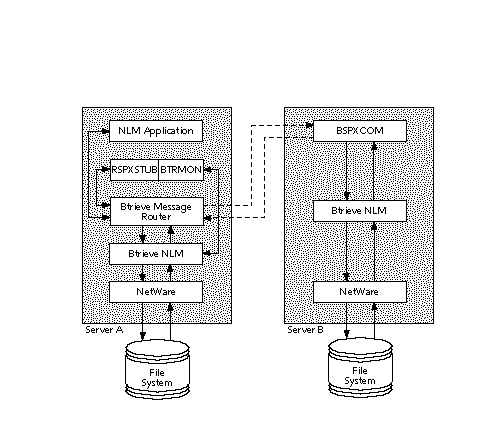
Server Application Using BSPXSTUB
Server Application Using BSPXSTUB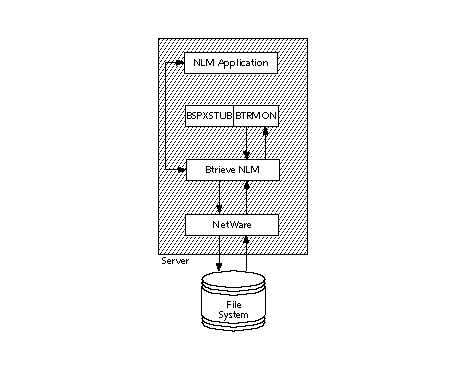
Server Application Using Scalable SQL
Server Application Using Scalable SQL