All storage devices, disk partitions, and logical partitions are identified by object numbers assigned by the NetWare operating system's Media Manager.
In addition, physical devices and adapters are assigned a device name.
These object numbers and device names are consistent across all NetWare utilities and console commands so that you can easily identify the objects and devices.
Object numbers are hexadecimal numbers assigned to devices, adapters, media, physical partitions, NSS partitions, and divisions of a partition (such as the Hot Fix redirection area).
If NetWare partitions are mirrored, each logical partition in the mirrored set has the same object number as the other partitions in the set.
Object numbers are not necessarily sequential, nor are they persistent. New numbers can be assigned when the server is restarted. But the same object number represents the same entity in any NetWare utility. For example, if you type LIST DEVICES at the server console prompt, you would see a list of storage devices, such as the following. The first number in each line is the object number:
0x0001: [V312-A0-d4:0] iomega jaz 1GB rev:H.72
0x0003: [V025-A1-D1:0] WDC AC22100H
0x0002: [V025-A2-D2:0] NEC CD-ROM DRIVE:282 rev:3.07
Likewise, in MONITOR, if you select Available Options > Storage Devices, you would see a list of storage devices, partitions, and adapters similar to the following:
0x0001: [V312-A0-d4:0] iomega jaz 1GB rev:H.72
0x0000: [V025-A1] Novell IDE Host Adapter Module
0x0003: [V025-A1-D1:0] WDC AC22100H
0x0002: [V025-A2-D2:0] NEC CD-ROM DRIVE:282 rev:3.07
0x0006: DOS Partitioned Media
0x0008: NetWare Partition
0x000A: Non-Mirrored Partition
The first number in each line is the hexadecimal object number. In the MONITOR example, object number 0x0001 represents an Iomega Jaz drive, just as it did in the LIST DEVICES display.
Note that a physical NetWare partition is identified as NetWare Partition and a logical partition is identified either as Non-Mirrored Partition or Mirrored Partition.
Mirroring messages use the logical partition object number to report that hard disks are being remirrored or unmirrored.
Devices such as hard disks and adapters are identified not only by a nonpersistent object number (see Object Numbers), but also by a permanent device name. When a hard disk fails, the failure message includes the device name so you can identify the disk or adapter.
To see a list of storage devices and their names, execute the LIST STORAGE ADAPTERS command at the server console prompt. The screen lists each device adapter, followed by a list of devices driven by that adapter. In the following example, the first line identifies an IDE disk adapter. The second line identifies a hard disk operated by that adapter:
[V025-A0] NOVELL IDE HOST ADAPTER MODULE
[V025-A0-D1:0] QUANTUM FIREBALL_TM3840A
The bracketed letters and numbers at the beginning of each line are the device name. The device name identifies the adapter or device, as follows:
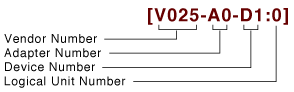
Vendor number. A unique number specific to the device vendor.
Adapter number. The instance of the adapter in the server. In the example, A0 identifies the first instance of an adapter installed in the server. Adapter numbers are unique. The second adapter installed in the server will have adapter number A1, even if the adapter is of the same type as adapter A0.
Device number. The number of the disk or other device. For a SCSI disk, this is the target ID, usually set by a jumper on the hard disk. For an IDE disk, this number represents the bus from the IDE controller. IDE numbers range from D0 through D3, representing the primary, secondary, tertiary, or quaternary bus.
Logical unit number (LUN). The LUN identifies individual devices when more than one device is attached to one bus. For example, one IDE bus might be attached to two disks, a master and a slave. LUN 0 represents the master and LUN 1 represents the slave. However, because disk manufacturers rarely use the logical unit number to identify hard disks, the LUN almost always appears as 0.
The same device name represents the device in all Novell utilities and console commands, including MONITOR, NWCONFIG, LIST DEVICES, etc.
Hot Fix messages use the device name to report that data on a hard disk has been redirected.