Directories Created During NetWare Installation
During installation, the following directories pertaining to the file system are automatically created.
SYS:DELETED.SAV contains files that have been deleted from deleted directories. Salvageable files are usually stored in the directory from which they were deleted. If a directory is deleted, the salvageable files from the deleted directory are moved to the deleted.sav directory. Deleted files can be salvaged if they have not yet been purged.
SYS:ETC contains sample files to help you configure the server.
SYS:LOGIN contains the programs necessary for users to log in to the network, such as LOGIN.EXE. An NLS subdirectory contains subdirectories for login message files for each supported language.
SYS:MAIL may or may not contain subdirectories or files. If you upgrade your server from a previous version of the NetWare® operating system, existing users may still have directories here for their login scripts, but their login scripts will become properties of the new User objects. If you create new users after upgrading, the new users won't have directories in SYS:MAIL
SYS:SYSTEM contains NetWare operating system files as well as NetWare utilities and programs for the network administrator. SYS:SYSTEM also has an NLS subdirectory, containing subdirectories for each supported language for message files.
SYS:PUBLIC allows general access to the network and contains NetWare utilities and programs for network users. SYS:PUBLIC has subdirectories for Windows 95 and Windows NT, as well as a subdirectory called NLS, containing the message files for utilities.
For ease of management, you should keep application files in a directory apart from the data files. Since the application programs don't normally change, you can keep one set of application files on backup media and skip the application directories when you do network backups. When creating application directories, you should also consider issues related to ease of distribution, installation, and operational control for network applications. NetWare provides the Application LauncherTM, a component of Z.E.N.worksTM, to assist you in setting up and managing network applications through NDS® from a single administrative console. (For more information, see ZENworks Starter Pack.) Although applications can be accessed from local drives, installing them on the network provides convenient access. Several structures are possible for application directories: The following figure shows this type of directory structure: Figure 3
The following figure shows this type of directory structure. Figure 4
The following figure shows this type of directory structure. Figure 5
Because users generally have Read and File Scan rights in SYS:PUBLIC, you don't need to make trustee assignments or map a search drive. However, users can see and use all applications. Use this directory structure only if you want all users to have access to all applications. The following figure shows this type of directory structure. Figure 6
Installing applications in SYS:PUBLIC isn't recommended (unless a subdirectory is created for each application). Upgrading a network is made more complicated by mixing NetWare utilities with application program files. An application file might have the same filename as a NetWare utility file or another application's program file. If so, one file overwrites the other because two files with the same filename can't coexist in a directory. NOTE: Some applications write files to the root. For security reasons you don't want users working at the root level. Therefore, use MAP ROOT to map a drive to a fake root---a directory or subdirectory in which the user can be assigned rights (see Fake Root).
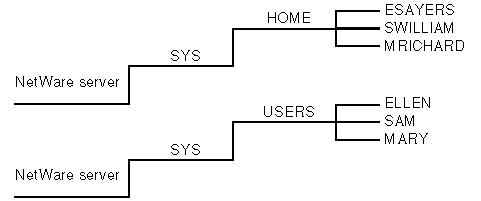
These are work directories for groups and users to keep work files in. You can also create a directory to transfer files between directories on the network. Although data can be created and stored in a home or user directory, when data is stored in a user's directory, no other user (except network administrators or managers assigned file rights) can access it. So, to allow users to share data, create work directories and make trustee assignments for groups or users who need access to these directories. To provide personal workspace for users, create home or username directories. You can create a parent directory in volume SYS: called HOME or USERS. Or, you can create a separate HOME or USERS volume. Then you can create a subdirectory for each user. The name of each subdirectory should be the username. Usernames can be up to 47 characters, but DOS displays only 8 characters in a one-level directory name. The following figure shows this type of directory structure. Figure 7 Application Directories
Application Volume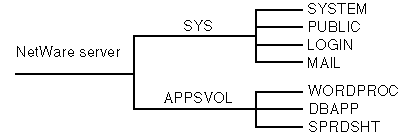
Application Directory off Volume SYS:
Parent Directory for Applications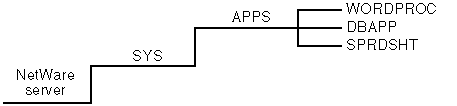
Application Directory in SYS:PUBLIC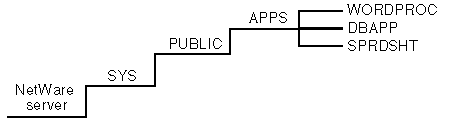
Data Directories
Home or Username Directories
Home or Username Directories