NetWare Link/Frame Relay
The NetWare Link/Frame Relay software is a streamlined, connection-oriented frame-mode data service based on frame-switching/relaying technology---the process of quickly transporting High-level Data Link Control (HDLC) frames through a network.
NetWare Link/Frame Relay is based on frame relay, a WAN telecommunications protocol standard specified by the ITU-T and American National Standards Institute (ANSI). Frame relay was originally specified by ITU-T as an Integrated Services Digital Network (ISDN) frame-mode service.
NetWare Link/Frame Relay supports AppleTalk, TCP/IP, IPX, and the source route bridge software of the Novell Internet Access Server 4.1.
For more information about features, functions, and how NetWare Link/Frame Relay works, refer to Novell Internet Access Server 4.1 Routing Concepts.
Frame Relay Networks
Private line networks permanently allocate dedicated transmission resources between communications end points, regardless of traffic conditions. The frame relay network uses statistical multiplexing; therefore, transmission resources are not allocated until active communications exist. Network resources are shared dynamically among participating end points.
Frame relay networks provide the best features of time division multiplexing (TDM) high-speed, low-delay circuit switching and the statistical multiplexing and port sharing of X.25 packet-switching technologies. This guarantees bandwidth according to the set committed information rate (CIR) and allows bandwidth-on-demand bursts.
The frame relay network consists of frame relay switches, which usually are owned and administered by the carriers. The access connection to the frame relay network is typically provided by a Local Exchange Carrier (LEC); it can also be bundled into the frame relay provider's service. A network provider can be an LEC; a metropolitan frame relay service; an interexchange carrier (IXC); or an interstate, national, or global frame relay service.
NetWare Link/Frame Relay encapsulates data frames and routes them through the frame relay network based on the Data-Link Connection Identifier (DLCI), which identifies the local permanent virtual circuit (PVC) end point of the router. DLCIs are defined through the configuration process or learned through the NetWare Link/Frame Relay link management protocol.
A frame relay network has the following characteristics:
- Transports frames transparently. The network modifies only the DLCI, congestion bits, and frame check sequence (FCS).
- Detects transmission, format, and operational errors.
- Preserves the order of the frame transfer on individual PVCs.
- Does not acknowledge or retransmit frames.
Using NetWare Link/Frame Relay, you can have a logical end-to-end link (a virtual private line) between communications end points. Although NetWare Link/Frame Relay appears as a dedicated private network to the user, the virtual circuits and high-speed internode trunking make it a more cost-effective service than a dedicated line service, with similar performance. It is intended primarily for high-speed, bursty data communications applications, such as WAN interconnections.
NetWare Link/Frame Relay Parameters
NetWare Link/Frame Relay network service parameters, which are determined at subscription time, are in effect on a per-virtual-circuit basis. To set up and use NetWare Link/Frame Relay, the following parameters must be configured before frame relay link activation:
- DLCIs are the PVC numbers that you need for data transfer (one DLCI denotes one end of a virtual circuit). Two DLCIs, one at each end of the connection, are required to form one end-to-end virtual circuit. The DLCI is also known as the virtual circuit number.
- Committed burst size (Bc) is the maximum number of data bits that a network agrees to transfer under normal conditions over a measured time interval.
- Excess burst size (Be) is the maximum number of uncommitted data bits that the network attempts to deliver over a measured time interval.
- Committed information rate (CIR) is the user information rate, in bits per second, at which the network agrees to transfer data on a particular virtual circuit under typical operating conditions.
- The physical access rateaccess rate (AR) of the user channel is the throughput rate, in bits per second, that limits the load offered to the frame relay network.
- The measurement interval (T) is the time over which rates and burst sizes are measured.
When a client workstation needs access to a remote node, the NetWare Link/Frame Relay router sends the frame to the local frame relay network switch, which then sends the frame through the network to the remote end node.
Minimum committed bandwidth access is enforced using the CIR protocol feature. If a user exceeds the specified CIR limit, there is a risk of dropped packets; however, users working within their set CIR are usually guaranteed delivery by the service provider.
The frame relay network switch monitors the access rate and size of data frames transferred through the mesh network. The data throughput CIR is guaranteed by the network, but allows for excess bursts (Be) of data not to exceed the access rate (AR) of the connection. The committed burst size (Bc) sets the maximum amount of data that the network agrees to transfer in a specified time period.
Bursting above the set CIR is allowed, however, only if the connection is configured for it and the actual bandwidth is available on an end-to-end basis. This means that the entrance edge node into the frame relay network, the transit nodes within the network, and the exiting edge node from the network must be available before excess bursting can occur.
Diagramming Your Frame Relay Network
To ensure that all the desired connections to the frame relay network are properly diagrammed, complete the following steps:
-
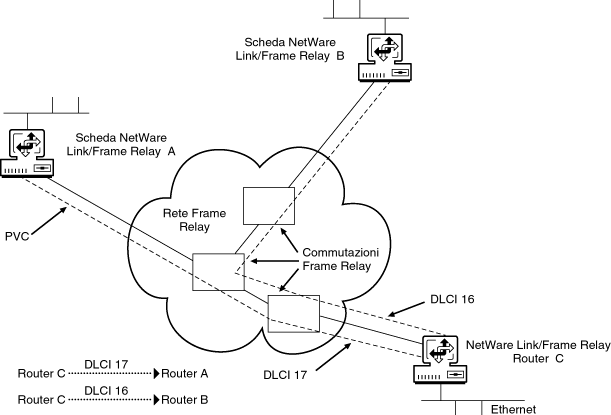
Diagram the existing frame relay network showing all Novell Internet Access Server 4.1 routing access points.
Figure 16-1 shows a simple example of a planning diagram.
-
Draw each connection from the local NetWare router to its corresponding partner.
Indicate the DLCI number assigned by the network for each connection (PVC).
Figure 16-1.
Frame Relay Planning Diagram
Planning Your Frame Relay Network
To ensure that all aspects of your connections to the frame relay network are covered, complete the following steps:
-
For each location where a router attaches to the frame relay network, specify the following parameters:
- Interface speed required (for example, 256 Kbps or 1.544 Mbps)
The interface speed should support the type of applications that will be communicating using NetWare Link/Frame Relay software.
For example, if you have an application that must communicate with three remote sites using a minimum of 32 Kbps sustained bandwidth, the physical interface must be able to support at least 3 x 32 Kbps, or 96 Kbps.
You should also consider traffic pattern characteristics (bursty or sustained) when specifying interface speed.
- Physical interface required (for example, V.35 or RS-232)
- Number of partner routers that will be connected using frame relay
-
Contact your frame relay network service provider and request the specific parameter values you require.
These values should correspond to those defined in Step 1.
The frame relay network service provider will set up your service and assign DLCI numbers to each PVC.
-
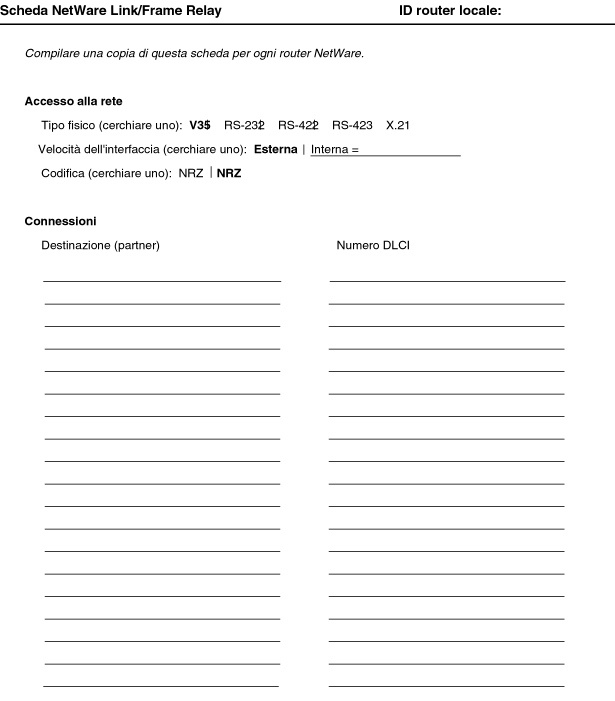
Using the information from Step 1 and Step 2, fill in the NetWare Link/Frame Relay worksheet.
Figure 16-2 shows a template of the NetWare Link/Frame Relay configuration worksheet.
Figure 16-2.
NetWare Link/Frame Relay Worksheet
The following fields are included in the NetWare Link/Frame Relay configuration worksheet:
- NetWare Link/Frame Relay Local Router ID (at top of page)---Symbolic name assigned by the system administrator to identify a particular NetWare Link/Frame Relay router. The ID is arbitrary. It provides a way to track or reference a particular NetWare Link/Frame Relay router.
- Physical Type---Physical connection type to the frame relay switch that the NetWare Link/Frame Relay router is to be connected to.
- Interface Speed---External or internal. Internal speeds vary with the driver used.
- Encoding Option---Corresponds to the encoding set on the physical line that the NetWare Link/Frame Relay router is attached to. It can be NRZI (nonreturn to zero inverted) or NRZ (nonreturn to zero).
- Destination (Partner)---Destination name at the remote end of a PVC that connects communications partners.
- DLCI Number---Data Link Connection Identifier number assigned by the frame relay network service provider for each PVC.
Where to Go from Here
When you have completed all the planning steps for your frame relay connections, verify that the appropriate WAN interface boards are installed and configured as described in Chapter 2, "Configuring Drivers and Board Parameters.”
After the WAN interface boards are installed and configured, refer to "Configuring Frame Relay Network Access” for configuration information.