NetWare Link/X.25
NetWare Link/X.25 operates in a NetWare server or NetWare router/bridge PC environment and provides services for NetWare products and other applications (including independent developer applications) requiring wide area connectivity.
NetWare Link/X.25 uses the ITU-T Recommendation X.25, which defines the interaction between data terminal equipment (DTE) and data circuit-terminating equipment (DCE) of a packet-switching network. The most recent ITU-T Recommendation X.25 is the 1992 revision.
DTE is a generic term for any network-attached, customer-premises, or end-user equipment operating in packet mode. DCE can be any one of the devices that is not a DTE but is associated with a single network port and is responsible for establishing, maintaining, and terminating the connection with a DTE. The X.25 protocol requires a DTE/DCE pair to operate.
NetWare Link/X.25 implements the X.25 protocol as described in these recommendations, including the physical level, frame level, and packet level, along with several library modules used in interfacing with the user applications.
The wide area connectivity products that NetWare Link/X.25 supports include Novell Internet Access Server 4.1 routing and remote access functionality, and SNA/QLLC (NWSAA product).
For more information about features, functions, and how NetWare Link/X.25 works, refer to Novell Internet Access Server 4.1 Routing Concepts.
Virtual Circuit Service
X.25 provides for two types of virtual circuits: switched virtual circuits (SVCs) and permanent virtual circuits (PVCs). An SVC is a dynamically established virtual circuit using call setup and call clearing procedures. A PVC is a permanent, network-assigned virtual circuit that requires no call setup or clearing.
A virtual circuit provides a connection-oriented service, similar to that of circuit switching but with the following exceptions:
- It is limited to a connection between two end points.
- It has the advantage of economical statistical multiplexing for establishing a logical path through the network.
This logical path can be provided either on a permanent basis by a PVC, which is equivalent to a leased circuit, or on a request basis by an SVC. Once the logical path is established, the packets are transferred between connected ends, as desired.
The packets are statistically multiplexed with packets of other users, optimizing the transmission media of the network.
Each packet is associated with a logical channel, which is mapped to the appropriate destination of the virtual circuit. This enables a more effective use of the access circuit for the available bandwidth and the traffic density for each logical channel.
The router can manually maintain IPX, IP, and AppleTalk connections using SVCs between multiple sites. You can set up SVCs that can be connected manually or automatically. Links that are set up manually are easy to install and maintain because they use routing table updates to discover end-user stations and hosts for each X.25 destination automatically. The router can automatically establish and disconnect on-demand IP connections using SVCs.
The types of connections supported by NetWare Link/X.25 for various protocols are shown in the following table.
Protocol |
PVC |
Permanent SVC |
On-Demand SVC |
|---|
IPX |
X |
X |
X |
IP |
X |
X |
RFC 1356 |
AT |
X |
X |
X |
Source route bridge |
|
X |
X |
A permanent SVC is established at initialization and is left in a connected state until the user or application brings it down. An on-demand SVC is established only when data is present for the associated virtual circuit and is brought down after the data has been transmitted and the configured idle timer has expired. An on-demand SVC remains down until more data is queued up to be sent, then the connection is reestablished.
The procedure for setting up a virtual call is to establish a logical path, then the data packets are automatically sent to the appropriate destination.
The packet level provides the virtual circuit service of PVCs and SVCs. Logical channels differentiate the virtual circuits supported by the packet level. Multiple connections are provided simultaneously by multiplexing virtual circuits over the access line. Only one PVC or SVC can be established at a time on each logical channel.
Logical Channel Numbers
The identification of a logical channel is present in every packet flowing across the X.25 interface. This identification is in the form of a field within the packet consisting of 12 bits. For SVCs, the association between a logical channel identifier and a particular virtual circuit is accomplished at call setup time when the identifier is chosen from a pool of unused identifiers. For PVCs, this association is by network subscription.
At network subscription time, the user specifies the number of logical channels needed for both SVCs and PVCs by designating ranges of logical channel numbers. NetWare Link/X.25 configuration uses the decimal equivalent of the complete 12-bit Logical Channel Identifier in terms of two subfields: the Logical Channel Group (4 bits) and the Logical Channel Number (8 bits).
Within any of the following categories, the range of available logical channels must be contiguous. Each successive range of logical channel numbers must be numerically higher than the previous range.
In increasing order, the logical channel ranges include the following:
- PVCs
- SVCs supporting only calls from the network (inbound SVCs)
- SVCs supporting calls from and to the network (two-way SVCs)
- SVCs supporting only calls to the network (outbound SVCs)
NetWare Link/X.25 User Facilities
The ITU-T Recommendation X.25 addresses users' needs for versatility in their network requirements through a set of optional user facilities. These facilities give X.25 the capability of being tailored to meet varied network and user requirements, and allow a network installer to fine-tune the network's handling of such areas as security, accounting, routing, and performance. These facilities can be selectively and incrementally specified to the needs of the users on that network.
Many user facilities can be used within an X.25 connection to a PDN. The user facilities available with NetWare Link/X.25 include the following:
- Flow Control Negotiation---Allows negotiation, on a per-call basis, of the window size and maximum user data field length that can be used on the call in each direction.
- Throughput Class Negotiation---Specifies, on a per-call basis, the throughput of data that can be transferred on a virtual circuit. The range is 75 bps to 64 Kbps.
- Fast Select---Expands the Call and Clear user data fields from the normal 16 octets to 128 octets, enhancing the data field's usefulness for short-duration, low-volume, transaction-oriented applications. This facility is often used in the retail point-of-sale and credit card authorization terminal environment.
- Reverse Charging---Offers the equivalent of a collect call. It is allowed on a per-call basis and is specified in the Call Request packet by the calling DTE.
- Closed User Group (CUG)---Allows the configuration of one or more virtual private networks within a larger public network. It allows a user to collect a number of DTEs into a single logical group and restrict access to the group having the ability to receive incoming calls from or to make outgoing calls to the restricted "open" portion of the network. The number of CUGs is network-dependent. A single DTE can belong to one or more CUGs.
Within the CUG category, you can specify whether a user connection has incoming access (CUG with Incoming Access), outgoing access (CUG with Outgoing Access), or both. If a DTE belongs to more than one CUG, you must also specify a preferred (or primary) CUG.
- Bilateral Closed User Group (BCUG)---Offers a finer degree of access control than the CUG offers. Bilateral signifies a CUG relationship that has been limited to a pair of DTEs. Access between the pair of DTEs is unrestricted; however, access to or from any other DTE is not possible.
A DTE subscription with a PDN can include a provision to allow or disallow a remotely originated, reverse-charged call from reaching that DTE (Reverse Charging Acceptance). Additionally, a DTE subscription with a PDN can include a provision to disallow any locally charged calls; that is, all locally generated call requests must specify reverse charging.
NetWare Link/X.25 additionally provides local configurable options for both of the preceding items; that is, regardless of a customer's PDN subscription, all inbound reverse-charged calls can be rejected and all outbound call attempts that do not specify reverse charging can be disallowed.
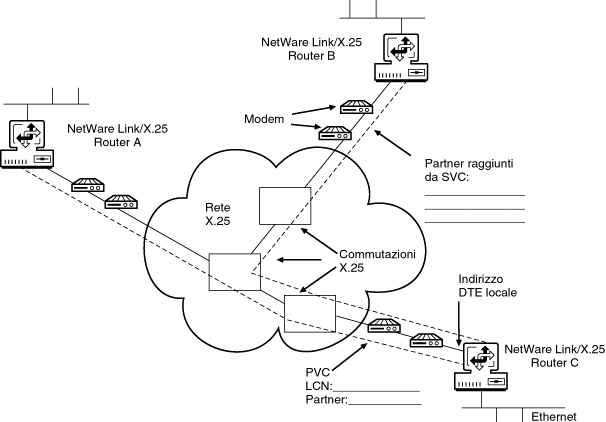
Diagramming Your X.25 Network
To ensure that all connections to the X.25 network are properly diagrammed, complete the following steps:
-
Diagram the existing X.25 network showing all Novell Internet Access Server 4.1 routing access points and mark the X.25 addresses.
Figure 16-3 shows a simple example of a planning diagram.
-
Draw in and show each type of connection from the local Novell Internet Access Server 4.1 router to its corresponding partner.
For PVC-type connections, show the LCN assigned by the X.25 network service provider and the partner name.
For SVC-type connections, list the partner names.
Figure 16-3.
X.25 Planning Diagram Example
Planning Your X.25 Network
To ensure that all aspects of your planned connections to the X.25 network are covered, complete the following steps:
-
For each location that a router attaches to the X.25 network, specify the following parameters:
-
Using the information from Step 1, fill in the NetWare Link/X.25 Network Access Worksheet.
Figure 16-4 shows the NetWare Link/X.25 Network Access Worksheet.
The NetWare Link/X.25 Network Access Worksheet fields are described following the worksheet.
-
Contact your X.25 network service provider and request the specific parameter values you require.
These values correspond to those specified on the worksheet.
The X.25 network service provider will set up your service and assign a range of virtual circuit numbers to meet your requirements.
-
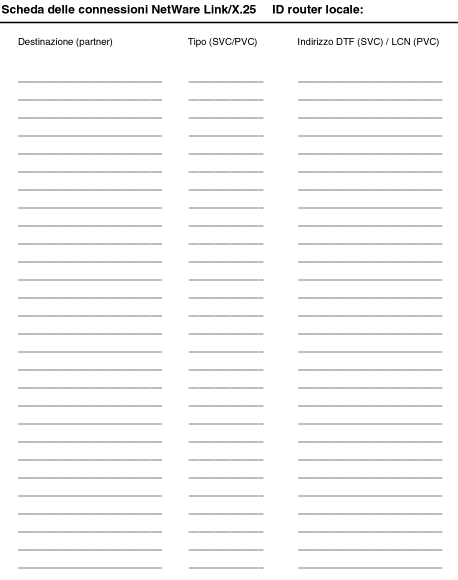
Using the information from Step 3, fill in the NetWare Link/X.25 Connections Worksheet.
Figure 16-5 shows the NetWare Link/X.25 Connections Worksheet.
Figure 16-4.
NetWare Link/X.25 Network Access Worksheet
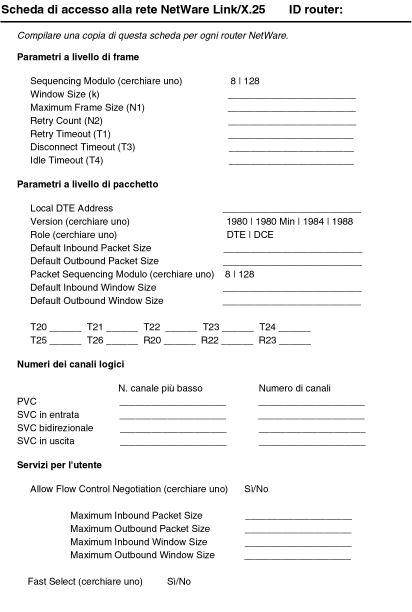
The following list describes the fields in the NetWare Link/X.25 Network Access Worksheet:
NetWare Link/X.25 Router ID (at top of page)---Symbolic name assigned by the system administrator to identify a particular NetWare Link/X.25 router. The ID provides a way to track or reference a particular NetWare Link/X.25 router.
Frame-Level Parameters
- Sequencing Modulo---Specifies the numbering of sequential frames allowed in a Data-Link layer window. For most networks, Modulo 8 should be used. For special networks, Modulo 128 can be used; this allows users to select a larger window size.
NOTE: The Default Window Size field is dependent on which Modulo method you select here.
- Window Size (k)---Determines the maximum number of sequential frames that can be received or sent before the server or router sends (or waits for) an acknowledgment.
- Maximum Frame Size (N1)---Determines the maximum frame size allowed to be received on the link (in octets).
- Retry Count (N2)---Determines the maximum number of times a frame should be retransmitted because of the expiration of the Retry Timer (T1). A large value for this parameter increases the probability of a correct transfer between the DTE and DCE. A small value permits faster detection of a permanent error condition.
- Retry Timeout (T1)---Determines the time, in seconds, to wait for an acknowledgment of the oldest transmitted frame. If no acknowledgment is received within this set time, an attempt is made to determine the status of the remote device.
Set this parameter to a value slightly greater than twice the transmission time of the longest frame, including anticipated delay time to the peer node.
- Disconnect Timeout (T3)---Displays the value of the T3 timer. After attempting to connect the link by sending N2 Set Asynchronous Balanced Mode (SABM) frames on T1 expiration, the Data-Link layer continues sending SABM frames when the T3 timer expires.
- Idle Timeout (T4)---Specifies the amount of time the local DTE waits (when a link becomes idle) before attempting to poll the partner node for status. If the partner node does not respond to the polls, the link is reset and all current virtual calls are cleared or reset.
Packet-Level Parameters
- Local DTE Address---Specifies the X.121 address (up to 15 digits) of the local DTE. It should match the address assigned by your attached network. This address in included in the Calling Address field of the outbound Call Request packets.
- Version---Determines the specific conformance year for the X.25 specification you use for this port.
- Role---Determines whether you use DTE or DCE procedures for packet-level operation in the logical channel number (LCN) assignment.
When establishing a connection to an X.25 network, you must set this parameter to DTE (the default value) to avoid call collisions.
- Default Inbound Packet Size---Determines the default packet size that is used for a call. Unless another packet size is specified when the call is made, the default packet size value is used. Set this value to correspond to your network subscription.
- Default Outbound Packet Size---Determines the maximum outgoing data packet size when a call is established without the Flow Control Negotiation parameter. The Default Outbound Packet Size should be a value that is agreed on by the PDN and the remote DTE.
- Sequencing Modulo---Provides control over the numbering of sequential data packets allowed in a window. For most networks, Modulo 8 should be used.
NOTE: The Default Window Size field is dependent on which Modulo method you select here.
- Default Inbound Window Size---Specifies the default number of sequential incoming or outgoing data packets that can be sent before an acknowledgment is required.
NOTE: The Packet Sequencing Modulo and Window Size fields are independent of the Frame Sequencing Modulo and Window Size parameters.
- Default Outbound Window Size---Specifies the default value of the maximum number of sequentially numbered data packets that can be transmitted by the local DTE without receiving an acknowledgment at any given time.
When a virtual circuit is established without flow control negotiation, this value is used as an outbound window size. You should set this parameter to the value agreed on by the PDN.
- T20 (Restart Response Timer)---Determines the amount of time, in seconds, that the local DTE waits when it issues a Restart Request packet to receive a restart confirmation or restart indication.
When the time limit expires, the Restart Request packet is retransmitted.
- T21 (Call Response Timer)---Specifies the amount of time, in seconds, that the DTE waits for a response to an outbound Call Request packet.
- T22 (Reset Response Timer)---Specifies the amount of time, in seconds, that the DTE waits for a response to a Reset Request packet.
- T23 (Clear Response Timer)---Specifies the amount of time, in seconds, that the DTE waits for a response to a Clear Request packet.
- T24 (Ack-Send Timer)---Specifies the amount of time, in seconds, that a DTE waits when a packet carrying a valid acknowledgment is sent.
This timer is used to ensure that no acknowledgment is lost. If the timer expires, an RR (Receiver Ready) packet is sent.
- T25 (Data Packet Retransmission Timer)---Specifies the amount of time, in seconds, that the DTE waits for the appropriate acknowledgment after transmitting a data packet.
If the T25 timer expires, the packet layer resets the virtual circuit.
- T26 (Interrupt Timer)---Specifies the amount of time, in seconds, that the DTE waits when an Interrupt Request packet is sent for an interrupt confirmation to be received.
If the T26 timer expires, the packet layer resets the virtual circuit.
- R20 (Restart Retransmission Timer)---Specifies the maximum number of times the local DTE retransmits, upon expiration of the T20 timer, before notifying the user that the associated link is inoperative.
- R22 (Restart Retransmission Count)---Determines the maximum number of times the local DTE retransmits a Reset Request packet, upon expiration of the T22 timer, before initiating a Clear procedure for SVC or a Restart procedure for PVC.
- R23 (Clear Retransmission Count)---Determines the maximum number of times the local DTE retransmits a Clear Request packet, upon expiration of the T23 timer, before initiating a Restart procedure on the associated link.
Logical Channel Numbers
- PVC, Lowest LCN---Determines the lowest LCN that can be used for a PVC.
- PVC, Number of LCNs---Determines the number of logical channels supporting PVCs.
This number must agree with your network subscription.
- Inbound SVC, Lowest LCN---Determines the lowest LCN that can be used for one-way incoming logical channels for SVCs.
This value must be greater than or equal to the Lowest PVC LCN parameter value.
- Inbound SVC, Number of LCNs---Determines the number of incoming channels assigned for inbound-only SVCs.
This number must agree with your network subscription.
- Two-Way SVC, Lowest LCN---Determines the lowest number of two-way channels assigned for SVCs that can be used for both inbound and outbound calls.
- Two-Way SVC, Number of LCNs---Determines the lowest LCN that can be used for two-way SVCs.
This number must agree with your network subscription.
- Outbound, Lowest LCN---Determines the lowest LCN that can be used for outgoing logical channels for SVCs.
The value must be greater than or equal to the Lowest Two-Way SVC LCNs value plus the Number of Two-Way LCNs value.
- Outbound, Number of LCNs---Determines the number of logical channels reserved for outbound-only SVCs.
This number must agree with your network subscription.
User Facilities
- Allow Flow Control Negotiation---If set to Yes, negotiates (downgrades) incoming calls containing either Window Size or Packet Size facility values that are greater than those specified.
If set to No, rejects incoming calls containing either Window Size or Packet Size facility values that are greater than those specified.
- Maximum Inbound Packet Size---Specifies the largest incoming packet size that can be negotiated on a per-virtual-circuit basis.
- Maximum Outbound Packet Size---Specifies the largest outgoing packet size that can be negotiated on a per-virtual-circuit basis.
- Maximum Inbound Window Size---Specifies the largest value, per virtual circuit, to be negotiated in a Window Size facility parameter field.
The maximum value for this parameter is dependent on which Packet Sequencing Modulo method you selected.
- Maximum Outbound Window Size---Specifies the largest value, per virtual circuit, to be negotiated in a Window Size facility parameter field.
The maximum value for this parameter is dependent on which Packet Sequencing Modulo method you selected.
- Fast Select---If set to Yes, allows up to 128 bytes of user data to be included in Call Request packets. If set to No, user data is not included in Call Request packets.
Figure 16-5.
NetWare Link/X.25 Connections Worksheet
Where to Go from Here
When you have completed all the planning steps for your frame relay connections, verify that the appropriate WAN interface boards are installed and configured as described in Chapter 2, "Configuring Drivers and Board Parameters.”
After the WAN interface boards are installed and configured, refer to "Configuring NetWare Link/X.25” for configuration information.