Wireless Connectivity with NetWare Mobile IPX
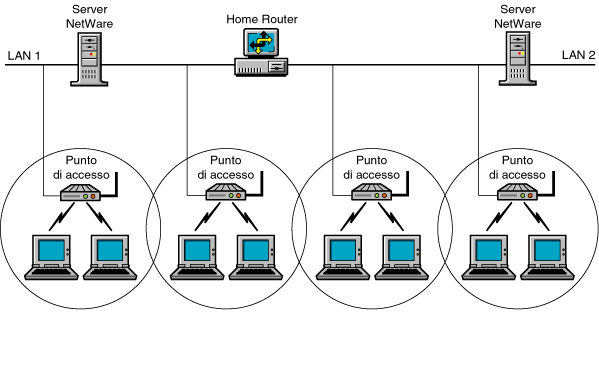
NetWare Mobile IPXTM software provides all the functionality of IPX and also provides continuous connectivity between NetWare servers and portable NetWare clients---called mobile clients---in wired and wireless IPX network environments. With NetWare Mobile IPX, you can unplug your mobile client from the network, move to another location---even across router boundaries---and reconnect the client to the network without interrupting or losing your network session.
Wireless IPX network connectivity is made possible by spread spectrum radio frequency or diffuse infrared light frequency products operating through a wireless local bridge called an access point. The access point is a radio or light frequency receiver technology for LAN environments that operates as a bridge to the network. Each access point operates as a cell, similar to a cellular phone network.
A Home Router serves as the central connection point between mobile clients and NetWare servers. To enable mobile clients to establish and maintain network connections, the Home Router allocates an address from the server's IPX internal network for use by the mobile clients.
The address allocated from the Home Router's internal network is the mobile client's virtual network address. When a mobile client establishes a connection, it uses this virtual network address. While a Home Router is serving a mobile client, all the packets directed at the client's virtual network address are forwarded through the Home Router. Because the Home Router always keeps track of the mobile client's location, it forwards the packets to the client.
Communications from the mobile client to the server take the shortest route. Communications from the server to the mobile client go through the Home Router, which might not be on the shortest route.
Figure 1-3 shows how wireless connectivity works on an IPX network. Access points on one LAN segment can work among themselves to "hand off" mobile clients transparently from one cell range to another. As soon as a mobile client crosses a router boundary, however, the access points can no longer help the client maintain sessions because the network address has changed. The Home Router must then ensure that packets are delivered to the mobile client on its new LAN segment.
Figure 1-3.
Wireless Connectivity with NetWare Mobile IPX
Although mobile client users might roam from one IPX network to another, they still need to maintain their network sessions. However, because NCP applications and many IPX/SPXTM applications "remember" the IPX network and node addresses while a connection is active, the users would no longer receive packets from the server after they roam to a different network. As they roam, users would need to reload the client networking software to obtain IPX addresses each time they move to another network. Additionally, a NetWare server terminates its connection to a client if the client stops responding to watchdog (keep-alive) packets. When a mobile client roams out of wireless coverage, the connection is terminated because the client system cannot answer the watchdog packets from the server.
NetWare Mobile IPX maintains network sessions between clients and servers even when a mobile client roams outside a wireless connectivity area. The Home Router intercepts all packets destined for its mobile clients. If the Home Router detects that an incoming packet is a watchdog packet, it replies to the server on behalf of the mobile client. The Home Router answers watchdog packets for the mobile client for a user-defined period of time before it drops the connection to the client. Therefore, when users roam out of range, they can still access their local drives without session termination or delay.
You can also put a mobile client into a low-power state called sleep mode. When you "awaken" the client, you can continue your work without having lost your previous network session.
NetWare Mobile IPX allows hot swapping of Personal Computer Memory Card International Association (PCMCIA) boards and modems. For example, hot swapping enables you to exchange a standard Ethernet board for a wireless Ethernet board without losing your network session.
Traditionally, NetWare expects the network board to be in the system when the networking software loads. Unless the system is restarted, the board never leaves the system. With NetWare Mobile IPX, a user can bring up a client without the PCMCIA board being in the system.
Mobile client users can also configure an alternate interface in the NetWare Mobile IPX section of the client's NET.CFG file. The primary interface is specified as usual. If the primary interface has connectivity, IPXODI always gives it priority over the alternate interface. IPXODI automatically unbinds from the primary interface and binds to the alternate interface if the primary interface becomes unusable. At any given time, IPXODI is communicating using one of the two interfaces.