On-Demand Call Between a Branch Office and the Main Office
For packets to travel between two IPX network segments separated by a WAN, there must be a connection between the two routers representing each segment. This connection is represented by the WAN call destination, a unique name that identifies the router on the other end of the connection.
A WAN connection can be initiated by any of the following methods:
After a WAN connection is established, the routers use the IPXWAN protocol to negotiate the values or states of various connection characteristics, such as speed, throughput, routing type, and IPX header compression. These and other characteristics are negotiated before the routers exchange any routing information or data.
Associated with each WAN call destination is the call type, which characterizes the behavior of the call after it is established. Calls can be permanent or on-demand.
A permanent call is a connection that remains active between the local router and the remote router identified by the call destination. A permanent call can be established automatically from configured protocol-to-board bindings, or manually from CALLMGR. The call remains active until IPX is unbound from the interface, or until the connection is disconnected manually from CALLMGR. If a permanent call fails, IPXRTR tries to reestablish the connection.
IPX routing and service information crosses permanent calls as required by the operative routing/service protocol, which can be RIP/SAP or NLSP. If you do not want routing and service traffic to cross a permanent-call link, Novell Internet Access Server 4.1 enables you to configure static routes and services on each router. This is typically how IPX routers are made aware of remote routes and services over links that use on-demand calls.
For information about static routes and services, refer to "Static Routes and Services.”
For more information about permanent calls, refer to Chapter 5, "NetWare Link/PPP.”
An on-demand call is a dedicated, point-to-point connection between two routers that becomes active only when one router must send user data to the other. Because the on-demand call relies on configured static routes and services, no routing or service information crosses the link while the call is active.
With an on-demand call, the link remains inactive until user data needs to cross it. Workstations needing to reach remote destinations send packets to their local IPX router advertising the routes, assuming the packets can reach their destination. The local router stores the packets and tries to establish a connection to the remote router. After the local router completes the call and negotiates on-demand service, it forwards the stored packets to the remote router, which then forwards them to their destination.
NOTE: To avoid activating potentially expensive connections, IPX routers do not forward type 20 (NetBIOS) packets over on-demand calls.
For more information about on-demand calls, refer to Chapter 5, "NetWare Link/PPP,”
Novell Internet Access Server 4.1 also enables you to configure a routed on-demand call. Unlike the "standard" on-demand call, which relies on statically configured routes and services, a routed on-demand call runs a routing protocol while the link is active. When the link goes down, the routes and services made known by the routing protocol become unavailable.
If no data crosses the link after some period of time, a Data-Link layer timer triggers the termination of an on-demand call. However, the routing protocol running over a routed on-demand call resets this timer each time it transmits a packet. This keeps the link continuously active. To solve this problem, Novell Internet Access Server 4.1 uses a similar timer that operates at the Network layer. This timer is reset only when data packets---not protocol packets---cross the link. In this way, the routing updates do not keep the link active when no data is being transmitted.
Routed on-demand calls are well-suited for large corporate networks that have many branch offices. In this type of internetwork, most of the traffic is unidirectional: from the branch office to the corporate network. Configuring each branch office with a single (default) route to the corporate network is sufficient. When a branch office router establishes a link to the router serving the corporate network, the routing protocol floods the branch office routes into the corporate network. This is necessary so that responses to branch office service requests know how to reach their destination in the branch office network. As long as the branch office forwards information to the corporate network, the link remains active. If the link is idle for some predetermined period of time, it goes down.
You configure a routed on-demand call the same way you configure a standard on-demand call with one exception: you must configure a routing protocol to operate over the link.
IPXWAN negotiates the WAN routing type, which determines which IPX routing protocol---if any---runs over the connection. Novell Internet Access Server 4.1 supports the following routing types for IPX exchanges over a WAN connection:
NOTE: The first four routing types operate only between routers; the fifth, WAN Workstation, operates between a router and a NetWare workstation.
To choose the most suitable routing type, IPXWAN considers the following criteria during its negotiation process:
Earlier versions of the routing software, such as NetWare MultiProtocol Router PlusTM 2.1x software and NetWare WAN LinksTM 2.0 software, support only Numbered RIP connections.
For example, two routers running NLSP at their respective WAN interfaces automatically use the WAN NLSP routing type over the connection.
Some third-party routers might support only Numbered RIP connections for IPX routing over WANs.
WAN NLSP, Unnumbered RIP, and Numbered RIP operate only over permanent calls; the On-Demand routing type operates only over on-demand calls.
A static route is a RIP route that is added to the Routing Information Table by a network administrator, rather than by the active routing protocol---in this case, RIP---operating over a network link. For a WAN connection, a static route comprises a WAN call destination, the destination IPX network number, and the route metrics (hops and ticks) to reach the destination. A static service is a SAP service that is also added manually rather than dynamically by SAP. A static service comprises a WAN call destination; the service name and type; the service address network, node, and socket; and the service metrics (hops and ticks) to reach the destination advertising the service. With Novell Internet Access Server 4.1, you can configure static routes and services for both permanent and on-demand calls.
When used with permanent calls, static routes and services are useful for redirecting traffic to a particular network, perhaps for security reasons, and for conserving bandwidth on slow or low-capacity links. A single static route is also useful as a default route. In this way, the only routing information crossing the link is that required by users to access a specified set of services.
When used with on-demand calls, static routes and services are useful for connections that use expensive telecommunications carriers and for slow links over which it is undesirable to exchange routing and service information. Consider an internetwork that connects tens to hundreds of branch offices to a single main office. Typically, each branch office requires periodic access to information at the main office. However, it is most likely that the main office periodically polls the branch offices to get up-to-date information, such as the day's sales figures. Because a permanent call to each branch office is not necessary, connections to the main office need only be low-speed, dial-up lines. For this reason, the first several minutes of the call should not be taken up by a flood of routing and service information into a branch office. Nor should there be a relatively smaller flood of (mostly irrelevant) routing and service information from a branch office into the main office.
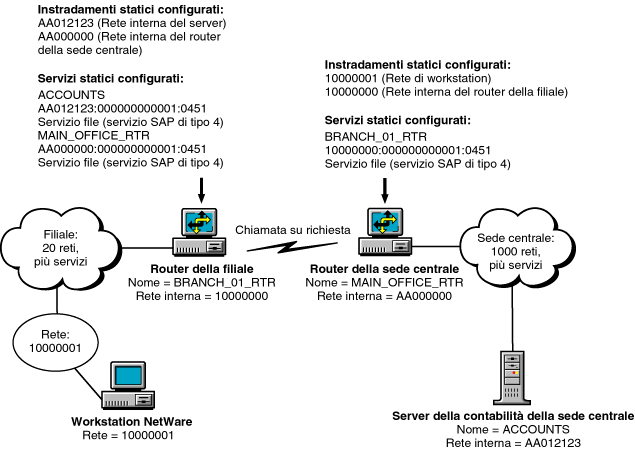
Figure 1-4 shows a typical configuration for static routes and services over an on-demand call.
Figure 1-4.
On-Demand Call Between a Branch Office and the Main Office
In this configuration, the branch office router, BRANCH_01_RTR, must know only the addresses and names of a few servers and services. This small number of extra routes and services is of minimal burden to the branch office network. The main office router, MAIN_OFFICE_RTR, must keep track of only a few networks and services from each branch office. This is significantly better than being flooded with potentially thousands of extra routes and services that are of no use to the main office network.
To configure static routes and services for permanent and on-demand calls, you can use either of the following utilities:
NetWare servers use the Watchdog protocol to validate workstation connections periodically. When a workstation is logged in to a server but has not transmitted a packet for some period of time (the default is 5 minutes), the server sends a watchdog query packet to the workstation. If the workstation does not reply with a watchdog response packet after 5 minutes, the server sends additional queries at specified intervals until 15 minutes have elapsed. If the workstation still has not replied, the server terminates the connection.
With several workstations operating over an on-demand call, the exchange of watchdog packets can keep the connection active most of the time. Depending on the telecommunications carrier you use for the connection, this can become expensive.
You can avoid this problem by configuring your router to perform watchdog spoofing. This means that the router captures watchdog query packets on their way to a workstation and responds on behalf of the workstation without activating the on-demand call. Because of the spoofing, however, the workstation's server connection remains occupied unless it logs out. A way to avoid this is for the remote server to execute a forced logout of all workstations at a predetermined time (midnight, for example), so that all server connections are freed for the next day.
Figure 1-5 shows how watchdog spoofing works over an on-demand call.
Figure 1-5.
Watchdog Spoofing Enabled over an
On-Demand Call
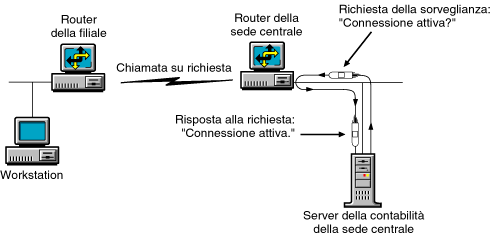
When watchdog spoofing is enabled on an on-demand call, watchdog packets, going from a server to a client, cause the router to reply that the workstation is active without initiating the call. If watchdog spoofing is disabled, an on-demand call is initiated for each watchdog packet that crosses the connection.
NOTE: NCP header compression is not used for NCP packets using the Packet BurstTM protocol. Because IPX headers are the standard, IPX header compression is used.
Header compression increases the throughput of IPX and NCP packets over low-speed serial lines (except for NCP packets using the Packet Burst protocol). An IPX packet header is 30 bytes and is typically followed by an upper-layer protocol header, such as an SPX header. Header compression reduces the size of this combined packet header to just a few bytes.
Header compression is negotiated by the IPXWAN protocol when a call is established over any WAN connection type. Header compression is not used on the connection if IPXWAN detects that one of the routers does not support it. The routers at each end of the connection must have header compression enabled and must allocate the same number of compression slots.
When you enable header compression, you can also specify the number of compression slots. A compression slot is a location in router memory that stores packet header information. The compression algorithm uses this information to compress outgoing---and decompress incoming---packet headers.
IMPORTANT: You must allocate the same number of compression slots on each router. If the values are different, the IPXWAN protocol chooses the lesser of the two.
If too few compression slots are allocated for the number of different-style packets crossing the connection, the values in the following IPXCON counters become large:
The compression algorithm is running efficiently if the number of compressed packets sent is significantly higher than the values in these counters.
A router sends an uncompressed packet when it is considered beneficial not to reuse a compression slot.
Allocating too many compression slots has its own consequences. More memory is required to store all the headers, and the compression algorithm must scan through more stored headers to find a match for each transmitted packet. This results in a higher processing load and slower performance.
Five packet types are used to exchange compression-state information about packets sent over a connection on which header compression is enabled. Three of these packet types---slot initialization, reject, and acknowledgment packets---manage the flow of compressed and uncompressed packets over the connection; these are the compression protocol packets. The packet type, along with other information, is indicated in the first byte of a compressed packet. Compression packet types are defined as follows:
IPXCON tracks uncompressed packets exchanged on a connection in the Uncompressed Packets Sent and Uncompressed Packets Received counters.
IPXCON tracks compressed packets in the Packets Sent and Packets Received counters.
IPXCON tracks initialization packets in the Initialization Packets Sent and Initialization Packets Received counters.
IPXCON tracks reject packets in the Reject Packets Sent and Reject Packets Received counters.
IPXCON does not track acknowledgment packets.