Local Bridging Between 4-Mbps and
16-Mbps Token Ring Networks
This section describes the most common uses of the source route bridge software. These applications include bridging between multiple token ring networks, bridging with concurrent network management, bridging with concurrent access to NetWare file services, bridging over WANs, and bridging over redundant links.
When configured as a standalone two-port token ring bridge, Novell source route bridge software works like an IBM source route bridge. Novell Internet Access Server 4.1 can be used to replace existing bridges while adding a migration path to an environment with simultaneous bridging, routing, and NetWare print and file services.
Each token ring LAN is limited by the physical length of the network and by the number of nodes it can support (up to 260 nodes with shielded twisted-pair and 72 nodes with unshielded twisted-pair). Source route bridging can be used to physically extend the length of a network or increase the number of users a network can support. The size of the network is limited only by the maximum number of allowed bridges (hops) between any given source and destination nodes. Novell supports the IBM bridge and IEEE 802.5 bridging standards for a seven-hop limitation, and allows you to extend a Novell-bridged network up to a 13-hop limit.
Bridges also allow you to partition your network into segments so that most traffic remains local to the segment. This segmentation reduces the overall bandwidth used on all segments of the network while still providing access to the rest of the bridged network. Segmentation can also be used to control access to certain rings or departments.
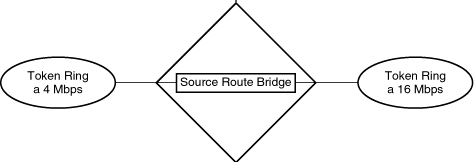
Source route bridges can be used to connect PC users on both 4-Mbps and 16-Mbps token ring networks, as shown in Figure 4-5. PC users on the same network segment must operate at the same speed. Linking LANs operating at different speeds together with source route bridges is especially important when organizations are installing newer 16-Mbps token ring networks but still have a large number of 4-Mbps LANs.
Figure 4-5.
Local Bridging Between 4-Mbps and
16-Mbps Token Ring Networks
Novell Internet Access Server 4.1 supports remote bridging over frame relay (per RFC 1490), X.25 (per RFCs 1294 and 1356), and PPP (per RFC 1220), allowing you to connect geographically dispersed LANs and further extend the distances over which devices can communicate.
Novell source route bridge software provides two methods of attaching to another bridge over a WAN link:
The virtual WAN ring ensures interoperability of Novell source route bridge software with another vendor's bridge over a WAN link. In contrast, the half-bridge configuration option can be used only when both bridges use Novell source route bridge software. The reason is that there is no industry standard for half-bridges.
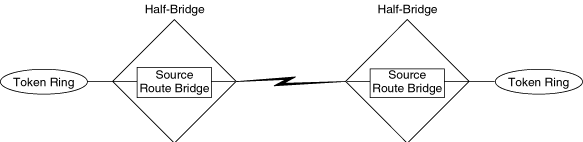
The virtual WAN ring can also be used when both bridges use Novell source route bridge software. The use of the virtual WAN ring in this case is optional and is implemented primarily because it is often simpler to configure than two half-bridges. Half-bridges, by definition, must share the same bridge number. These half-bridge numbers are configured in the Bridge Number option of NIASCFG (parameter path: Select Configure NIAS > Protocols and Routing > Protocols > Source Route Bridge). Two half-bridges with a WAN link are shown in Figure 4-6.
Figure 4-6.
Remote Bridging Using Two Half-Bridges with a WAN Link
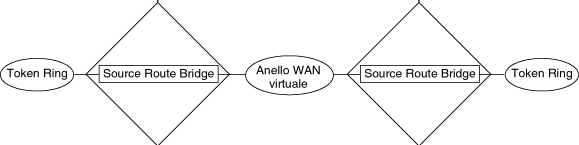
When a virtual WAN ring is used, both sides of the link must be configured with the same ring number. However, because this manually configured parameter is displayed in NIASCFG, fewer mistakes occur. The main disadvantage of the virtual WAN ring is that it adds one hop to the route (half-bridges do not add a hop). Figure 4-7 shows that the virtual WAN ring adds an extra ring to the hop count.
Figure 4-7.
Remote Bridging Using a Virtual WAN Ring
Presently, many source route bridges support only two-port bridging. This limitation exists because the interface boards (with hardware specifically supporting source route bridging) typically provide only for two-way bridging; they can bridge only from one source ring to a single destination ring. In source route bridging, each bridge hop is specified by a source ring number, bridge number, and destination ring number. Boards with source route bridge hardware support this configuration. Because there is more than one possible destination ring in a multiport bridge, the hardware cannot be configured to support multiport bridging directly. To eliminate this limitation, Novell source route bridge software supports the use of a virtual internal ring, as shown in Figure 4-8.
Figure 4-8.
Using the Virtual Internal Ring to Support Three or More Interfaces
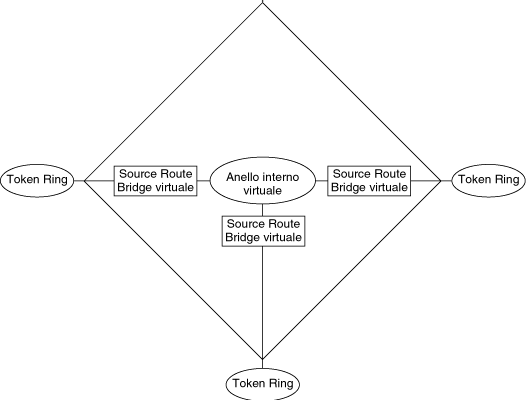
With the internal ring, any receiving interface has a virtual internal bridge associated with it as shown in Figure 4-8. Each virtual internal bridge can pass packets from the external source ring to one destination ring (the virtual internal ring). Each forwarding interface can then bridge from the virtual internal ring to a single external destination.
NOTE: For multiport bridging, the virtual internal ring is not activated until you assign it a ring number in NIASCFG. The only time the virtual internal ring is not needed is when your interface boards support three-port bridging.
Although virtual internal rings and virtual internal bridges have no corresponding physical devices, they appear in the routes specified in a frame's information field and are treated as if they were actual rings and bridges. The additional logic needed to implement the virtual internal ring with multiple virtual internal bridges does not impact performance. In fact, by using the virtual internal ring, the bridging logic can take advantage of the hardware support on the interface boards and significantly improve bridge performance.
NOTE: In some cases, performance might be impacted because configuring a virtual internal ring adds one hop to the route.
Access to a NetWare application, such as print and file services or network management, usually requires that the appropriate protocol is routed on each interface, providing access for clients that want to use that application. However, if a protocol is being bridged on an interface, it cannot be routed on that interface. Therefore, when bridging is used, an alternate mode of access to the application must be provided through the use of the virtual internal ring. This principle applies to all NetWare applications and services, including RCONSOLE, SNMP, NetWare for Macintosh, NetWare for SAA*, and NetWare for NFS.
The virtual internal ring is attached to each bridged interface through a separate virtual internal bridge, as described in "Multiport Bridging.” In this case, the required protocol must be attached to the virtual internal ring through a virtual token ring board that uses the SRBRIDGE.LAN driver. The virtual board is then attached to the virtual internal ring automatically. When the bridge logic is attached to a LAN or WAN interface, the virtual internal ring is automatically attached to the bridge. Each attachment of the bridge protocol to an interface essentially causes the creation of a virtual internal bridge for that interface. With this procedure, a protocol is attached to the LAN or WAN interface indirectly (through the SRBRIDGE.LAN driver, virtual internal ring, and bridge protocol). An example of this configuration using the IPX protocol is shown in Figure 4-9. Note that the two token rings might be part of a larger, looped topology.
Figure 4-9.
Server-Based Bridging
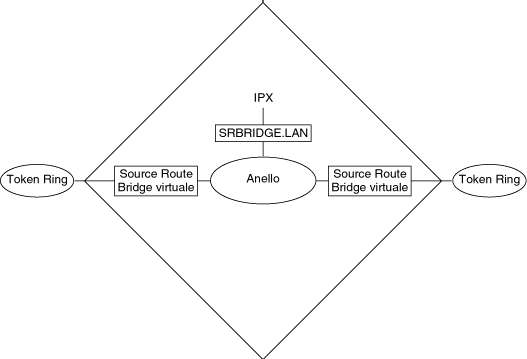
NOTE: For server-based bridging, assigning a ring number to the virtual internal ring is not required to activate the ring and is not recommended. In fact, if you are using IBM LAN Network Manager (LNM) to monitor your network, assigning a ring number to the virtual internal ring will cause IBM LNM to become confused. This will also add one hop to the hop count.
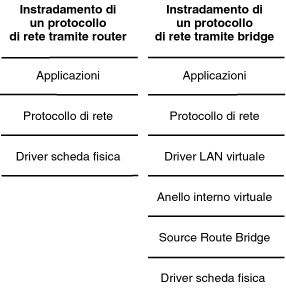
This indirect attachment allows access to the application above the Transport/Network layer, as shown in the bridging portion (right side) of Figure 4-10. Figure 4-10 also shows routing (left side) in comparison with bridging. Note that because a protocol can be attached only to Data-Link layer board drivers, access to applications can be achieved only by attaching the protocol directly to an interface (routing the protocol) or by attaching the protocol to the interface through the virtual board (SRBRIDGE.LAN), the virtual internal ring, and the bridge.
Figure 4-10.
Accessing Applications: Comparison of Routing and Bridging
Routing offers several advantages over bridging. These advantages include the support of larger networks, better flow control, more reliable communications across WAN links, and better segmentation. In a bridged network, most hardware is limited to eight rings from end to end, with seven bridge hops in between. This restriction is due to the maximum timeout between source and destination stations and the hop count limitation in the routing information field of data packets generated by IBM bridging software. Each source route bridged network can use only one network or subnet number. However, routers can be used to connect different source route bridged networks (each with a unique network number), enabling the total bridged network to exceed the seven-hop limitation.
Routers continually update their routing tables, allowing them to provide more reliable connections because they are more responsive to changes and failures in the network. Routing also allows the restriction of data flow to some segments or end stations based on protocol. In addition, subnets can be managed by a local administrator.
Novell Internet Access Server 4.1 can either route or bridge any of the major network protocols (IPX, TCP/IP, or AppleTalk). However, because IBM NetBIOS lacks a Network layer, the network protocols cannot be forwarded by the router and must be bridged. In addition, SNA traffic must be bridged because Novell Internet Access Server 4.1 does not operate as an advanced peer-to-peer networking (APPN) or physical unit type 4 (PU4) router. Because you cannot bridge and route the same protocol on the same interface, Novell Internet Access Server 4.1 automatically disables the bridging of a protocol on any interface that is configured to route that protocol. Novell Internet Access Server 4.1 also allows you to display which protocols are being routed (and which protocols have bridging disabled) on any particular interface.
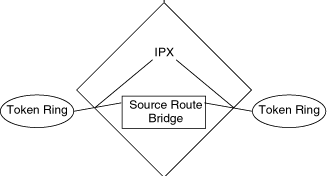
In most cases, you should route protocols that can be routed by Novell Internet Access Server 4.1 and bridge other protocols. Figure 4-11 shows a simple two-port configuration that routes IPX and bridges all other protocols. Note that because only two interfaces are supported, the virtual internal ring is not required.
Figure 4-11.
Routing IPX and Bridging All Other Protocols
To ensure a fault-tolerant network system, parallel bridges can be installed in selected locations. Parallel bridges offer redundant links in case of bridge failure.
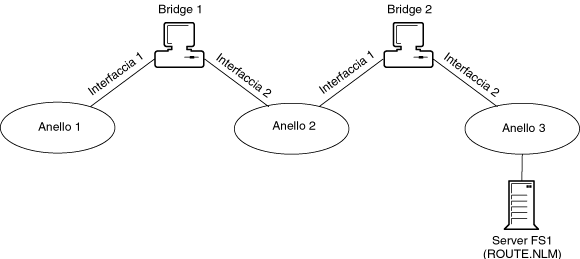
Figure 4-12 shows a network that does not contain any fault tolerance for bridge failure. The primary server, FS1, is located on Ring 3. If Bridge 2 fails, clients on Ring 1 and Ring 2 cannot communicate with the server.
Figure 4-12.
A Bridged Network without Fault Tolerance
To add fault tolerance to this network, a redundant bridge is installed, as shown in Figure 4-13. In this configuration, the new redundant bridge (Bridge 3) connects Ring 2 and Ring 3 in the same manner as Bridge 2. If Bridge 2 fails, Bridge 3 becomes the designated bridge.
Figure 4-13.
A Bridged Network with Fault Tolerance
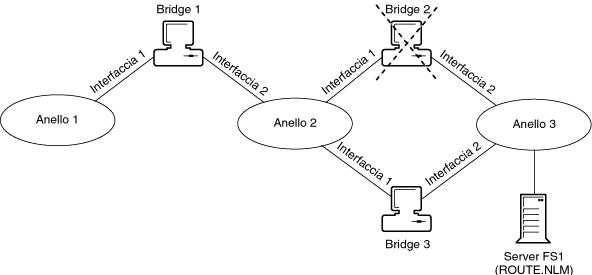
In Figure 4-13, Bridge 3 is configured with Spanning Tree Mode set to Automatic; therefore, the reconfiguration is automatic. If the bridge is not configured manually to use the Spanning Tree Protocol, it must be configured to become an active bridge between Ring 2 and Ring 3. This is one example of the advantage of Spanning Tree Protocol automatic reconfiguration.
It is possible that a single path between two end stations can become overloaded, decreasing network throughput and performance. This situation can be alleviated somewhat by balancing the load between parallel paths.
For example, in Figure 4-14, Clients C1 and C2 are on Ring 1, and Servers FS1 and FS2 are on Ring 2. Two parallel bridges, Bridge 1 and Bridge 2, connect the rings. Bridge 1 and Bridge 2 are configured to use the Spanning Tree Protocol, causing the blocked port (Interface 2) of Bridge 2.
Figure 4-14.
Balancing the Traffic Load in a Bridged Network
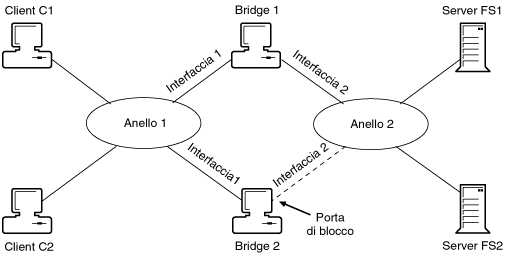
Client C1 wants to communicate with Server FS1. Client C2 wants to communicate with Server FS2. Client C1 transmits a single-route explorer frame to learn the address of Server FS1. Server FS1 replies through Bridge 1. Client C1 and Server FS1 learn that Bridge 1 is the route to each other. Because of the heavy client/server interaction between Client C1 and Server FS1, the data path through Bridge 1 might become congested.
Client C2 transmits a single-route explorer frame to Server FS2. Server FS2 responds through Bridge 1, even though this data path is congested, because Interface 2 of Bridge 2 is blocked.
By using the default configuration of ROUTE.NLM and ROUTE.COM, Bridge 2 can be used to balance the load between the two rings. Instead of transmitting a single-route broadcast frame, Client C2 transmits an all-routes explorer frame. This frame is transmitted through Bridge 2 faster than Bridge 1, because Bridge 1 is heavily loaded with traffic between Client C1 and Server FS1. Server FS2 would transmit the response through Bridge 2. This is the route that Client C2 and Server FS2 now use to communicate.
As shown in this example, configuring the end stations to use all-routes explorer frames instead of single-route explorer frames can be advantageous.
There are two primary ways to configure a remote bridge. One method is to create a virtual WAN link, or virtual token ring network, between sites. The second method is to configure the bridges at each site as half-bridges. The half-bridge implementation is Novell-specific and requires that each half-bridge use Novell source route bridge software.
One of the most important concerns when remote bridges are linked is the addressing method used. This method differs greatly, depending on the link method selected.
An additional consideration is imposed when the Spanning Tree Protocol is used across WAN links. This section addresses each of these issues.
The virtual WAN ring method of configuring a WAN link conforms to IEEE standards and ensures interoperability between Novell Internet Access Server 4.1 configured as a source route bridge and another vendor's bridge across a WAN link. The disadvantage of using the virtual WAN ring is that it adds one to the hop count of frames crossing it.
Figure 4-15 shows a virtual WAN link between two remote token ring networks.
Figure 4-15.
Linking Two Remote Networks with a Virtual WAN Ring
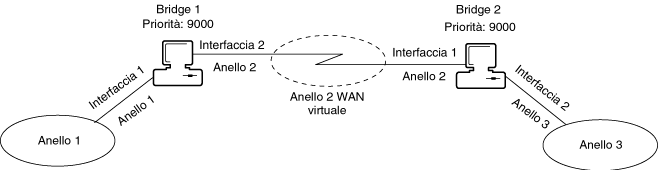
This method of configuring a WAN link requires the use of a virtual WAN ring. Each bridge interface connected to the virtual WAN ring must be assigned the appropriate ring number. For example, in Figure 4-15, Bridge 1, Interface 2, is configured with Ring 2. Likewise, Bridge 2, Interface 1, is configured with Ring 2.
When configuring a network that uses the Spanning Tree Protocol, ensure that the remote bridge is not the root bridge by resetting Bridge Label/Priority to a higher number. The default is 8000. Assigned bridge priorities are shown in Figure 4-15.
Using two half-bridges across a WAN link offers a distinct advantage over using full bridges by not adding a hop count to the frames using this data path. This configuration can be used if both half-bridges use Novell source route bridge software.
One of the main considerations when configuring the half-bridge WAN link method is addressing bridges and setting the ring number for each bridge interface.
Figure 4-16 shows a WAN link using the half-bridge method.
Figure 4-16.
Linking Two Remote Networks with Half-Bridges
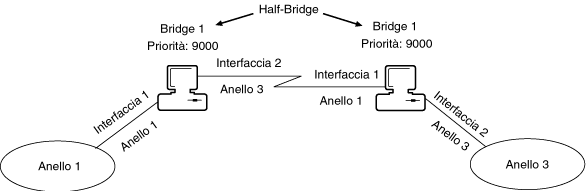
As shown in Figure 4-16, both half-bridges have the same bridge number. The bridges also maintain the same ring numbers assigned to the interfaces.
Remote bridges should not be the root bridge on a network using the Spanning Tree Protocol. To ensure this, assign the Bridge Label/Priority parameter a higher value during configuration. The default is 8000.