Dynamic Mode Implementation of NAT
Network Address Translation (NAT) has two main applications:
To access the Internet, a host must have a globally unique address assigned by the Internet Assigned Numbers Authority (IANA) or other Internet registry. However, because of the depletion of registered IP addresses, it might be impractical to reassign globally unique IP addresses to all the systems on your private network. NAT solves this problem by automatically reassigning a globally unique address to any host that accesses the Internet through a particular router interface. NAT enables the hosts on your private network to access the Internet even if their IP addresses are not globally unique.
NAT can also be used to limit the access of hosts on the public network to resources on your private network. By configuring NAT to translate addresses for only the private hosts that you want to be accessed by hosts outside your private network, you can deny access to all other resources on your network.
Although NAT is most often used to provide access to the Internet, it can also be used within a private network to isolate or protect certain systems from the rest of the private network. For example, NAT can be used to limit the access the overall company has to critical resources, or it can be used to protect the confidentiality of the resources of the finance or personnel departments from general access.
NAT can be configured to operate in one of three modes: dynamic only, static only, and a combination of dynamic and static. Dynamic mode is used to allow hosts on your private network to access the public network. Static mode is used to allow hosts on the public network to access selected resources on your private network or is used to allow certain private hosts to access public hosts. The combination mode is used when both dynamic mode and static mode functions are needed.
In dynamic mode, hosts accessing the Internet are dynamically assigned the IP address used by NAT and a port from a pool of available ports that are constantly reused. Each time a packet is forwarded to the public network, the private address is replaced with the globally unique public address and randomly assigned port. When the session is completed, the port is returned to the pool to be reassigned when needed. No connections can be initiated from the public network into your private network. To use dynamic mode, the NAT interface must be configured with one public address.
NAT provides a pool of 5,000 ports for TCP connections, a pool of 5,000 ports for UDP mappings, and a pool of 5,000 ports for ICMP mappings. To establish a new conversation when all 5,000 UDP or ICMP mappings are being used, NAT drops the oldest mapping and provides a port number to the new mapping. To establish a new TCP connection when all 5,000 connections are being used, NAT provides a port number to the new connection by dropping the oldest connection that meets the following criteria in the order shown:
In static mode, NAT is configured with a table of IP address pairs. Each table entry contains a pair of IP addresses for each host that public hosts are permitted to access. The first IP address in each pair is a public IP address to which the private address is mapped; the second address is the address of the host on your private network. Because public hosts can access private hosts only by using the public IP address, public hosts can access only those hosts that have their IP addresses defined in this network address translation table. In addition, once a private IP host has an entry configured in the network address translation table, it has full access to public IP hosts. To use static mode, one public IP address must be configured for each private host.
NAT can be configured to operate simultaneously in both dynamic and static mode. This combination mode is used when your private network has hosts that want to access the Internet and has resources that you want to be accessed by public hosts. To use dynamic and static mode, one public address must be configured for dynamic translations and one public address must be configured for each private host.
In addition to translating IP addresses, NAT has the following advantages:
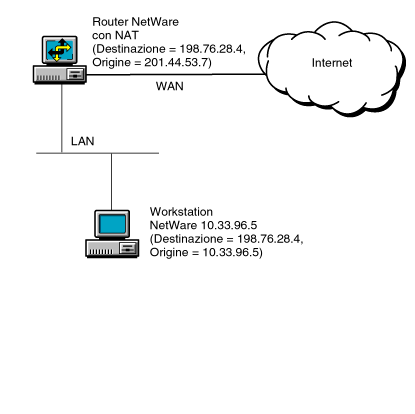
Figure 2-22 shows an application of NAT in dynamic mode. In Figure 2-22, the host on the private network uses the class A address 10.33.96.5. The router's NAT interface to the public network has been configured with the class C address 201.44.53.7. This class C address is globally unique and is registered with the IANA.
When the host with private address 10.33.96.5 wants to access a host on the Internet with the public address 198.76.28.4, it sends packets to its primary router. The router has a default route configured on the WAN interface, so packets are forwarded to the WAN interface. NAT then translates the source address 10.33.96.5 in the IP header with the globally unique address 201.44.53.7 and a new source port before packets are forwarded. Similarly, IP packets on the return path undergo the reverse address and port translation.
The NAT-enabled interface should be configured so that it never uses RIP to advertise the private networks to the public backbone.
Figure 2-22.
Dynamic Mode Implementation of NAT
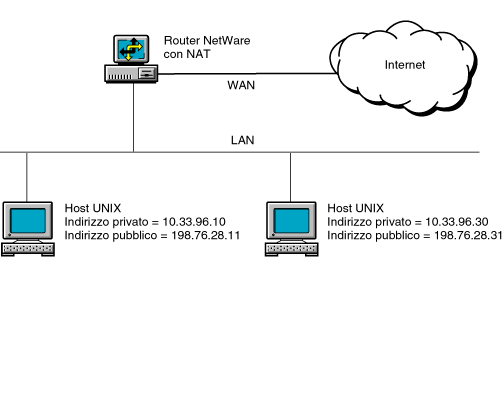
Figure 2-23 shows an application of NAT in static mode. In this case, NAT is configured to allow hosts on the public network to access two UNIX hosts on the private network. The private addresses of the hosts are 10.33.96.10 and 10.33.96.30. The network address translation table is configured to translate these private addresses to the public IP addresses 198.76.28.11 and 198.76.28.31, respectively. To configure more than one public address in the network address translation table, you must configure the NAT-enabled interface using multihoming as described in Novell Internet Access Server 4.1 Routing Configuration.
When NAT is configured in this way and packets from public hosts with a destination address of either 198.76.28.11 or 198.76.28.31 are received by the NetWare router on a NAT-enabled interface, NAT substitutes the destination address of the packets with the appropriate private address and forwards the packets to the private hosts. Reply packets from the hosts to public hosts have the reverse procedure performed on them. In this way, hosts on the public network can access specific resources on the private network, but access is limited to only those resources that have their private addresses configured in the network address translation table. The private hosts configured in the network address translation table can also access any public host.
The NAT-enabled interface should be configured so that it never uses RIP to advertise the private networks to the public backbone.
NOTE: When NAT is used in static mode with a multiaccess configuration, the public router must have a static host route for each address pair defined in the NAT static mapping table. If NAT is used with a numbered point-to-point configuration, you are not required to configure static host routes.
Figure 2-23.
Static Mode Implementation of NAT
NAT has the following limitations:
To determine which IP address to assign to private hosts when NAT is used, use the guidelines in RFC 1918. In summary, RFC 1918 explains that the Internet Assigned Numbers Authority (IANA) has reserved the following three blocks of IP space for private internets:
10.0.0.0 to 10.255.255.255 (10/8 prefix)
172.16.0.0 to 172.31.255.255 (172.16/12 prefix)
192.168.0.0 to 192.168.255.255 (192.168/16 prefix)
The first block is referred to as a 24-bit block, the second block as a 20-bit block, and the third block as a 16-bit block. Note that the first block is a single class A network number, whereas the second block is a set of 16 contiguous class B network numbers and the third block is a set of 256 contiguous class C network numbers. Because the backbone routers of the Internet have filters that prevent them from forwarding packets to these network addresses, using the addresses offers additional protection for private hosts hidden by the Novell IP Gateway or NAT in the event that the gateway, NAT, or firewall malfunctions. However, the routers used by some ISPs might not have filters for these addresses, thereby allowing access to your private hosts by any IP hosts that use the same ISP.
An enterprise can use the network numbers of the address space described in RFC 1918 without any coordination with IANA or an Internet registry. Therefore, the network numbers can be used by many enterprises. Addresses within this private address space must be unique within the enterprise, or within the set of enterprises that choose to share the address space in order to communicate with each other using their own private internet.
The types of packets that NAT filters is largely determined by the mode in which it is operating. The NAT mode is set using the Status parameter. There are four possible settings for this parameter: Disabled, Dynamic Only, Static Only, and Dynamic and Static. For more information about how to configure NAT parameters, refer to Novell Internet Access Server 4.1 Routing Configuration.
If a NAT-enabled interface is configured for Disabled, all incoming and outgoing packets are passed without any modifications to either the source or destination IP address or port. This is the default setting.
If a NAT-enabled interface is configured for Dynamic Only, the filtering rules are as follows:
NOTE: NAT translates any outbound packets that pass through the interface. For a private network that has both registered and unregistered IP addresses, the registered IP addresses are translated to the registered address configured for the NAT interface.
If a NAT-enabled interface is configured for Static Only, the filtering rules are as follows:
NOTE: By configuring filters for a NAT-enabled interface, a secure static translation can be created by allowing only specified services, hosts, or networks access from the public network. For more information about configuring filters, refer to Novell Internet Access Server 4.1 Routing Configuration.
If a NAT-enabled interface is configured for Dynamic and Static, the filtering rules are as follows:
Using NAT to access the Internet has several advantages compared to using the Novell IP Gateway to access the Internet. Novell IP Gateway requires that special client software is installed on the hosts; NAT does not require special client software. The Novell IP Gateway can be used by Windows 3.1 and Windows 95 hosts only; NAT can be used by hosts on any platform, including Macintosh*, UNIX*, OS/2*, and Windows NT*. NAT also operates faster than the Novell IP Gateway because NAT operates at the Network layer whereas the Novell IP Gateway operates at the Session layer. However, the Novell IP Gateway has the advantage of using Novell Directory Services (NDS) and Access Control to limit connectivity to the Internet.