RIP Packet Structure
As a Network-layer protocol, IPX uses the following NetWare protocols to propagate and maintain routes and services:
RIP, like IPX, was derived from XNS. RIP uses IPX and the MAC protocols for its transport.
IPX routers use RIP to exchange routing information with neighboring routers on an IPX internetwork. As a router becomes aware of changes in the internetwork, it broadcasts this information immediately to neighboring routers.
A RIP router periodically broadcasts a packet containing all routing information known to the router. These broadcasts keep all routers on the internetwork synchronized and provide a means of aging networks that have become inaccessible since the last broadcast. A network might be inaccessible because a router went down, or because a router "dropped" a packet containing notification that the route to the network is unreachable. Aged networks do not appear in the routing information broadcast.
NetWare workstations also use RIP to locate the fastest route to a distant network. To initiate a route request, the workstation broadcasts a RIP packet and then "listens" for the RIP response that contains the route information.
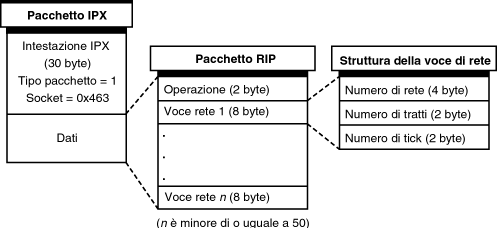
The RIP packet structure is shown in Figure 1-6. As with most higher-level NetWare protocols, the RIP packet is encapsulated within the data section of the IPX packet. RIP packets are defined in the IPX header as Packet Type 1 and Socket Number 0x453.
Figure 1-6.
RIP Packet Structure
Following is a description of the RIP packet fields:
A RIP packet can contain up to 50 network entries. Therefore, depending on the amount of network information contained in the packet, the size of a RIP packet can vary from a minimum of 40 bytes (IPX header and one RIP network entry) to a maximum of 432 bytes (IPX header and 50 entries). Each RIP network entry comprises the following fields:
For RIP requests, this field can be set to 0xFFFFFFFF to indicate an all routes request.
For response packets, the Number of Hops must be at least 1.
The original XNS definition of RIP did not include the Number of Ticks field.
NOTE: If there are multiple routes to a network number, a router uses the path with the least number of ticks when forwarding packets to that network number. If two paths have equal tick values, the router chooses the one with the fewest hops.
With NetWare routers, the network interface board driver is responsible for reporting the time delay on its segment.
For RIP operating on a LAN, the time delay is always one tick. For RIP operating over WAN connections, the IPXWAN protocol calculates the delay and throughput characteristics and assigns a tick value.
As information about the network segment is passed throughout the network by way of periodic broadcasts, routers add any additional delay that they impose to the initial time delay for the segment. This time delay does not include any dynamic queuing delay.
IPX routers use RIP to create and dynamically maintain a database of routing information called the Routing Information Table. This table contains information about all the network segments on an IPX internetwork. The router uses this information to forward packets to their destination by the best possible route.
Table 1-3 shows a sample Routing Information Table.
Network Number |
Hops to Network |
Ticks to Network |
Network Interface
|
Immediate Address of Forwarding Router |
Aging Timer |
|---|---|---|---|---|---|
00000001 |
1 |
2 |
A |
- |
0 |
00000002 |
1 |
2 |
B |
- |
0 |
FEED0038 |
1 |
20 |
C |
- |
0 |
FEED0035 |
2 |
3 |
B |
00001B029927 |
1 |
000000FF |
2 |
3 |
A |
00001B0349B2 |
2 |
FEED0036 |
3 |
4 |
A |
00001B0349B2 |
2 |
NOTE: The Routing Information Table can contain additional fields; only those pertinent to this discussion are shown.
The following describes the fields in the Routing Information Table:
If the router cannot find the destination network number in its Routing Information Table, it forwards the packet to any router advertising FFFFFFFE, the default route. If FFFFFFFE is not advertised on the network, the router considers the destination unknown and discards the packet. To learn more about the default route and other special network numbers, refer to "Reserved Network Numbers.”
This field remains empty if the segment is directly connected to the router.
Each time the router receives information about the network, it resets the Aging Timer to zero. If the value reaches 3 minutes, the router assumes that the route to the network is down and broadcasts that information to its connected segments.
NetWare file servers, print servers, gateway servers, and PCs running Novell Internet Access Server 4.1 routing software use SAP to advertise their services and network addresses. Routers gather this information and share it with other routers. Workstations on the network determine which services are available on the network and obtain the IPX address of the services. Workstations use this information to initiate a session with a service.
SAP makes the process of adding and removing services on an internetwork dynamic. As servers start up, they use SAP to advertise their services; as they are brought down, they use SAP to indicate that their services are no longer available.
As a router becomes aware of any change in the internetwork server layout, this information is broadcast immediately to all neighboring routers. SAP broadcast packets containing all server information known to the router are sent periodically---every 60 seconds, by default. These broadcasts keep all routers on the internetwork synchronized and provide a means of aging servers that become inaccessible because a router---or server---has gone down since the last broadcast. A server might be inaccessible because a router went down, or because a router "dropped" a packet containing notification that the route to the server is unreachable. Aged servers do not appear in the SAP broadcast.
Like RIP, SAP uses IPX and the MAC protocols for its transport.
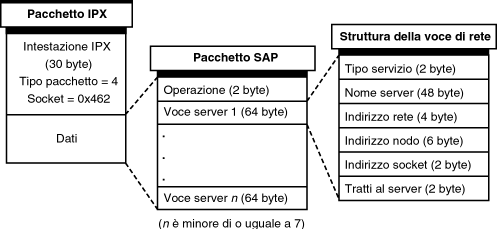
The SAP packet structure is shown in Figure 1-7. As with most of the higher-level protocols, the SAP packet is encapsulated within the data area of IPX. SAP packets are defined in the IPX header as Packet Type 4 and Socket Number 0x452.
Figure 1-7.
SAP Packet Structure
Following is a description of the SAP packet fields:
Depending on the type of operation, the Operation field is followed by either a single field or one or more sets of fields. For all SAP requests (operations 1 and 3), the packet includes only the first Service Type field. This means that all SAP requests are 34 bytes, not including the media header (IPX header plus SAP Operation and Service Type fields = 30 + 2 + 2 = 34 bytes). All other fields apply only to SAP responses (operations 2 and 4).
A SAP response can include from one to seven server entries. Therefore, SAP response packets can vary from 96 bytes (IPX header and one server entry) to 480 bytes (IPX header and seven entries). Each entry includes information about a particular server and comprises the following fields:
Novell assigns each type of server a unique service type. For example, a Novell file server advertises itself as Type 4. This value becomes the object type for this server as it is found in the NetWare bindery. Table 1-4 lists some well-known service types.
Service Type |
Field Value (Hex) |
|---|---|
Unknown |
0x0000 |
Print Queue |
0x0003 |
File Server |
0x0004 |
Job Server |
0x0005 |
Print Server |
0x0007 |
Archive Server |
0x0009 |
Remote Bridge Server |
0x0024 |
Advertising Print Server |
0x0047 |
Reserved Up To |
0x8000 |
Wildcard |
0xFFFF (-1) |
The server name, along with the service type, uniquely identifies a server on an internetwork. Although SAP response packets always include the full 48 bytes for this field, server names are typically fewer than 48 characters.
Each time the packet passes through an intermediate network, the field is incremented by one.
With NetWare 3, commands such as LOGIN, MAP, and ATTACH take a server name and look it up in the bindery, Novell's equivalent of a telephone book. The service is then mapped to an IPX address.
A service name identifies a recipient on a node on the network. Rather than sending the entire service name in each IPX message, the service is mapped to a socket number. The socket number allows for up to 65,000 recipients on each IPX node. Each service on a NetWare server has its own socket number and a service name and type that are unique on the IPX network. Some of these service types and their corresponding socket numbers are listed in Table 1-4.
When you log in to a NetWare server, the LOGIN command reads the list of services on the attached server. From there, it obtains the IPX address and the socket number of the file server with the name you supply. This address and socket number are put into messages that reach the designated recipient. This means that each server must have a copy of all services on your IPX network.
NetWare 4 introduced Novell Directory ServicesTM (NDSTM) software, a method of storing and retrieving service information in a distributed database. The directory database organizes this information in a hierarchical tree structure, independent of its physical location. Rather than keeping all service information in the same location, each directory server contains some portion of it. However, each directory server has access to any service information in the database. The directory database replaces the bindery in NetWare 4 servers.
With NDS, the use of SAP is considerably reduced. NetWare workstations locate services by consulting an NDS server. The server disseminates the NDS-resident service information by direct, unicast-based protocols, not by broadcast-based SAP. However, even in a network of all NetWare 4 nodes, some uses of SAP remain. For example, SAP locates the nearest NDS server at initialization time.
NLSP is derived from IS-IS (Intermediate System-to-Intermediate System), the link state routing protocol developed by the International Standards Organization (ISO). Like IS-IS, NLSP exchanges routing information between routers and makes routing decisions based on that information. For workstation-to-router communication, NLSP routers use RIP. To read about RIP, refer to "RIP.”
NLSP routers exchange information such as connectivity states, path costs, external network numbers, Maximum Transmission Unit (MTU) size, throughput, and media types. By exchanging this information with its peer routers, each NLSP router builds and maintains a logical map of the entire network.
Unlike RIP and SAP, which periodically broadcast routing and service information, NLSP transmits routing information only when a change occurs in a route or service somewhere in the network, or every two hours---whichever occurs first.
Like RIP and SAP packets, NLSP packets are carried in the data portion of IPX packets, immediately following the IPX header. The IPX packets, in turn, are carried in the data portion of data-link frames, following the MAC header.
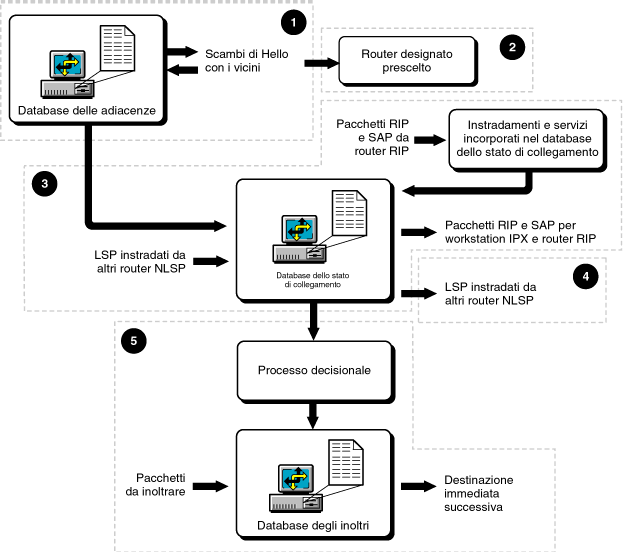
The following steps summarize how NLSP discovers information about routers and links on an IPX network and uses the information to build a map by which it can make routing decisions:
This process is explained in "How Neighboring Routers Form Adjacencies.”
This process is explained in "How the Designated Router Is Elected.”
This process is explained in "How NLSP Routers Develop Their View of the Network.”
This process is explained in "Building the Link State Database” and "Synchronizing the Link State Database.”
This process is explained in "How NLSP Routers Forward Packets.”
Figure 1-8 summarizes the packet exchanges that occur among NLSP routers, the databases each router uses, and the processing necessary to perform routing operations. The numbers in the figure correspond roughly to the preceding steps.
Figure 1-8.
Overview of How NLSP Works
The rest of this section examines the elements of NLSP and explains how it works on an IPX internetwork.
Before an NLSP router floods the network with its link state information, it determines the reachability of its neighboring routers, or neighbors. Two routers are considered neighbors when they can communicate directly---that is, without the aid of an intermediate router.
An adjacency is the record that a router keeps about the state of its connection with a neighbor, and about the attributes of that neighbor. The adjacencies database keeps track of a router's neighbors and the state of the links to those neighbors.
When a link comes up, an NLSP router begins a periodic transmission of Hello packets and waits for replies from its neighbors. When a neighbor replies with a Hello packet, the router adds a record of the neighbor to its adjacencies database. Transmission of Hello packets is governed by the Hello Interval, an NLSP convergence parameter that you can set from NIASCFG.
NLSP, by default, broadcasts its Hello packets and LSPs to NLSP routers across the network. You can, however, configure NLSP to multicast these packets. NLSP uses broadcast transmission as a default because some LAN drivers do not properly support packet multicast.
IMPORTANT: A Hello packet can be no larger than the MTU of the network medium and no smaller than the minimum size that any system on the LAN can receive. This limits the number of neighbors a router can have on a single interface. For example, the Ethernet MTU of 1,500 bytes corresponds to about 235 neighbors.
Each adjacency can assume one of three states:
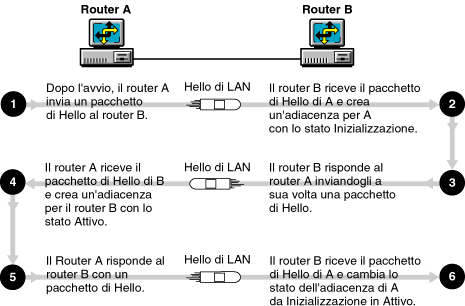
Figure 1-9 shows how two neighboring NLSP routers---A and B---form an adjacency over a LAN. Router B is already running; the packet exchange begins when Router A starts up.
Figure 1-9.
Two Routers Forming an Adjacency on a LAN
If a router goes offline and stops sending Hello packets, each of its neighbors keeps the adjacency to that router in the Up state for the number of seconds specified by the holding time. The holding time is the product of the router's Hello Interval and Holding Timer Multiplier and is carried in the Hello packet that a router transmits to its neighbors. The holding time tells the neighbors how long to keep the adjacency to the router in the Up state. For example, a neighbor receiving a Hello packet from a router whose Hello Interval is 20 seconds and whose Holding Timer Multiplier is 4 keeps the adjacency in the Up state for 80 seconds before changing the state to Down and finally purging the adjacency from its adjacencies database.
NLSP uses the concept of a circuit for LANs and WANs. In general, a circuit is an internal logical representation of network connectivity.
For LANs, a circuit is a single interface to a network segment through which the router can reach other systems and WANs. Two points of attachment to the same network segment are treated as two circuits.
In a NetWare environment, enabling a LAN circuit is equivalent to binding a network protocol to a LAN interface. In fact, the name of the LAN circuit is the name you assign to the LAN board in NIASCFG.
For a dedicated or dial-up point-to-point WAN medium, each interface is treated as a circuit. For multipoint WAN media, such as X.25 and frame relay, a single interface can provide access to many other systems using a connection-oriented data-link protocol. NLSP treats each X.25 or frame relay virtual circuit---switched or permanent---as a separate circuit because virtual circuits can share the same network interface.
In a NetWare environment, enabling a WAN circuit is equivalent to bringing up a WAN call destination. The name of the circuit is the remote system ID (remote server name).
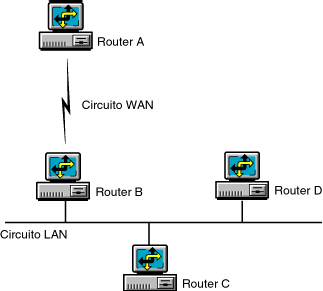
Figure 1-10 shows an example of circuits and neighbors on a simple internetwork. Router B has one WAN circuit and one LAN circuit. On the WAN circuit, Router B has one neighbor: Router A. On the LAN circuit, Router B has two neighbors: Routers C and D.
Figure 1-10.
Circuits in an Internetwork
The following events summarize what occurs between neighbors forming an adjacency over a LAN circuit:
The following events summarize what occurs between two neighbors forming an adjacency over a WAN circuit:
Each Hello packet contains a field with the priority of the router. The priority is an NLSP parameter that you can set, using NIASCFG, for each LAN interface on a router.
After each router forms adjacencies with its neighbors, NLSP examines the priority of each router. The router with the highest priority is elected the Designated Router. The Designated Router is responsible for exchanges of link state information on behalf of all other NLSP routers on a LAN. If two or more routers have the same priority, NLSP compares the routers' MAC addresses; the router with the numerically higher address becomes the Designated Router.
The Designated Router has its own Broadcast Hello Interval, which, by default, broadcasts a Hello packet every 10 seconds---twice the rate of the standard Hello Interval. Therefore, if the Designated Router goes down, its neighbors notice sooner and can elect a new Designated Router quickly.
While a new Designated Router is being elected, a portion of the network might lose connectivity for a moment. When a system becomes the Designated Router, it immediately increases its priority by 20 to prevent frequent, unnecessary reelections. You can further minimize such reelections by choosing a "stable" router---one that is up most of the time---and setting its priority high enough so that it retains its status as Designated Router. We recommend a priority value of 100 for the Designated Router.
The Designated Router must also have enough memory to process and maintain all the link state information for its LAN. If the Designated Router runs out of memory, it can no longer process this information and its link state database---the collection of LSPs that represent the entire network---becomes overloaded.
NOTE: A router attached to several LANs might be the Designated Router for some LANs but not for others; the Designated Router election is independent on different LANs.
In "mixed" networks---those on which both NLSP and RIP/SAP operate---only the Designated Router propagates RIP and SAP information in its LSPs. To avoid inefficient routing, all NLSP routers broadcast RIP and SAP onto a network on which RIP is active, but use the split horizon technique to reduce these broadcasts.
On LANs, NLSP takes special measures to keep the size of the link state database manageable. Consider how LAN adjacencies are modeled in the internetwork shown in Figure 1-11.
Figure 1-11.
Modeling LAN Adjacencies
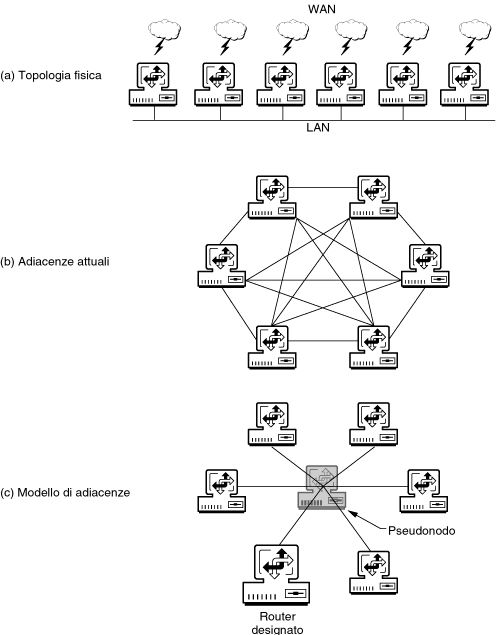
In (a), each router connects the LAN and a particular WAN. In terms of physical connectivity, each router can reach all others in one hop. This means there is full mesh connectivity, as shown in (b). (The WAN links are not shown.) To avoid propagating large amounts of adjacency information into the NLSP network, NLSP models the LAN adjacencies, as shown in (c).
A fictitious pseudonode represents an entire LAN in the link state database. Each router represents itself as directly connected to the pseudonode, but because the pseudonode is a fictitious router, the Designated Router represents it for LSP exchanges.
End nodes are also directly connected to the pseudonode, although they are not represented in the LSPs. Representing end nodes is not necessary---they are located by having the same network number as the pseudonode.
The Designated Router sends LSPs on behalf of the pseudonode. If the Designated Router resigns because a new router with a higher priority comes online, the Designated Router floods the network with a null LSP indicating that the old pseudonode is no longer valid. At this point, the new router becomes the Designated Router and represents the pseudonode.
The LSP comprises two parts: a 27-byte header that contains length, identification, and administrative fields; and a variable-length portion that contains the link state information.
When an NLSP router creates its own LSP, it puts the following information into the variable-length portion:
The pseudonode LSP contains an additional set of information called external routes. These are the RIP routes that are available on---or through---the LAN represented by the Designated Router. External route information includes the number of hops, the network number, and the number of ticks from the NLSP router to the RIP network.
Each LSP also contains a unique 8-byte ID number. NLSP routers use this number to keep track of each LSP and the router it came from. Each LSP also contains a 4-byte sequence number that distinguishes between older and newer LSPs. An LSP with a higher sequence number is newer.
The minimum---and default---LSP size is 512 bytes. You can use NIASCFG to set the LSP size to any value up to 4,096 bytes, depending on the smallest MTU of any network segment in your NLSP internetwork. The larger the LSP size, the fewer LSPs are necessary to propagate a router's link state information. This, however, is not a clear advantage to most networks; for this reason, we recommend that you use the default LSP size for all NLSP routers.
Each NLSP router compiles the LSPs it receives from all other NLSP routers into the link state database. The link state database represents the connectivity of an entire network.
All NLSP routers maintain a copy of the link state database and synchronize their views of the database. To a great extent, the work of NLSP is keeping all copies of the link state database consistent among the routers. When a topology change occurs, there is a short transitional period during which the copies differ before NLSP makes them converge again.
IMPORTANT: The link state database represents only routers, network numbers, and services. It does not represent NetWare workstations or personal computers.
When all copies of the link state database are identical and represent the actual connectivity of the network, forwarding decisions made by successive NLSP routers in a packet's path are consistent with each other. The packet progresses from its source to its destination successfully and efficiently.
For each point-to-point WAN link, the link state database records information about the end point routers and the state of the link. For each LAN, the link state database records information about the routers connected to the LAN.
When a link comes up or goes down, it takes time for that event to become known throughout the network. In the meantime, there is a temporary inconsistency among the link state databases. Such a disruption to the network must be minimized by making the link state databases converge to a consistent view as fast as possible.
Flooding is the means used to synchronize the link state databases. Each router sends information, in the form of an LSP, that is derived from its adjacencies database to its neighbors. Each LSP is numbered so that a router can detect when it receives the same LSP more than once. When a new LSP arrives, the following occurs:
Therefore, the link state database is the collection of LSPs derived from the router's own adjacencies database and LSPs received from other routers through flooding.
If an adjacency is lost, each router detecting the event sends an LSP indicating that the link is down. Routers receiving this LSP tag the link as down.
Each NLSP router sends LSPs to its neighbors. Some LSPs describe the contents of the sending router's adjacencies database; some are forwarded from other neighbors.
LAN and WAN links often do not guarantee packet delivery. NLSP uses two methods to ensure that all copies of the link state database are synchronized throughout the network: one for broadcast (LAN) circuits, and the other for nonbroadcast point-to-point (WAN) circuits.
Broadcast (LAN) circuits---On a LAN circuit, each NLSP router broadcasts its LSP only once. None of the routers receiving the LSP sends an acknowledgment to confirm that it received the LSP.
To ensure that all NLSP routers receive the complete set of LSPs, the Designated Router broadcasts a Complete Sequence Number Packet (CSNP) periodically. The CSNP does not contain the entire link state database; it contains just enough information about each LSP in the database so that the other routers can determine whether they have the same set of LSPs as the Designated Router.
The CSNP identifies the Designated Router and contains the ID, sequence number, and remaining lifetime of each LSP in its link state database. A router receiving the CSNP compares this information to that which is in its own link state database. If the information is identical, the router discards the CSNP.
NOTE: How often the Designated Router broadcasts CSNPs is controlled by the Complete SNP Interval, a convergence parameter that you can set from NIASCFG.
If the router receiving the CSNP determines that the Designated Router has out-of-date LSPs, it sends the newer LSPs. If the router receiving the CSNP has out-of-date LSPs, it multicasts a Partial Sequence Number Packet (PSNP) identifying---by sequence number---the LSPs it needs. The Designated Router then sends the missing or new LSPs to the router.
Nonbroadcast (WAN) circuits---An NLSP router on one end of a point-to-point WAN connection sends each LSP repeatedly until it receives a PSNP as an acknowledgment.
For example, suppose Router A sends an LSP over a WAN link to Router B. This LSP is typically newer than, or the same as, the one that Router B already has. In either case, Router B acknowledges with a PSNP.
If the LSP that Router B receives is older than the one already in its link state database, Router B sends the newer LSP to Router A.
A synchronized link state database gives all NLSP routers a consistent view of the network. However, the routers cannot decide where to forward outgoing packets from link state information alone. To determine the next hop for a packet, routers run the decision process, a computation that operates on the link state information and presents it in a new form, called the forwarding database.
The forwarding database consists of a set of pairs comprising the next hop and its external network number. Although all routers have the same link state database, each router has a unique version of the forwarding database, expressed from its own vantage point. The forwarding database is like a table that maps a destination network number to the next hop.
NOTE: In a network with both NLSP and RIP routers, the decision process always chooses a direct NLSP route instead of any RIP route to the same destination.
The IPX internetwork in Figure 1-12 serves as an example of how an NLSP router builds its forwarding database.
Figure 1-12.
Building a Forwarding Database
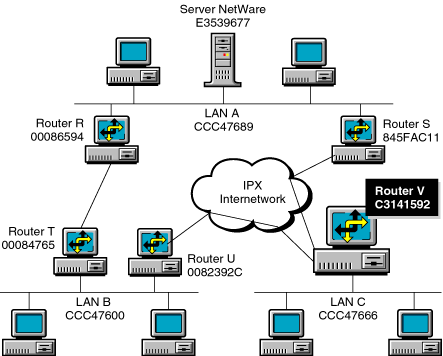
Table 1-5 shows a forwarding database from the vantage point of Router V. The first column lists all the destinations in the routing area. For each destination, the "next hop" indicates which outgoing link---and destination on that link---to use for packets destined for that network. When the router needs to transmit a packet, its forwarding database determines where to forward it.
Destination |
Next Hop from Router V |
|---|---|
LAN A (0xCCC47689) |
Router S |
Server (0xE3539677) |
Router S |
LAN C (0xCCC47666) |
LAN C |
LAN B (0xCCC47600) |
Router U |
Router U (0x0082392C) |
Router U |
Router T (0x00084765) |
Router U |
Router S (0x845FAC11) |
Router S |
Router R (0x00086594) |
Router S |
Router V (0xC3141592) |
Router V |
For example, CCC47666 is the network number for LAN C; nodes on C are reached through that address. The network number for router V, the "owner" of the forwarding database, is C3141592. Because this database belongs to Router V, packets addressed to network C3141592 are not forwarded by V.
When a router detects a change in the link state database, it runs the decision process to rebuild its forwarding database. However, because several topology changes can occur within a brief period of time, the SPF Hold-Down Interval imposes a minimum waiting period between runs of the decision process. This enables the router to incorporate topology changes into its link state database before running the decision process. Without the SPF Hold-Down Interval, the router would run the decision process for every topology change and waste its own processing resources. You can change the value of the SPF Hold-Down Interval from NIASCFG.
To a large extent, NLSP uses an assigned path cost to choose the best route by which to forward IPX packets. The higher the throughput of the network medium, the lower the cost of the route. Table 1-6 shows the throughput range and default cost for typical network media.
Throughput Range |
Default Cost |
Typical Network Media |
|---|---|---|
0--16 Kbps |
61 |
9,600-baud line |
56--128 Kbps |
45 |
ISDN (U.S.) |
64--128 Kbps |
45 |
ISDN (Europe) |
1--2 Mbps |
27 |
Corvus Omninet (1 Mbps), T1 (1.5 Mbps) |
2--4 Mbps |
26 |
E1 (2 Mbps), ARCnet* (2.5 Mbps) |
4--8 Mbps |
25 |
Token ring (4 Mbps), Corvus Omninet (4 Mbps) |
10--16 Mbps |
20 |
Ethernet (10 Mbps) |
16--32 Mbps |
19 |
Token ring (16 Mbps) |
64--128 Mbps |
14 |
FDDI (100 Mbps), CDDI (100 Mbps) |
You can influence how an NLSP router forwards packets through its interfaces. By changing the cost associated with a particular interface, you can establish preferred routes or create equal-cost routes over which the router can distribute traffic bound for the same destination network.
IMPORTANT: If you change the cost associated with a route on one router, make sure you change it on all other routers attached to the same network.
Novell Internet Access Server 4.1 supports load balancing, a method by which an NLSP router distributes traffic bound for a single destination over as many as eight equal-cost routes to that destination.
NOTE: Load sharing is another name for load balancing.
Consider the four routers on the network in Figure 1-13. Interfaces 1 through 6 represent individual paths between Router A and its first-hop routers, Router B and Router C. The purpose of load balancing is for Router A to use each of these paths equally to carry traffic destined for Router D.
Figure 1-13.
Distributing Network Traffic over Equal-Cost Routes
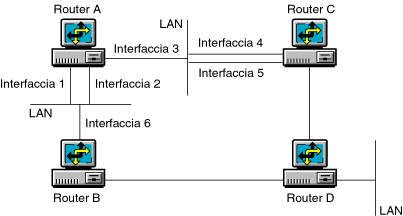
Router A's forwarding database indicates that the next hop to Router D is either Router B or Router C, each of which has an equal-cost route to Router D. As it forwards each outbound packet, Router A alternates between Router B and Router C.
Because there are multiple interfaces---and, therefore, multiple paths---between Router A and the next-hop routers (B and C), Router A must also distribute the traffic evenly along each path. From the information in its link state database, Router A knows the MAC addresses and board numbers associated with each interface. Router A uses this information to compute a path to Router D for each outbound packet.
With two paths to each next-hop router and two next-hop routers, Router A completes one "load-balancing cycle" every four packets. The following table traces the path of four packets---one cycle---from Router A to Router D.
Packet Number |
Passes Through Interfaces |
To Router |
Which Forwards It to Router |
|---|---|---|---|
1 |
1 and 6 |
B |
D |
2 |
3 and 5 |
C |
D |
3 |
2 and 6 |
B |
D |
4 |
3 and 4 |
C |
D |
Each NLSP router is represented by a unique, 6-byte hexadecimal number called the system ID. The default system ID comprises a 2-byte constant, 0x0200, followed by the router's own internal network number. A typical NLSP system ID looks like the following:
0200AA112482
The system ID is contained in the LSPs that each router floods throughout the network.
Each system ID must be unique throughout the network. Duplicate system IDs create serious problems and can disable a network. Two routers using the same system ID exchange and update their LSPs indefinitely and, therefore, prevent the network from converging.
Basic IPX network and node addressing is explained in "IPX Addressing.” This section explains IPX addressing in the context of NLSP routing areas.
Two 32-bit numbers---an area network number and a mask---identify a routing area. Together, these numbers constitute the area address. Here is an example:
The network number identifies the routing area. The mask indicates how much of the network number identifies the area itself, and how much identifies an individual IPX network within the area. The mask enables you to indicate which networks belong in an area so that only those networks having the same network number-mask pair are reachable within the area.
In the preceding example, the first 24 bits---080685---represent the routing area; therefore, every network number within the area starts with 080685. The remaining eight bits identify individual IPX networks within the routing area; for example, the networks 080685AB and 08068500 each represent an IPX network in the routing area.
The default values for the area network number and mask are as follows:
The area network number and mask are both set to zero to ensure compatibility with future versions of NLSP. Zero values mean that all NLSP routers operate in a single routing area.
For more information about routing areas, refer to Novell Guide to NLSP Migration.
Business organizations, each with its own enterprise network, sometimes merge or agree to share information. Or, these same organizations might want to connect their networks to a larger public internetwork to use the services it provides. In such situations, all network numbers throughout the connected organizations must be unique.
For this purpose, Novell offers the Novell Network Registry(SM) service. The Novell Network Registry assigns and tracks IPX network addresses and organization names. This service enables participating organizations to share data between interconnected NetWare networks without name and address conflicts.
The Novell Network Registry assigns a contiguous "block" of IPX network addresses that are unique to your organization. The size of your address block depends on the number of NetWare LANs and servers in your IPX internetwork, including any additional LANs or servers you anticipate installing over the next two years.
To learn more about the Novell Network Registry, or to reserve a block of IPX network addresses, call 1-408-577-7506 or send Internet e-mail to registry@novell.com. You can also send e-mail by way of the Novell NHUB system to registry@novell.