Installing Single Sign-on on Workstations
By installing NSSO on an administrative workstation, you can administer NSSO from there. By installing NSSO on users' workstations, you simplify the users' environments.
Components for an Administrative Workstation
You can administer Single Sign-on from your administrative workstation by installing the following components there:
- NICI client
- Novell Single Sign-on
- Novell Modular Authentication Service (NMASTM) client
- v-GO* client
- ConsoleOneTM
NSSO does not support ConsoleOne at the server console. You configure and administer NSSO from a workstation.
However, you can copy the snap-in files from the CLIENT\SNAPIN directory on the Novell Single Sign-on CD to a network directory (SYS:\PUBLIC\MGMT\CONSOLEONE\1.2), and then run NSSO from various workstations. Single Sign-on must also be running on those workstations.
- The NSSO snap-in to ConsoleOne
Requirements for an Administrative Workstation
- A Windows 95, Windows 98, Windows ME, Windows NT 4.0, or Windows 2000 workstation used exclusively as a client workstation
- Novell ClientTM 3.21 or later for Windows 95, Windows 98, and Windows ME workstations; Novell Client 4.71 or later for Windows NT and Windows 2000 workstations.
- Supervisor rights to the NDS tree
Installing Administrative Components
-
From the client workstation, log in to the NDS tree and server where the SecretStore service is located.
IMPORTANT: For the NICI software to be installed correctly on Windows NT or Windows 2000, you must be logged in as a user with Administrator rights.
-
Insert the Novell Single Sign-on CD.
The auto-run program launches CLIENT\NSSOINSTALL.EXE /CD. The /A switches also enables you to select and install all administrative components.
To display all the components except ConsoleOne and the ConsoleOne snap-in, omit the /CD or /A switch.
-
Select the setup language.
The Novell Single Sign-on Administrator Installation screen appears.
-
Select the needed client and administrative components > click Install.
The Client System Requirements box lists components that are already installed. The following figure illustrates the box:
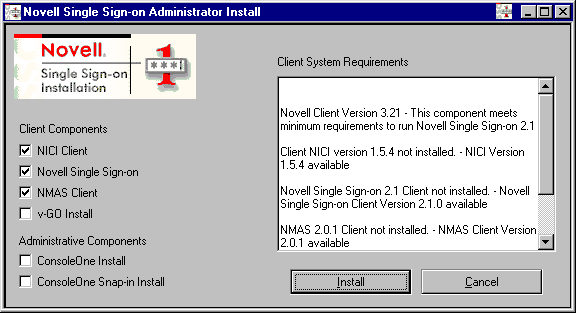
If a component is already installed on your workstation, the check box for that component is unchecked.
NSSOINSTALL.EXE installs ConsoleOne 1.2c. If you have installed ConsoleOne 1.2d or later (from NDS eDirectory 8.5), uncheck the check box for ConsoleOne Install. Doing this prevents overwriting the 1.2d files. NSSO works equally well with both versions of ConsoleOne.
-
Follow the on-screen instructions to accept the license agreement and copy files.
As the following figure illustrates, a check mark appears after a component is installed:
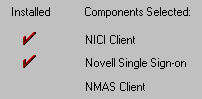
As Setup installs the Novell Single Sign-on component, the Select Components screen is displayed.
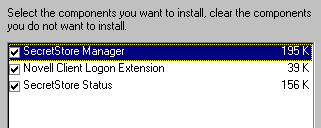
As administrator, you'll most likely want all the components on your administrative workstation, even though all the functionality of SecretStore Status is in SecretStore Manager.
Novell packages connectors for Lotus* Notes*, Entrust*, and PeopleSoft*. If Setup discovers these connectors on a workstation, Setup displays them so that you can also install or uncheck them.
-
Restart the workstation.
Components for Users' Workstations
So that users can use Single Sign-on, you must install the following on their workstations:
- NICI client
- Novell Single Sign-on
- NMAS client
- v-GO client
Client Workstation Requirements
- Each user must have an assigned User object in the NDS tree where the SecretStore service is installed.
- A Windows 95, Windows 98, Windows ME, Windows NT 4.0, or Windows 2000 workstation.
- Novell Client 3.21 or later for Windows 95, Windows 98, or Windows ME workstations; Novell Client 4.71 or later for Windows NT or Windows 2000 workstations.
Installing Components for Users
-
From the client workstation, log in to the NDS tree as the appropriate user.
IMPORTANT: For the NICI software to be installed correctly on Windows NT or Windows 2000, you must be logged in to Windows as a user with Administrator rights.
-
Insert the Novell Single Sign-on CD.
The auto-run program launches CLIENT\NSSOINSTALL.EXE /CD. To display and install all the components except ConsoleOne and the ConsoleOne snap-in, run NSSOINSTALL.EXE without the /CD switch.
-
Follow the on-screen instructions.
As Setup installs the Novell Single Sign-on component, the Select Components screen is displayed.
To select components, use the following guidelines:
- As a general rule, install all components on users' workstations.
Users can use SecretStore Manager to manage their secrets. As administrator, you can use SecretStore Manager to manage users' secrets as well.
Also, users and the help desk might benefit from having both the SecretStore Manager and SecretStore Status installed on users' workstations.
- SecretStore Status provides the simplest and most efficient way for a user (or help desk) to test connectivity to the SecretStore service.
- To limit access to SecretStore, only install SecretStore Status.
SecretStore Status enables users to set master passwords and unlock their SecretStore.
- To prevent users from seeing passwords, don't install NMAS on users' workstations.
Also, Single Sign-on can be distributed to user workstations via ZENworksTM.
Before Using v-GO for the First Time
After installing v-GO for Novell Single Sign-on on a workstation (and before running v-GO for the first time), be sure to authenticate the user to the proper NDS eDirectory tree and object.
An association between the logged in Windows user, v-GO's local store, and SecretStore on the NDS user object is made at this time. While the target NDS User object may be reset later, it's best to ensure the user is logged in to the correct NDS tree and user account at installation time.
Using Full v-Go Functionality
Novell Single Sign-on runs out-of-the-box, with little or no administrative setup. The default server and client installation options provide basic Novell Single Sign-on connector support and client capabilities.
v-GO for Novell Single Sign-on is installed as part of Novell Single Sign-on. However, v-GO runs in a limited mode until you enable it.
If you purchased (either separately or bundled) the license for full v-GO functionality, you can enable v-GO. To do this, you use ConsoleOne to do the following:
Previous | Next