How NSSO Works
Architecture
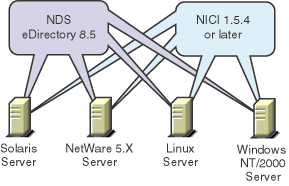
NSSO 2.1 runs on Solaris*, Linux*, NetWare 5.x, and Windows 2000/NT.
The Solaris and Linux servers require NDS eDirectory 8.5 or Corporate Edition 8.5. (NICI is automatically installed during server installation.)
NSSO 2.1 runs on NetWare 5.x and Windows NT/2000 servers running NDS 7, as long as NICI 1.5.4 or later is installed. However, we recommend that you upgrade to NDS eDirectory 8.5.
The following figure illustrates NSSO 2.1 running on these platforms:
When you install NSSO 2.1 on these servers, the installation program installs the SecretStore service on top of NDS eDirectory and NICI. SecretStore plug-ins run on top of SecretStore.
The following figure illustrates this software:
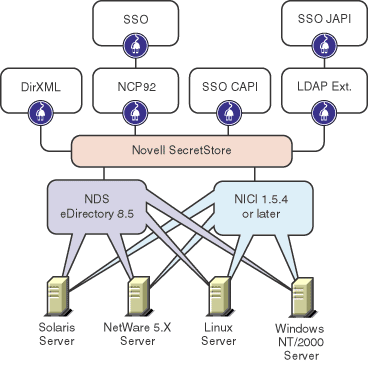
SecretStore plug-ins include DirXMLTM, client APIs, NCPTM, and an LDAP extension.
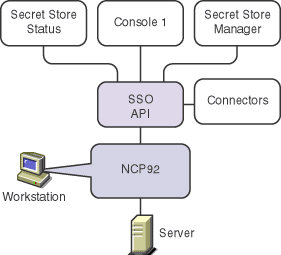
You install administrative components on a Windows workstation and administer NSSO from there. You also install NSSO components on users' Windows workstations.
The following figure illustrates client software running on a Windows workstation:
Process
The following figure illustrates how NSSO works:
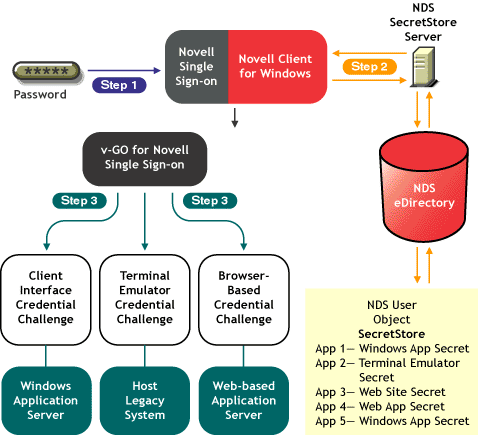
- In Step 1, a user logs in to NDS by using a password.
- In Step 2, a successful logon prompts the user's secrets to be downloaded from SecretStore to the workstation. This process enables disconnected use.
- In Step 3, the user accesses a Windows, Web-based, or host-based application. v-GO for Novell Single Sign-on recognizes the application and responds with the appropriate username and password.
If v-GO does not discover matching credentials, v-GO prompts the user to add the application. Secrets are synchronized when certain events occur or when the user connects to NDS.
For illustrations concerning how NSSO works, see "Novell Single Sign-on" in the November 1999 AppNotes.
This article illustrates the following:
- How applications authenticate before NSSO is enabled
- A user's first-time authentication to NSSO-enabled applications
- A user's subsequent authentications
Scenarios Concerning Starting Up
The following scenarios illustrate NSSO's startup process. Both scenarios assume the following:
- v-GO has been installed
- The NMAS client has been installed
- v-GO has synchronized with NDS
- Logon credentials for Windows and applications have been saved in previous NSSO sessions
Scenario 1: A user is disconnected from NDS
- At Digital Airlines, Paulo begins logging in.
- Using the NDS password (or an alternative NMAS method), Client32 GINA authenticates Paulo to NDS.
If Paulo uses the NDS password method, an encrypted hash of the password is stored in the registry. NSSO uses this encrypted hash for re-authentication and disconnected modes.
The Client32 logon manager retrieves the Windows NT/2000 password from SecretStore and passes it to Windows.
- As needed, the Client32 logon manager retrieves Paulo's passwords from SecretStore as the login script is processed.
- The v-GO background process launches, reads administrative overrides, and reads application settings from NDS.
- v-GO confirms that NDS-user Paulo is the same as the last NDS-user Paulo.
- v-GO synchronizes the logon data between the local store and SecretStore.
- Paulo starts Lotus* Notes*, opens a Web logon page, or opens a mainframe session.
- v-GO detects that Paulo is logging on to a supported application; v-GO confirms user authentication.
- v-GO retrieves logon data from the local encrypted cache and provides it to Lotus Notes.
- Lotus Notes accepts the credentials and completes the startup.
Scenario 2: A user is disconnected from NDS
- Using the Windows password, Paulo logs in to NDS.
- The v-GO background process launches and reads application settings from previously cached data.
- v-GO detects that Paulo is not authenticated to NDS.
- (Conditional) If the network administrator has disabled disconnected operations, v-GO displays a message and shuts down. Otherwise, Paulo starts Lotus Notes, opens a Web logon page, or opens a mainframe session.
- v-GO detects the supported logon to Lotus Notes.
- v-GO calls NMAS disconnected authentication.
To continue, Paulo must enter his NDS password.
- v-GO retrieves logon data from the local encrypted cache and provides it to Lotus Notes.
- Notes accepts the credentials and completes the startup.
Previous | Next