SSSI.NLM---Extends the NDS schema, installs the Novell SecretStore service, and initializes and/or validates the Security Domain Infrastructure (SDI).
You use NWCONFIG.NLM to load SSSI.NLM (Novell SecretStore Installation NetWare® Loadable Module). SSSI.NLM does the following:
SSS.NLM---The Single Sign-on service, also known as the Novell SecretStore service.
The equivalent file for Windows* NT*/2000 servers is SSS.DLM. The equivalent file for UNIX* servers is LIBSSS.SO.
SecretStore provides a secure infrastructure for storing and retrieving application credentials in NDS. SecretStore uses NICI and Security Domain Infrastructure (SDI) to safely and securely store a user's single sign-on passwords.
Upon a successful authentication of the user to an application, SecretStore stores (on the user's NDS User object) the application's login credential. From then on, when the user logs in to NDS and launches the application, the NSSO client retrieves the application password from SecretStore, provides it to the application or Web site in the background, and authenticates the user.
LSSS.NLM---Allows applications to use the Light Weight Directory Access Protocol (LDAP) to store and retrieve secrets for NSSO.
LSSS.NLM is a SecretStore LDAP plug-in. The equivalent file for Windows NT/2000 servers is LSSS.DLL.
ConsoleOne---Enables you (the administrator) to configure and administer NSSO objects.
NDS eDirectory automatically installs ConsoleOneTM on a server. However, to use ConsoleOne, you install the NSSO snap-in to ConsoleOne on a client workstation (or to a directory on a server) and run ConsoleOne from a workstation. NSSO 2.1 does not support running the snap-in from a server console.
For more information on SecretStore, see the following editions of Novell Developer Notes:
The installation program (NSSOINSTALL.EXE) installs the following components on your administrative Windows workstation. Workstation components are currently not available for UNIX platforms.
NICI client---Enables NSSO to provide all the encrypted traffic between SecretStore, the v-GO client, the Novell Modular Authentication Services (NMASTM) client, and application connectors.
Novell Single Sign-on---Enables applications to communicate with SecretStore.
The Novell Single Sign-on client (NWSSO.DLL) embodies the APIs for accessing the SecretStore service.
NMAS client---Enables NSSO users (online or offline) to authenticate to NDS.
The NMAS client can confirm authentication during the following situations:
v-GO client---An intelligent logon client.
v-GO collects usernames and passwords, recognizes an application credential or password field, and authenticates users by passing the credentials to the application.
The v-GO client enables anyone to use applications without repeatedly entering passwords. A user can be logged in to or disconnected from a network.
ConsoleOne---Enables you to administer (from a workstation) secrets in SecretStore.
ConsoleOne snap-in---Enables you to create, configure, and administer NSSO objects in NDS.
You can run the ConsoleOne snap-in on your workstation provided you have also installed the NICI and Novell Single Sign-on client components.
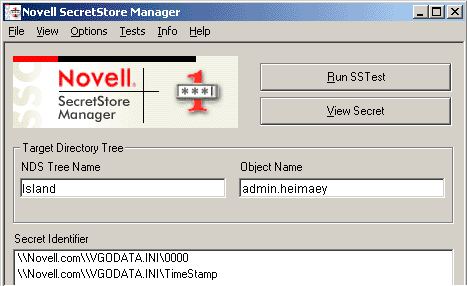
SecretStore Manager---Enables users to perform basic maintenance tasks on their SecretStore.
Users can use SecretStore Manager to do the following:
SecretStore Manager protects secrets by requiring NMAS authentication before a user can view secrets.
Although SecretStore Manager is not intended as the primary interface to SecretStore, it helps users manage SecretStore secrets outside the interfaces provided by the Single Sign-on-enabled applications.
The following figure illustrates SecretStore Manager:
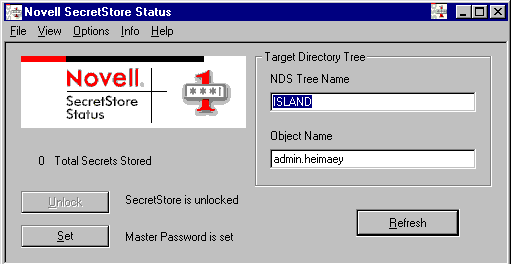
SecretStore Status---Enables users to set their master password, unlock SecretStore, switch between NDS trees, or switch between DNS usernames.
SecretStore Status is a lite version of SecretStore Manager. The following figure illustrates SecretStore Status:
nssoSingleSignon---A Container object that holds optional application objects, policy objects, and service configuration settings.
The nssoSingleSignon object is the configuration object for Novell Single Sign-on. You use it to configure the SecretStore service as well as v-GO for Novell Single Sign-on.
The following figure illustrates the nssoSingleSignon object in ConsoleOne:

nsssoApplication object---Configures the NSSO system so that it properly supports an application.
An nssoApplication object is used to configure the Novell Single Sign-on system so that NSSO properly supports an application. These objects are primarily for v-GO for Novell Single Sign-on to use. You can also use these objects to develop NSSO API-based application connectors.
In addition, this object allows for assignment of Graded Access labels. The NSSO service uses these labels with NMAS on the server to regulate access to applications.
The following figure illustrates an nssoApplication object in ConsoleOne:

nssoPasswordPolicy object---Defines required characteristics for automatically-generated and user-generated passwords.
You can reference this object from the nssoSingleSignon object (as the system default) or from individual nssoApplication objects.
You can specify the following:
v-GO for Novell Single Sign-on uses these settings. API-based application connectors that have been written to support password policies also use them.
The following figure illustrates an nssoPasswordPolicy object in ConsoleOne:

nssoPasswordExclude object---A list of words that users can't enter as passwords.
An nssoPasswordPolicy object can reference this class of objects. You can use the nssoPasswordExclude object to prohibit users from entering restricted words that might otherwise meet the password policy.
Scenario: At the Digital Airlines company, you create a policy that requires passwords to have at least seven characters.The password should contain at least one numeric character but not more than four numeric characters. A user enters the password digital2000, which is acceptable. To enhance security, you associate a password-exclude list that includes digital*. When a user enters digital2000, NSSO rejects that password.
NOTE: v-GO for Novell Single Sign-on doesn't yet support Password Exclude List. However, application connectors can use this feature.
The following figure illustrates an nssoPasswordExclude object in ConsoleOne:
