10.2 Configuring IP Load Balancing with YaST
You can configure kernel-based IP load balancing with the YaST iplb module. It is a front-end for ldirectord.
To access the IP Load Balancing dialog, start YaST as root and select . Alternatively, start the YaST cluster module as root on a command line with yast2 iplb.
The YaST module writes its configuration to /etc/ha.d/ldirectord.cf. The tabs available in the YaST module correspond to the structure of the /etc/ha.d/ldirectord.cf configuration file, defining global options and defining the options for the virtual services.
For an example configuration and the resulting processes between load balancers and real servers, refer to Example 10-1.
NOTE: Global Parameters and Virtual Server Parameters
If a certain parameter is specified in both the virtual server section and in the global section, the value defined in the virtual server section overrides the value defined in the global section.
Configuring Global Parameters
The following procedure describes how to configure the most important global parameters. For more details about the individual parameters (and the parameters not covered here), click or refer to the ldirectord man page.
-
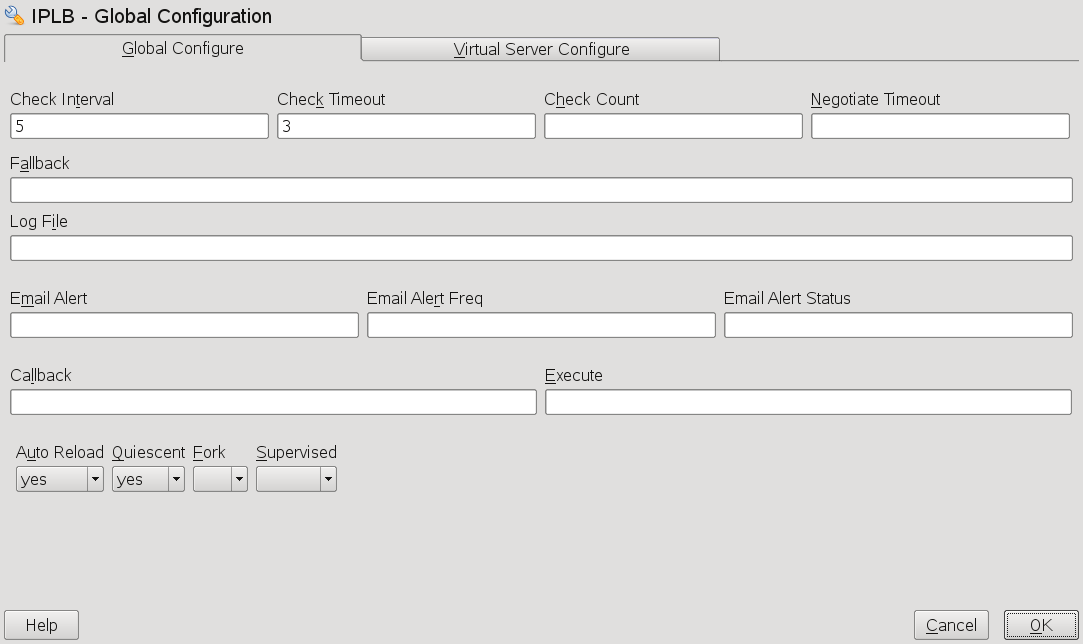
With , define the interval in which ldirectord will connect to each of the real servers to check if they are still online.
-
With , set the time in which the real server should have responded after the last check.
-
With you can define how many times ldirectord will attempt to request the real servers until the check is considered as failed.
-
With define a timeout in seconds for negotiate checks.
-
In , enter the hostname or IP address of the Web server onto which to redirect a Web service in case all real servers are down.
-
If you want to use an alternative path for logging, specify a path for the logs in . By default, ldirectord writes its logs to /var/log/ldirectord.log.
-
If you want the system to send alerts in case the connection status to any real server changes, enter a valid e-mail address in .
-
With , define after how many seconds the e-mail alert should be repeated if any of the real servers remains inaccessible.
-
In specify the server states for which email alerts should be sent. If you want to define more than one state, use a comma-separated list.
-
With define, if ldirectord should continuously monitor the configuration file for modification. If set to yes, the configuration is automatically reloaded upon changes.
-
With the switch, define if to remove failed real servers from the kernel's LVS table or not. If set to , failed servers are not removed. Instead their weight is set to 0 which means that no new connections will be accepted. Already established connections will persist until they time out.
Figure 10-1 YaST IP Load Balancing—Global Parameters
Configuring Virtual Services
You can configure one or more virtual services by defining a couple of parameters for each. The following procedure describes how to configure the most important parameters for a virtual service. For more details about the individual parameters (and the parameters not covered here), click or refer to the ldirectord man page.
-
In the YaST iplb module, switch to the tab.
-
a new virtual server or an existing virtual server. A new dialog shows the available options.
-
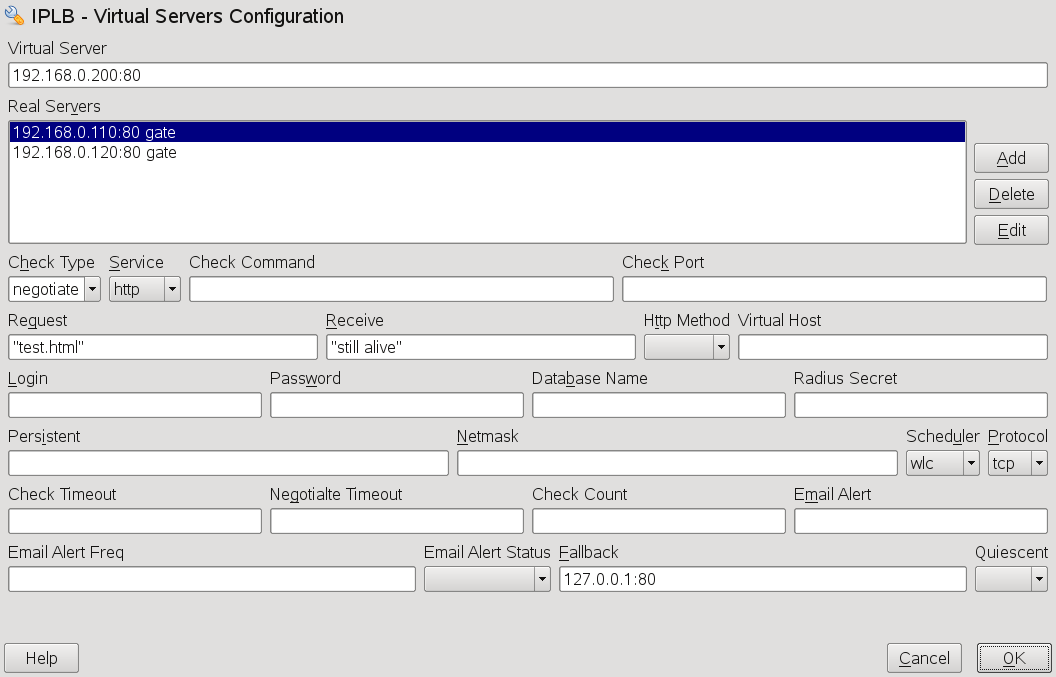
In enter the shared virtual IP address and port under which the load balancers and the real servers are accessible as LVS. Instead of IP address and port name, you can also specify a hostname and a service. Alternatively, you can also use a firewall mark. A firewall mark is a way of aggregating an arbitrary collection of VIP:port services into one virtual service.
-
To specify the , you need to enter the IP address (or hostnames) of the servers, the ports (or service names) and the forwarding method. The forwarding method must either be gate, ipip or masq, see Section 10.1.3, Direct Routing.
Click the button and enter the required arguments for each real server.
-
As , select the type of check that should be performed to test if the real servers are still alive. For example, to send a request and check if the response contains an expected string, select Negotiate.
-
If you have set the to Negotiate, you also need to define the type of service to monitor. Select it from the drop-down list.
-
In , enter the URI to the object that is requested on each real server during the check intervals.
-
If you want to check if the response from the real servers contains a certain string (
I'm alive
message), define a regular expression that needs to be matched. Enter the regular expression into . If the response from a real server contains this expression, the real server is considered to be alive. -
Depending on the type of you have selected in Step 6, you also need to specify further parameters like , , , or . For more information, refer to the YaST help text or to the ldirectord man page.
-
Select the to be used for load balancing. For information on the available schedulers, refer to the ipvsadm(8) man page.
-
Select the to be used. If the virtual service is specified as an IP address and port, it must be either tcp or udp. If the virtual service is specified as a firewall mark, the protocol must be fwm.
-
Define further parameters, if needed. Confirm your configuration with . YaST writes the configuration to /etc/ha.d/ldirectord.cf.
Figure 10-2 YaST IP Load Balancing—Virtual Services
Example 10-1 Simple ldirectord Configuration
The values shown in Figure 10-1 and Figure 10-2, would lead to the following configuration, defined in /etc/ha.d/ldirectord.cf:
autoreload = yescheckinterval = 5
checktimeout = 3
quiescent = yes
virtual = 192.168.0.200:80
checktype = negotiate
fallback = 127.0.0.1:80
protocol = tcp
real = 192.168.0.110:80 gate
real = 192.168.0.120:80 gate receive = "still alive"
request = "test.html"
scheduler = wlc
service = http

|
Defines that ldirectord should continuously check the configuration file for modification. |
|
Interval in which ldirectord will connect to each of the real servers to check if they are still online. |
|
Time in which the real server should have responded after the last check. |
|
Defines not to remove failed real servers from the kernel's LVS table, but to set their weight to 0 instead. |
|
Virtual IP address (VIP) of the LVS. The LVS is available at port 80. |
|
Type of check that should be performed to test if the real servers are still alive. |
|
Server onto which to redirect a Web service all real servers for this service are down. |
|
Protocol to be used. |
|
Two real servers defined, both available at port 80. The packet forwarding method is gate, meaning that direct routing is used. |
|
Regular expression that needs to be matched in the response string from the real server. |
|
URI to the object that is requested on each real server during the check intervals. |
|
Selected scheduler to be used for load balancing. |
|
Type of service to monitor. |
This configuration would lead to the following process flow: The ldirectord will connect to each real server once every 5 seconds and request 192.168.0.110:80/test.html or 192.168.0.120:80/test.html as specified in and . If it does not receive the expected still alive string from a real server within 3 seconds of the last check, it will remove the real server from the available pool. However, because of the quiescent=yes setting , the real server will not be removed from the LVS table, but its weight will be set to 0 so that no new connections to this real server will be accepted. Already established connections will be persistent until they time out.