NetWare-to-UNIX Printing Process
The NetWare® Print Services for UNIX* provides users with access to remote printers. The product provides the following print services:
This section provides an overview and a component-level description of the print services.
Print services enable users to access remote printers just as if they were local printers. After you install and configure the print services, users can print their work on remote printers without taking any special action. They use their operating system's standard commands and utilities. The print services transparently route the print job to the appropriate queue and printer.
The installation program installs the print services automatically. The UNICON utility enables you to configure and start the print services after installation. Although the installation program provides the option of starting any of the UXPS services at the end of the installation procedure, you cannot start the print services until configuration is complete.
Users access print services based on user account, group membership, and host identification. Therefore, you must configure global objects as well as configuring the print services. Configuring global objects for print services consists of the following:
NOTE: Both print services process print jobs sent by users and groups without mapped accounts by using the default user account as described in "Default UNIX User Account" and "Default NetWare User Account."
For more information on configuring global objects, see "Global Objects."
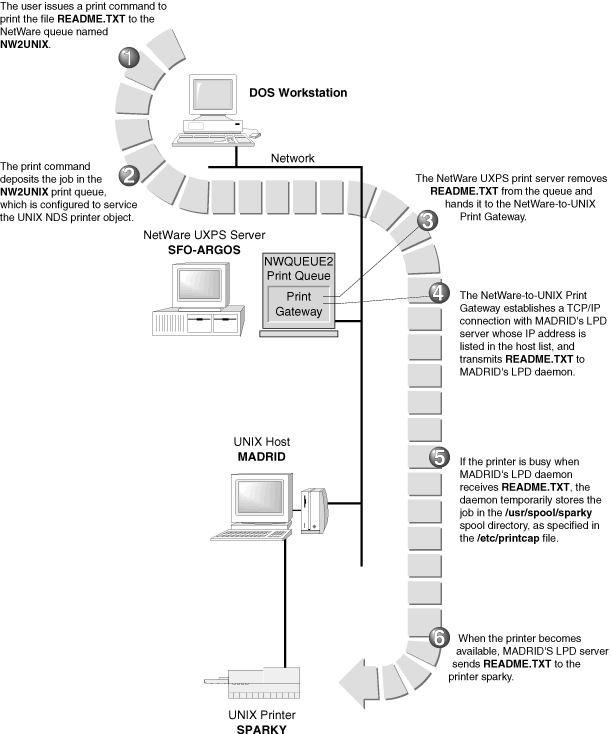
The NetWare-to-UNIX print service takes print jobs from NetWare print queues and sends them to remote computers. After a print job reaches a remote print queue, the remote computer sends the print job to the appropriate printer. "NetWare-to-UNIX Printing Process" shows how print jobs flow from a NetWare print queue to a remote computer's print queue.
Figure 6.
NetWare-to-UNIX Printing Process
The UNICON utility enables you to manage all aspects of the NetWare-to-UNIX print service. The UNICON utility also enables you to view and modify NDSTM objects you create using other NetWare 4 print utilities such as PCONSOLE and PRINTCON. These utilities are not provided with NetWare 5. You will have to use the NetWare Administrator utility for this purpose.
The NetWare-to-UNIX print service consists of the following components:
The following sections provide information about the NetWare-to-UNIX print service components, which you should understand before you configure the print service.
The print server takes jobs from the print queue and passes them to the NetWare-to-UNIX print gateway. The print gateway then sends the print job to the remote UNIX host.
You must select a default print server before configuring any of the other NetWare-to-UNIX print components. The print server can exist in the same OU as the NetWare server running the NetWare-to-UNIX print service, or it can exist in another location in the NDS tree.
UNIX printer objects represent remote UNIX printers. There must be an NDS printer object for each remote UNIX printer that accepts print jobs from the NetWare-to-UNIX print service.
Creating a new UNIX NDS printer object consists of identifying the following:
Once the NDS UNIX printer object exists, NetWare users can select the UNIX printer just as they would select any other NDS printer.
The default UNIX user account enables NetWare users who are not listed in the OU or who do not have mapped UNIX accounts to access UNIX printers. When a user sends a print job to the UNIX printer, the print service checks to see whether the user has a valid mapped user account. When a user does not have a valid mapped user account, the print service submits the print job under the default UNIX user account. Many administrators select an account such as GUEST as the default UNIX user account.
The NetWare-to-UNIX print service also includes an option that specifies using the default user account for all users who use the print service. By selecting this option, you can avoid having to create a mapped account for every user who wants to use the print service.
Each UNIX printer associated with an NDS printer object attaches to a UNIX host. Each UNIX host requires a method for receiving and processing a print job, information about the NetWare queue sending the print job, and a place to store the print job before sending it to the printer. To meet all of these requirements, each UNIX host must be set up as follows:
The UNIX host uses the LPD protocol to receive print commands and print jobs from the NetWare server. Therefore, each UNIX host that receives print jobs from the NetWare-to-UNIX print service must support and run the lpd daemon.
Most UNIX operating systems use a printcap file to control local and remote printing. Each entry in the printcap file specifies a printer, the queues associated with the printer, and some additional configuration parameters. Each printer to which the host sends print jobs must have an entry in the printcap file.
If you use a currently configured UNIX printer, it probably already has an entry in the printcap file. However, you may want to create an additional printcap entry that specifies a different spool directory for incoming NetWare print jobs.
The UNIX host temporarily stores the print jobs it receives from the NetWare server in the print spool directory specified in the printcap entry. If you use a currently configured UNIX printer, there is probably already a printcap entry that specifies a spool directory. If you create a printcap entry that specifies a new spool directory, you must create the spool directory manually.
The Managing section provides step--by--step instructions for setting up a UNIX printer host.
The UNIX-to-NetWare print service accepts print jobs from remote computers and places them into NetWare print queues. After a job reaches a NetWare print queue, NetWare sends the job to the appropriate printer. "UNIX-to-NetWare Printing Process" shows how print jobs flow from a remote computer's print queue to a NetWare print queue.
Although this product refers to the print service as the UNIX-to-NetWare print service, the service is accessible to any remote computer that supports the LPD protocol. If your remote computers do not support the LPD protocol, these computers may still be able to access the print service using the rsh command. For more information on using the rsh command, see "Using the rsh Command" under “Managing."
Figure 7.
UNIX-to-NetWare Printing Process 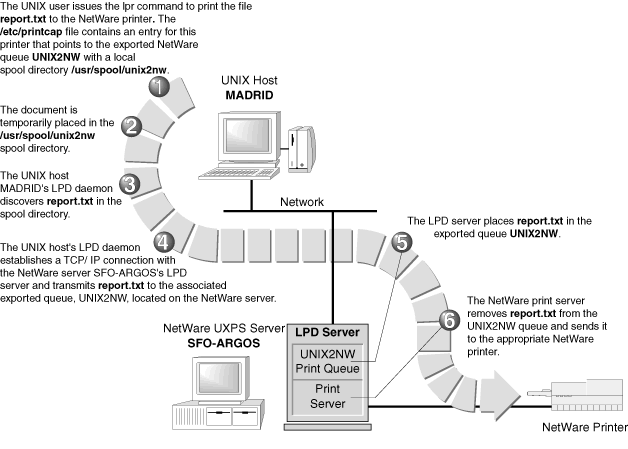
The UNICON utility enables you to manage all aspects of the UNIX-to-NetWare print service. The UNICON utility also enables you to view and modify NDS objects you create using other NetWare 4 print utilities such as PCONSOLE and PRINTCON. These utilities are not provided with NetWare 5. You will have to use the NetWare Administrator utility for this purpose.
The UNIX-to-NetWare print service consists of the following components:
The following sections provide information about the UNIX-to-NetWare print service components, which you should understand before you configure the print service.
Before a UNIX user can access a NetWare printer, the NetWare queue associated with the printer must be made available to accept UNIX print jobs from UNIX hosts. This process is called exporting the NetWare queue. Exporting a NetWare queue consists of the following:
You can allow access to all hosts or to specific trusted hosts or hostgroups.
You can select a filter type of None, Line Printer, or Postscript.
The print service applies the specified print job configuration to all print jobs it receives from UNIX hosts. For information on print job configurations, see "Print Job Configuration Entries."
The UNIX-to-NetWare print service also enables UNIX users to send print jobs to remote print queues on both NetWare 3.x and NetWare 4 / NetWare 5 servers, as shown in "Printing to a Remote Queue." You can export remote print queues from
Figure 8.
Printing to a Remote Queue 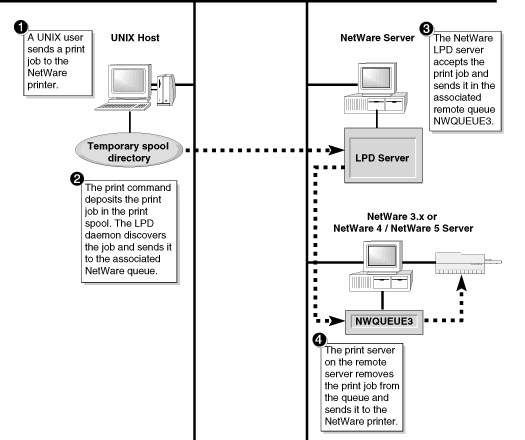
The UNIX-to-NetWare print service enables UNIX users to submit print jobs to a remote queue located on a NetWare server in the same NDS tree as the server running the print service. Using the object browser, you can select the remote queue from any location within the NDS tree. After selecting the remote queue, you export it as you would any other local queue.
When the print service receives a print job from a UNIX host, it submits the print job to the remote NetWare queue as the user named IP Service Handler. Therefore, the print service requires you to make IP Service Handler a queue user of the remote print queue using the PCONSOLE or NetWare Administrator utility.
The UNIX-to-NetWare print service enables UNIX users to submit print jobs to a queue located on a NetWare 3.x server or a NetWare 4 / NetWare 5 server in a different NDS tree. Configuring this type of remote queue consists of the following:
The UNIX-to-NetWare print service cannot submit print jobs to the remote print queue if the remote user account has a password. Therefore, the appropriate entry in the /ETC/NWPARAMS file must specify a valid bindery user with no password. The remote user must also be a queue user of the remote print queue.
The object browser can access only the print queues in the NDS tree where the server running the service resides. Therefore, the print service enables you to create a new queue and link it to a remote queue.
The UNICON utility enables you to export the local queue that corresponds to the remote queue. When the print service receives a print job within the local queue, it forwards the job to the remote queue automatically.
For step--by--step instructions on printing to remote queues, see "Printing to Remote Print Queues" under “Managing."
A print job configuration entry consists of a group of characteristics that define how the print service prints a print job. The print service applies the default print job configuration entry assigned to an exported NetWare print queue to all print jobs the queue receives from remote computers. The UNICON utility enables you to select an existing print configuration entry or create a new entry.
A user can override the default print job configuration assigned to an exported NetWare queue by specifying a different configuration in the lpr command line. The print service applies print job configuration entries in the following order of precedence.
NOTE: Default print job configuration entries are set from a workstation using the PRINTCON or NetWare Administrator utility.
The default NetWare user account enables UNIX users who do not have mapped NetWare accounts to access NetWare printers. When a user sends a print job to the NetWare printer, the print service checks to see whether the user has a valid mapped user account. When a valid mapped user account does not exist for the user, the print service submits the print job under the default NetWare user account. Many administrators select an account such as GUEST as the default NetWare user account.
The UNIX-to-NetWare print service also includes an option that specifies using the default user account for all users who use the print service. By selecting this option, you can avoid having to create a mapped account for every user who wants to use the print service.
The default exported queue configuration specifies default configuration values for exported NetWare queues. The UNICON utility uses these values when exporting a NetWare queue for access by UNIX print jobs. After exporting the NetWare queue, you can change the default values for the queue as needed.
The UNIX-to-NetWare print service uses the print spool directory as a temporary storage area for incoming print jobs before sending the jobs to the appropriate print queue.
By default, the print service creates the print spool directory on the SYS: volume. However, the directory can reside on another volume if necessary.
Each UNIX host that sends print jobs to a NetWare queue requires a method for transmitting a print job, information about the NetWare queue receiving the print job, and a place to store the print job before sending it to the NetWare server. To meet all of these requirements, each UNIX host must be set up as follows:
The UNIX host uses the LPD protocol to transmit print commands and print jobs to the NetWare server. Therefore, each UNIX host that sends print jobs to an exported NetWare queue must support and run the lpd daemon.
Most UNIX operating systems use a printcap file to control local and remote printing. Each entry in the printcap file specifies a printer, the queues associated with the printer, and some additional configuration parameters. A printcap entry must exist for each printer to which the UNIX host sends print jobs.
Before the UNIX host can send print jobs to a NetWare printer, you must create a printcap entry that associates a printer name with the exported NetWare queue.
The UNIX host temporarily stores print jobs in the print spool directory before sending them the NetWare server. If the lpd daemon is already running, there is probably already a spool directory. If you create a printcap entry that specifies a different spool directory, you must create the new directory manually.
The "Managing" section provides step--by--step instructions for setting up a UNIX printer host.