3.2 Searching the Directory
To perform a search, your application must first bind to the LDAP server and then select the root point in the directory (base object DN). For optimal performance, select a point that provides the smallest result set.
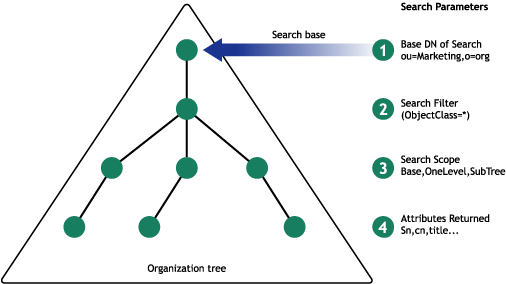
The following diagram illustrates a search that selects the marketing container as the root point for search. While setting up this search, decide on the type of object to search for and set up a search filter for that type of object.
Figure 3-1 Search
3.2.1 Specifying Search Parameters
Searching is performed using the LdapConnection.Search function. When you perform an LDAPsearch, you need to specify the following basic parameters:
Search Base
The search base parameter specifies the DN of the entry where you want to begin the search, such as ou=development, o=acme.
If you want the search to begin at the tree root pass an empty string.
NOTE:Beginning a search at the tree root is handled differently by the various LDAP server implementations. If your search does not return results, read the root DSE to retrieve valid naming contexts for a valid starting point.
Search Scope
The search scope parameter specifies the depth of the search and can be one of three values:
-
SCOPE_BASE: Only the entry specified as the search base is included in the search. This is used when you already know the DN of the object and you want to read its attributes. The read method may also be used to read the values of a single entry.
-
SCOPE_ONE: Objects one level below the base (but not including the base) are included in the search. If we specified o=acme as our search base, then entries in the o=acme container would be included, but not the object o=acme.
-
SCOPE_SUB: All objects below the base, including the base itself, are included in the search.
Search Filter
The search filter defines the entries that will be returned by the search. The LDAP search filter grammar is specified in RFC 2254 and 2251. The grammar uses ABNF notation. If you are looking for all employees with a title of engineer, the search filter would be (title=engineer).
Search Filters
The LDAP search filter grammar is specified in RFC 2254 and 2251. The grammar uses ABNF notation.
filter = " ( " filtercomp " ) "
filtercomp = and / or / not / item

and = "&" filterlist
   filterlist = 1*filter

or = "|" filterlist
   filterlist = 1*filter

not = "!" filterlist
   filterlist = 1*filter

item = simple / present / substring / extensible

simple = attr filtertype value
   attr =  name | name;binary
   filtertype = equal / approx / greater / less
   value = data valid for the attribute's syntax

equal = "="
approx = "~="
greater = ">="
less = "<="

present = attr "=*"
   attr =  name | name;binary

substing = attr "=" [initial] any [final]
   attr =  name | name;binary
   initial = value
   any = "*" *(value "*")
   final = value

extensible = attr [":dn"] [":" matchingrule] ":="value
            / [":dn] ":" matchingrule ":=" value
            / matchingrule = name | OID
For additional options for the attr option, see Section 4.1.5 of RFC 2251.
For additional information on the value option, see Section 4.1.6 of RFC 2251.
IMPORTANT:Novell® eDirectory™ does not support LDAP approximate (~=) matching or extensible matching rules.
Operators
Table 3-1 LDAP Filter Operators
The following Boolean operators can be combined with the standard operators to form more complex filters. Note that the Boolean operator syntax used is different in search filters than in the C and Java programming languages, but they are conceptually similar.
Table 3-2 LDAP Filter Boolean Operators
Examples
Operational Attributes
Operational attributes are not automatically returned in search
results; they must be requested by name in the search operation.
For a list of supported operational attributes in Novell eDirectory
8.5, see LDAP
Operational Attributes
in the LDAP and
eDirectory Integration Guide. The LDAP servers in releases
previous to 8.5 do not support requesting operational attributes
in a search operation.
Attribute List
A null-terminated array of strings indicating which attributes to return for each matching entry.
Types Only
A Boolean specifying whether you want to return only the attribute names or the attribute types and the attribute values.
3.2.2 Getting Search Results
Each result returned by the Search function is stored in a MessageQueue which can be retrieved either in a synchronous way using LdapSearchResults class or in an asynchronous way using LdapSearchQueue class.
The C# code snippet below shows how to do a synchronous and asynchronous search in a LDAP server:
string searchBase = "ou=development,o=acme";
int searchScope = LdapConnection.SCOPE_BASE;
string searchFilter = "(title=engineer)";
Searching the Directory - Asynchronous
// C# Library namespace
using Novell.Directory.Ldap;

// Creating an LdapConnection instance
LdapConnection ldapConn= new LdapConnection();

//Connect function will create a socket connection to the server
ldapConn.Connect(ldapHost,ldapPort);

//Bind function will Bind the user object Credentials to theServer
ldapConn.Bind(userDN,userPasswd);

// Searches in the Marketing container and return all child entries
just below this container i.e Single level search

LdapSearchQueue queue=ldapConn.Search (searchBase,
LdapConnection.SCOPE_ONE, searchFilter,null,false,(LdapSearchQueue)
null,(LdapSearchConstraints)null );
LdapMessage message;
while ((message = queue.getResponse()) !=null)
{
   if (message is LdapSearchResult)
   {
          LdapEntry entry = (LdapSearchResult) message.Entry;
          System.Console.Out.WriteLine("\n" + entry.DN);
          System.Console.Out.WriteLine("\tAttributes: ");

          // Get the attribute set of the entry
          LdapAttributeSet attributeSet = entry.getAttributeSet();
          System.Collections.IEnumerator ienum =
attributeSet.GetEnumerator();

         // Parse through the attribute set to get the attributes and
the corresponding values
          while(ienum.MoveNext())
          {
                 LdapAttribute attribute=(LdapAttribute)ienum.Current;
                 string attributeName =attribute.Name;
                 string attributeVal = attribute.StringValue;
                 Console.WriteLine( attributeName + "value:" +
attributeVal);}}
          }

   //Procced

   //While all the required entries are parsed, disconnect
   ldapConn.Disconnect();
Searching the Directory - Synchronous
// C# Library namespace
using Novell.Directory.Ldap;

// Creating an LdapConnection instance
LdapConnection ldapConn= new LdapConnection();

//Connect function will create a socket connection to the server
ldapConn.Connect(ldapHost,ldapPort);

//Bind function will bind the user object Credentials to the Server
ldapConn.Bind(userDN,userPasswd);

// Searches in the Marketing container and return all child entries
just below this container i.e. Single level search

LdapSearchResults
lsc=ldapConn.Search("ou=Marketing,o=Sales",LdapConnection.SCOPE_ONE,"
objectClass=*",null,false);
while (lsc.hasMore())
{
   LdapEntry nextEntry = null;
   try
   {
       nextEntry = lsc.next();
   } catch(LdapException e)
     {
         Console.WriteLine("Error: " + e.LdapErrorMessage);
         //Exception is thrown, go for next entry
         continue;
     }

Console.WriteLine("\n" + nextEntry.DN);

// Get the attribute set of the entry
LdapAttributeSet attributeSet = nextEntry.getAttributeSet();
System.Collections.IEnumerator ienum = attributeSet.GetEnumerator();

// Parse through the attribute set to get the attributes and the
corresponding values
while(ienum.MoveNext())
{
   LdapAttribute attribute=(LdapAttribute)ienum.Current;
   string attributeName = attribute.Name;
   string attributeVal = attribute.StringValue;
   Console.WriteLine( attributeName + "value:" + attributeVal);}
}

//Procced

//While all the entries are parsed, disconnect
ldapConn.Disconnect();