4.3 Distributed Reference Management
Just as subordinate references help maintain connectivity between parent and child partitions stored on different servers, the following other kinds of references also help keep eDirectory trees connected and synchronized:
- External references
- Back links
- Distributed reference links (DRLs)
- Obituaries
4.3.1 External References
A server usually stores replicas of only some of a directory's partitions. Sometimes a server must hold information about entries in partitions that the server does not store. Often, the server requires information about an entry in a parent partition. At other times, the server requires information about entries in partitions that are not parents or children of partitions it stores. For example, the file system may need to refer to these entries because entries from diverse partitions have been granted rights to directories on this server.
In the following figure, server NS2 does not store a replica of the [Root] partition. To maintain connectivity with the tree root, server NS2 stores an external reference of [Root].
Figure 4-5 Server Replicas with External References
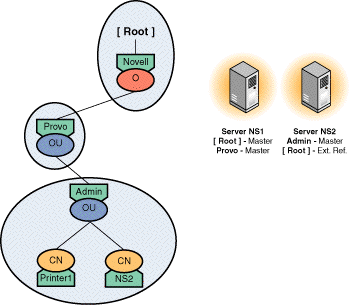
eDirectory stores these types of information in external references, which are place holders containing information about entries that the server does not hold. External references are not “real” entries because they do not contain complete entry information.
Besides providing connectivity, external references improve system performance by caching frequently accessed information. Currently, eDirectory caches only an entry's public key, which is stored as an attribute on the external reference.
Creating External References. eDirectory creates external references for the following operations:
-
Authentication. A user authenticates to a server, and this user does not have an entry stored in a partition on the server. To enable authentication, the server must create an external reference so that an entry ID can be given to the authentication process.
-
Browsing. When a user, browsing the eDirectory tree, requests information about an entry that is not stored locally, eDirectory creates an external reference to the entry.
-
Security Equivalence. Users who authenticate to the server can have security equivalence to entries not stored locally. Such entries require external references.
-
Attributes of Local Entries. Some attributes, such as Member, take a list of entries and can have entries of objects that are not stored locally. Each such entry requires an external reference.
-
File System. The file system uses entry IDs to maintain a list of owners and trustees of files and directories. Trustees or owners that are not local entries require external references.
In addition, eDirectory creates external references when a replica is removed from the server. eDirectory changes all of the entries in the removed replica into external references and marks them as expired.
eDirectory uses the following rules when creating external references:
- eDirectory never creates an external reference below a real entry in the tree.
- eDirectory never creates a subordinate reference below an external reference in the tree. Any subordinate references below an external reference will be removed during synchronization.
Deleting External References. On each server, eDirectory deletes expired external references if they have not been used within a specified time period. The system administrator can use a SET parameter to set a number of days after which eDirectory deletes external references that have not used, are not needed for another entry's context, or do not contain information that the operating system needs.
To remove expired external references, eDirectory builds a list of unused external references by checking the life span interval of each external reference. This interval defaults to eight days and thirty minutes.
The back link process checks to see if the file system must access any of the external references. If the file system uses the expired external references, they are not taken off the delete list. The back link process deletes the remaining entries on the list. The janitor process is responsible for purging the deleted external references.
When eDirectory updates entries and partitions, it also must update external references created for those entries. Synchronizing external references is usually done by the server receiving the original synchronization request; however, any read/write replica can initiate synchronization if the external reference is being deleted or renamed.
4.3.2 Back Links
When eDirectory creates a new external reference for an entry not stored on the local server, eDirectory locates the non-local entry to which the external reference points. On that entry, it stores a Back Link attribute, which points back to the external reference. The back link maintains connectivity between the server holding the external reference and the server hold the object to which the external reference points. Figure 4-6 illustrates this process.
Figure 4-6 Back Links and External References
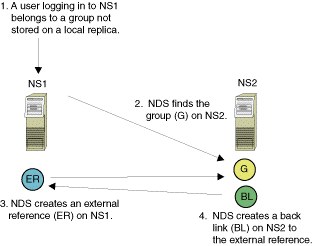
If eDirectory can't create the back link, it retries 9 times. The default retry interval is currently 3 minutes. If eDirectory cannot create the back link within 3 minutes, the task is assigned to the back link process which executes on a time interval set by the system administrator. The current default interval is 25 hours.
eDirectory uses back links to update external references in cases where the real object has been renamed or deleted. The back link process has two basic functions:
- Removes any expired or unnecessary external references from the system.
- Creates and maintains any back links that eDirectory could not create when it created the external reference.
When eDirectory removes an external reference, the back link to that external reference must be deleted. The server holding the external reference requests that the server holding the real entry delete the back link, and the server holding the back link then deletes the reference.
4.3.3 Distributed Reference Links (DRLs)
Distributed Reference Links (DRLs) work with external references to maintain connectivity in the eDirectory tree. They are new in NetWare 5.0 and replace back links. They have the advantage of referencing a partition rather than a specific server. Back links require a server to communicate with every server that contains a read/write replica of the partition the back link resides on. When information is needed about a DRL, any server with a replica of the partition can supply the information.
For backward compatibility with NetWare 4.x servers, eDirectory maintains back links with NetWare 4.x servers. However, these servers must be running at least NDS version 599a in a mixed NetWare 4.x and NetWare 5.x network.
Before an external reference is created in NetWare 5.x, eDirectory places a Used By attribute on a writable copy of the referenced object. This attribute is also placed on the referenced object's partition root and the object's partition root. The following figure illustrates this process.
Figure 4-7 DRL Process
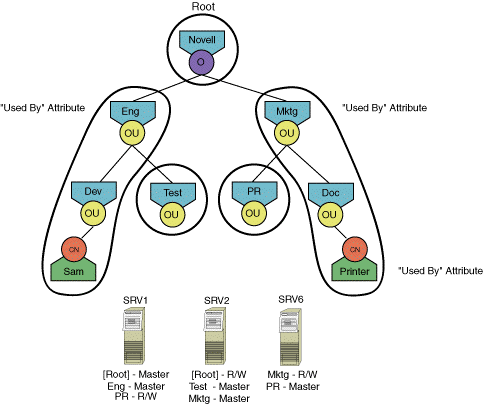
In this example, Sam is given rights to use Printer.Doc.Mkgt.Novell. Since this printer resides on another partition, and the SRV1 server does not contain a replica of the Mktg partition, SRV1 needs to create DRLs before creating the external reference to the printer. eDirectory places a Used By attribute on the printer, on the printer's root partition (Mktg), and on Sam's root partition (Eng). Since these are attribute values, any server containing a replica of the partitions can answer queries. In the example above, both SRV2 and SRV6 could answer queries about the referenced printer object.
The Used By attribute on a partition root contains information about objects that are referenced and objects that are referencing other objects. In the example above, the attribute on the Eng partition would indicate that Sam is referencing an object on the Mktg partition. The attribute on the Mktg partition would indicate that an object on the Eng partition has a reference to an object on the Mktg partition.
The attribute on an objects that is referenced contains information about the object that created the external reference. In this example, the Used By attribute on the printer would indicate that Sam is referencing it.
4.3.4 Obituaries
In a distributed database, each server receives updated information through synchronization. Because the servers do not receive updates simultaneously, the servers may not hold the same information at a given time. For this reason, each server holds on to the old information until all the other servers receive updates. eDirectory uses obituaries to keep track of such information.
Obituaries are attribute values that are not visible to clients and are used in server-to-server exchanges.
For example, the figure below shows how obituaries are used when an entry is renamed. On Server 1, the entry C is renamed to D. When Server 2, which holds a replica of C, receives the update during synchronization, it keeps the copy of C and attaches an obituary (called New RDN obituary in the figure). This obituary, which points to the new object, ensures that all servers can access C, even if they have not been notified of the name change. When Server 2 creates entry D, it attaches an Old RDN obituary pointing back to the original object. After all replicas have been synchronized, server 2 can delete its copy of C and remove the obituary from entry D.
Figure 4-8 Obituaries
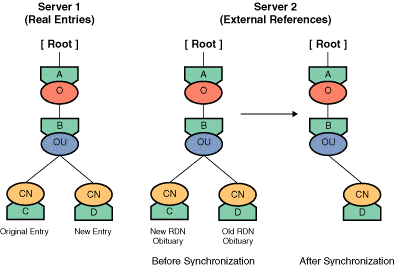
Since obituaries are attribute values, eDirectory synchronizes them the same way it synchronizes other attribute values in the replicas.
Primary and Secondary Obituaries. eDirectory uses two types of obituaries: primary and secondary. Primary obituaries keep track of entry-level modifications, including
- Renaming an entry
- Deleting an entry
- Moving an entry
- Moving a subtree
Generally, when data is changed, primary obituaries convey the changes to servers holding the affected entry.
Secondary obituaries convey the change to servers holding external references to the changed entry. The secondary obituary, also called a back link obituary, is placed on the entry's back link when the entry is renamed, moved, or deleted.
Obituary States. Both primary and secondary obituaries go through several states before they can be deleted from the database. Since secondary obituaries are linked to primary obituaries, all secondary obituaries must reach the state before the primary obituary can be marked as reaching that state.
Obituaries progress through the following states:
- Initial state assigned at creation
- Notified servers with copies of the obituary have been notified
- Wait timeout to ensure all changes are propagated to all replicas
- Purgeable servers with copies of the obituary mark the obituary as purgeable
- Wait timeout to ensure all changes are propagated to all replicas. Once they have been propagated, the obituary is deleted from the database.