2.10 Session Manager Services
2.10.1 Introduction
The client connection model provides connection management. The Session Manager is a collection of packages that allows various session providers to be abstracted under one interface, using one manager to tie them together. The Session Manager uses a Session interface as a base class for most of its concepts. This helps keep the interfaces for working with sessions easy to learn and re-use. See also Section 2.11, Remote Session Manager for information about the clientless version of NJCL.
Sessions are the building blocks of the API layer and are used to set up a communication channel between two entities. The first entity, the initiating entity, creates a session, and the second entity, the domain, can be anything from a tree to a server to any other object. Sessions, therefore, form the established communication channel between two objects in a domain. Once the object has established a singular session, it can communicate with another object in the same domain. Domains can be hierarchical, with child domains narrowing the scope of their parents.
Sessions are the client/server connections in NetWare and are part of a tree hierarchy where the Session Manager is the top-level session of the tree that ties all session providers together and is a session itself. Sessions are unique in relation to their parent and their domain name, which means two different sessions can have the same domain name, as long as their parents are different.
2.10.2 Multi User Session Manager
The Multi User Session Manager feature allows multiple separate sessions to the same domain. It also provides the capability for multiple distinct authentications sumultaneously into the same domain. For example, User1 and User2 can both be simultaneously authenticated to Tree1. The two sessions, Session1 and Session2, will then have User1 and User2 rights, respectively, when accessing services in Tree1. This feature only works when running on a NetWare server unless you are using the clientless version of NJCL. A source code sample, MultiUserSessionTest.java, is provided as an example of how to use this functionality.
2.10.3 Session Manager Components
The Session Manager is broken down into four packages. The important components (interfaces and classes) of the Session Manager are contained in these packages.
- Session Package contains components exposed to users of the Session Manager.
- Session.Bindery Package contains the provider for bindery type sessions.
- Session.NDS Package contains the provider for NDS type sessions
- Session.Xplat Package contains the components used to synchronize both bindery and NDS type sessions that have common roots in NetWare.
Session Package
The com.novell.service.session package provides the interfaces, classes, and operations that allow users to manage sessions across multiple session providers. Four interfaces and seven classes in the package are provided for public access.
- Authenticatable interface provides an interface for all objects returned by the Session Manager that are authenticatable, meaning the identity of either or both of the communicating objects can be authenticated. Sessions, as authenticatable objects, can return object identities for use in the com.novell.java.security.Authenticator class and its related packages as well as return the object's current authenticated state. For further information on session authentication, see Section 2.2, Authentication Services.
- Session interface
provides a communication channel between the owning/initiating
object that creates a session and the target domain (tree, server,
or any other object). The Session interface describes only those
methods that are common to all sessions. Functionality available
only to a specific implementation of a session falls into two separate
categories: read-only and read-write.
Read-only functionality is available through session attributes, which can be retrieved via the getAttributes methods. While attributes are designed to allow sessions to expose provider-specifics, some session attributes are common to all sessions (like those described in this class) for the sake of convenience. Session attributes are also used by the search method to facilitate finding sessions of a certain category.
Read-write functionality is available through session services and the session environment. Session services are retrieved via the getService method, while the session environment can be manipulated via the following methods: getEnvironment, getEffectiveEnvironment, and setEnvironment.
- SessionEnumerator class provides for the enumeration of sessions.
- SessionSearchEnumerator class provides an implementation of SessionEnumerator containing only sessions that match a given search criteria.
- SessionManager interface
provides a single interface under which session providers can be
abstracted. It provides for a collection of packages using one manager
to tie the various abstracted session providers together. Because SessionManager
is also a session, its session providers are accessible via its
child sessions.
The SessionManager interface provides no methods or constructors and only two variables (SCOPE_ATTR_ID and SESSION_MANAGER) for defining the scope and domain of the SessionManager. See the SessionManager interface in the Reference Guide for more specific information on these variables.
As the top level session, SessionManager is responsible for loading and managing initial providers. The SessionManager interface manages initial sessions by loading them via the InitialSessionFactory property and maintaining the load order as the preferred service-request order.
Getting a SessionManager requires, at a minimum, the following code:
   // Initialize Factories
    SessionEnv environment = new SessionEnv();

    // Get the session manager
    sm = SessionManagerFactory.getSessionManager(environment);
Each initial Session should be able to validate its sessions whenever requested to do so by calling the Session.validateLinks method.
- SessionService interface describes a SessionService object containing service extensions for this session. The SessionService object is returned by the Session.getService method. Typically, sessions are used only for gaining access to a set of services. Session services must be exposed and described by the provider offering those services via an object that implements SessionService. Session providers each have an initial session and zero or more child sessions specific to that provider.
- SessionAttr class provides for a session attribute, which is an identifying characteristic of the session from which it was retrieved. It constructs a new instance of a session attribute based on two parameters: attrId (the ID for the session attribute), and value (the value of the session attribute). Methods are provided for getting the session attribute ID and the value of a particular session attribute.
- SessionAttrs class provides for the creation of a collection of session attribute objects, and methods for adding, modifying, removing, and getting session attribute objects.
- SessionAttrEnumerator class provides for the enumeration of session attributes.
- SessionEnv class
provides a collection of key/value pairs describing a session
environment, which is used to modify the default behavior of a session.
It constructs a new, empty session environment that is shared, and
it provides methods for adding, modifying, removing, getting and
otherwise manipulating key/value sets.
By default, setting the environment on a parent session affects all of its children the same way. This is because the actual environment checked for modified behavior is the inherited, or effective, environment. To override this inherited behavior, the environment key/value pair should be set per child session, or removed from the parent.
- SessionManagerFactory class provides a class used to create a SessionManager, which is the top level object in a Session hierarchy. The SessionManagerFactory class is responsible for obtaining a SessionManager under a given scope.
Session.Bindery Package
The com.novell.service.session.bindery package provides a default implementation of sessions using a NetWare 3.x or 4.x server (if intended to be authenticated bindery) connections and security models. The bindery is contained in a flat hierarchy with no parent bindery sessions. Only one class, Bindery, of the bindery package is made public.
- Bindery class provides two static session attribute values for Bindery: The provider name for the bindery provider, and the domain name for the bindery initial session.
Session.NDS Package
The com.novell.service.session.nds package provides a default implementation of sessions using NetWare 4.x and newer server connection and security models. NDSSessions are contained in a two-level hierarchy with NDSTreeSessions as parents of NDSServerSessions. Only one class, NDS, of the Session.NDS package is made public.
- NDS class provides three static session attribute values for NDS: The provider name for the NDS provider, the domain name for the NDS initial session, and the attribute ID describing the raw authentication state of the NDS session.
Session.Xplat Package
The com.novell.service.session.xplat package provides static attribute values and environment keys for Xplat-based providers. It provides for both bindery and NDS type sessions that have common roots in NetWare; thus both type sessions share some implementation in the session.xplat package. Only one class, Xplat, of the Session.Xplat package is made public.
- Xplat class provides static attribute values and environment keys for Xplat-based providers.
2.10.4 Important Session Manager Methods
Listed below are some important Session Manager methods of which to be aware. For a complete list of available methods, go to the Reference Guide documentation. Note that all other methods in the Authenticatable interface have been depreciated.
- Authenticatable.createIdentity - Creates and returns an Identity based on the current session.
- Authenticatable.isAuthenticated - Determines if the object is authenticated.
- Session.close - Closes and invalidates the current session and its children, removing all stored credentials.
- Session.FindSession - Returns the first Session object found with a domain name matching the passed in domainName parameter value.
- Session.FindSessionTop - Returns the first Session object found with a matching domain name, starting at the Session Manager.
- Session.getAttributes - Returns a selected default subset of all attributes as a SessionAttrs object for the current session.
- Session.getAttributes - Returns the attributes for the current session listed in the String[] parameter as SessionAttrs objects.
- Session.getChildren - Returns an enumeration of child sessions for the current session as a SessionAttrs object.
- Session.hasChildren - Determines if the current session has children.
- Session.getDomainName - Returns the domain name of the current session.
- Session.getEffectiveEnvironment - Returns the environment for the current session.
- Session.setEnvironment - Sets/replaces the environment for the current session and returns the old environment.
- Session.getEnvironment - Returns the environment for the current session.
- Session.getParent - Returns the current session’s parent session, or NULL if its parent Session doesn’t exist.
- Session.hasParent - Determines if the current session has a parent.
- Session.getService - Returns a session service extension for the current session.
- Session.getSession - Retrieves sessions relative to the target session and based on the the domain name that is passed in. It returns a child session of the parent based on the session (domainName) from which this operation is called.
- Session.getSession - Creates and/or retrieves sessions relative to the target session and based on the the domain name that is passed in.
- Session.getSessionTop - Retrieves the first session matching the domain name that is passed in starting at the Session Manager.
- Session.getSessionTop - Retrieves the first session matching the domain name that is passed in starting at the Session Manager and using environment to control behavior when applicable.
- Session.getUID - Return the unique ID for the current session.
- Session.invalidate - Remove the passed in Session from its children, if possible without actually closing the Session.
- Session.isValid - Determines if the current session is in a valid state.
- Session.validateLinks - Validates the children of the current session.
- Session.search - Searches for sessions with matching attributes.
- SessionManagerFactory.getPrivate - Returns a unique, private instance of SessionManager.
- SessionManagerFactory.getSessionManager - Returns a shared instance of SessionManager based on the information in the environment parameter.
2.10.5 Relationship of Session Manager Classes and Interfaces
The relationship between the Session Manager interfaces and classes is illustrated in the diagram below, followed by a brief description of the relationship each interface and class has with other interfaces and classes.
Figure 2-14 Session Manager Interfaces and Classes
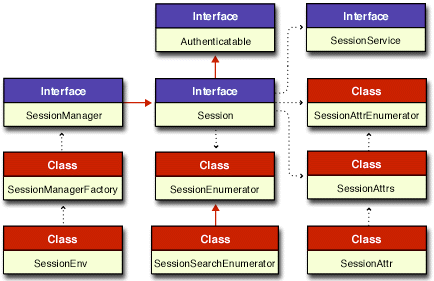
In this diagram of interfaces and classes a solid red line ending with a solid arrow represent an extension of a class or interface. The dotted black lines ending with a small solid arrow imply some relationships between the different interfaces and classes. Links are provided to the Reference Guide documentation for each of these important Session interfaces and classes.
- Authenticatable interface is extended by the Session interface.
- Session interface extends the Authenticable interface and is extended by the SessionManager interface.
- SessionEnumerator class provides for an enumeration of sessions.
- SessionSearchEnumerator class provides for an enumeration of sessions that match a given search criteria.
- SessionManager interface extends the Session interface and is created by the SessionManagerFactory class.
- SessionManagerFactory class provides a static class used to create a SessionManager, and is responsible for obtaining a SessionManager under a given scope.
- SessionEnv class provides the SessionManagerFactory with a collection of key/value pairs describing a session environment.
- SessionService interface describes an object type returned by the Session.getService() method, which returns service extensions for the current session.
- SessionAttr class provides for a session attribute, which is an identifying characteristic of the session from which it was retrieved.
- SessionAttrs class provides for the creation of a collection of session attribute objects.
- SessionAttrEnumerator class provides for an enumeration of session attribute objects.