2.3 Bindery Provider
2.3.1 Introduction
The Bindery provider for JNDI provides contexts that implement the behavior of the NetWare 3.x Bindery, such as creating, deleting and renaming Bindery objects and references to servers and trees, and discovering and accessing the objects present in the Bindery.
NetWare 3.x servers use the bindery database to identify and store information about network objects. The Bindery name provider allows applications to read and modify standard information stored in the bindery and to create and manage their own object data.
The NetWare 4.0 OS replaced the bindery with NDS (an object database), which offers many advantages over the bindery, including a hierarchical structure and global naming.
However, to maintain compatibility with bindery-based servers and to work effectively with such NetWare features as file trustee rights, NDS provides built-in bindery context. This is provided by a bindery-like database maintained by NDS for objects contained in the local directory partitions of a server.
NDS generates object IDs and makes them available to bindery clients using the local file system, queue management system, and other bindery-oriented services. These values are dynamic, not remaining consistent over time; however, NDS object IDs and the object IDs returned by Bindery are the same.
Some of the objects within a server’s bindery represent links to objects that are contained in other name spaces (such as servers, trees, and queues). Instances of these objects will support federation to their appropriate name spaces.
The Bindery serves many purposes, some of which are the following:
- Identifying users of the file system
This is done through login control and file trustee rights. Users, user groups, print servers, and other objects that require access to the NetWare file system must be represented in the bindery.
- Network advertising
The bindery advertises services and circulates their network addresses to NetWare servers and other network services.
- Storing application-specific data
For example, applications often use the bindery to maintain lists of users that can access the application services.
A bindery object is created by calling the createSubcontext() method on the BinderyDirContext object, passing it a set of attributes defining the new bindery object. The caller is required to define values for the Object Type, Object Flags and Object Security attributes. The server will assign values for the Object ID and Has-Properties Flag attributes. Additional properties can also be added as attributes either through the createSubcontext() method or through a modifyAttributes() request.
Each bindery object can be assigned one or more properties. These can be considered optional attributes as opposed to the mandatory attributes described above. Properties identify categories of information associated with an object. Each property provides storage space appropriate to the associated values. The Bindery provider represents these properties as dynamic attributes, using the property name as the attribute ID.
2.3.2 Bindery Components
The important components (interfaces and classes) of Bindery are the following:
- BinderyDirContext class implements the JNDI DirContext interface (via AtomicDirContext), and represents the NetWare Bindery for a given server. The bindery objects are returned as instances or subclasses of the BinderyObjectDirContext class.
- BinderyObjectDirContext class represents an individual object found in the NetWare bindery, extensions of which include QueueBinderyObjectDirContext, ServerBinderyObjectDirContext and TreeBinderyObjectDirContext, which represent dynamic queue, server and tree entries, respectively, in the bindery.
- QueueBinderyObjectDirContext class represents a bindery object that is a Queue in the NetWare 3.x Bindery, and is responsible for federating from the Bindery name system to the QMS name system. The lookup() method is what causes the implicit federation to the Queue context. You must use a trailing slash "/" to perform the federation.
- ServerBinderyObjectDirContext class represents a bindery object that is a Server in the NetWare 3.x Bindery, and is responsible for federating from the Bindery name system to the Server name system. The lookup() method is what causes the implicit federation to the Server context. You must use a trailing slash "/" to perform the federation.
- TreeBinderyObjectDirContext class represents a bindery object that is an NDS Tree in the NetWare 3.x Bindery, and is responsible for federating from the Bindery name system into the NDS name system. With the exception of lookup(), methods you perform on a TreeBinderyObjectDirContext are performed by its parent class, BinderyObjectDirContext. The lookup() method is the only one that TreeBinderyObjectDirContext overloads, and is what causes the implicit federation to the NDS context. You must use a trailing slash "/" to perform the federation.
- BinderyPropertyAttrVal class holds all information that is found in a Bindery Property, and is used as an Attribute Value attached to the Properties Attribute of a BinderyObject.
- BinderyPropertyDataSegment class holds a 128-byte data segment containing the data of a Bindery Property, and is used as an Attribute Value attached to the Bindery Properties attribute.
- BinderyEnvironment class defines the set of constant strings that uniquely controls the behavior of the bindery name provider. It also contains convenience functions for managing the bindery objects.
2.3.3 Bindery Initial Context Implementation
In order to access the Bindery interfaces and classes you must specify an initial context factory to use, or you can access the Bindery through federation from another name space. Following is an example of how the Bindery initial context factory implementation might be done.
   Hashtable properties = new Hashtable();

   property.put(Context.INITIAL_CONTEXT_FACTORY,

      "com.novell.service.bindery.BinderyInitialContextFactory");

   property.put(Context.PROVIDER_URL, <server name>);

   DirContext initCtx = new InitialDirContext(properties);
To access the Bindery through federation you might do the following:
serverDirContext = lookup(<server name>+"/");
For a detailed discussion of initial context implementation see Initial Context Implementations in the Novell Services Introduction.
2.3.4 Important Bindery Methods
Listed below are some important Bindery methods, all of which are inherited from Javasoft's Context and/or DirContext interfaces. All of the following methods can be accessed by going to the Javasoft JNDI 1.2 Specification Web Page, and from there you access the class and then the method index. For a list of additional methods, go to the Bindery package of the Reference Guide documentation.
- DirContext.createSubcontext(Name, Attributes) - Creates a new bindery object with the passed in set of attributes, and binds it in the target context. You must define values for the object type, object flags and object security. The server will assign values for the object ID and the Has-Properties flag.
- DirContext.getAttributes(String, String[]) - Retrieves selected attributes associated with a string-named object.
- DirContext.getSchema(String) - Retrieves the schema associated with the string-named object.
- Context.list(String) - Returns an enumeration of the names and the class names of their bound objects in the string-named context.
- Context.lookup(String) - Retrieves the named object in the server naming system using its string name. Use a trailing slash "/" to indicate implicit federation to the next naming system (Queue, Server, or Tree).
- DirContext.modifyAttributes(String, int, Attributes) - Modifies the attributes associated with a string-named object.
- DirContext.modifyAttributes(String, ModificationItem[]) - Modifies the attributes associated with a string-named object using an ordered list of modifications.
- DirContext.search(String, Attributes) - Searches in a single context for objects that contain a specified set of attributes and retrieve their attributes.
- DirContext.search(String, String, Object, SearchControls) - Searches in the named context or object for entries that satisfy the given search filter.
- DirContext.search(String, String, SearchControls) - Searches in the named context or named object for entries that satisfy the given search filter.
2.3.5 Relationship of Bindery Classes and Interfaces
The relationship between the Bindery interfaces and classes is illustrated in the diagram below, followed by a brief description of the relationship each interface and class has with other interfaces and classes.
Figure 2-2 Bindery Interfaces and Classes
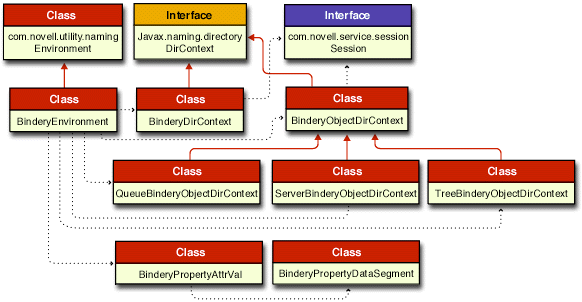
In this diagram of interfaces and classes a solid red line ending with a solid arrow represents an extension of a class. The dotted black lines ending with a small solid arrow imply some relationships between the different interfaces and classes. Links are provided to the Reference Guide documentation for each of these important bindery interfaces and classes.
- BinderyDirContext class extends the JNDI DirContext interface (via AtomicDirContext), and gets a session environment object from the Session interface.
- BinderyObjectDirContext class extends the JNDI DirContext interface (via AtomicDirContext), and is extended by the QueueBinderyObjectDirContext, ServerBinderyObjectDirContext, and TreeBinderyObjectDirContext classes. It also gets a session environment object from the Session interface.
- QueueBinderyObjectDirContext class extends the BinderyObjectDirContext class, and is used to federate into the Queue name space.
- ServerBinderyObjectDirContext class extends the BinderyObjectDirContext class, and is used to federate into the Server name space.
- TreeBinderyObjectDirContext class extends the BinderyObjectDirContext class, and is used to federate into the NDS name space.
- BinderyPropertyAttrVal class holds all information found in a Bindery Property, and is used as an attribute value attached to the properties attribute of a bindery object.
- BinderyPropertyDataSegment class holds a 128-byte data segment containing the data of a bindery property, and is used as an attribute value attached to the bindery properties attribute.
- BinderyEnvironment class extends the Environment class, and provides constants used by all other bindery classes.