2.8 Queue Management System (QMS) Provider
2.8.1 Introduction
The Queue Management System provider for JNDI allows the creation, submission, and servicing of queue jobs. The QMS service provides contexts that implement the behavior of NetWare queues and queue jobs through a central storage and queueing mechanism that enables users to create jobs that are added to the queue. The QMSQueue interface represents the central storage and queuing mechanism that is responsible for managing jobs placed in it. The jobs can be serviced remotely by an application at another node on the network. A queue job is an individual entry in the QMS queue. You can list, create, delete, and modify jobs in NetWare queues using JNDI methods.
Queues are the simplest and most direct of all the methods that developers can use to distribute processes on the network. Although not a suitable solution for all situations, QMS offers several advantages over other methods.
- Queues are managed through existing network tools and are suited to applications that deal with large workloads and that need the flexibility and control inherit in the queuing process.
- Security and access for queues are controlled by the network operating system. An application can ensure that only qualified users work with a job's related data.
- QMS provides great flexibility. Although every queue must adhere to QMS's standard structure, QMS allows applications to define their own specifications within the QMS format. Thus, queues can transmit information that is specific to a specialized service.
- The queue storage is centralized and accessible to a variety of clients.
The QMSQueue interface contains QMSJobs, which are created through the QMSQueue.createJob() method. Once the job is created, there are several job controls that can be set. When these controls have been set, a job is submitted to the queue through the QMSJob.submit() method, which returns an output stream used for storing job data. When the output stream is closed using the close() method, the job is ready for servicing.
A QMSJob can represent almost any application task, depending on how the developer has defined the job service protocol. One defined job service protocol is the Printing protocol, in which print jobs are submitted to a queue that is then serviced by a print server. The data to be printed is placed in the output stream provided when the print job is submitted to the queue.
Other job service protocols can be defined for handling any number of job types, including compile servers, archive servers, and so forth. The queue type and job type are useful in making sense of all the possible protocols. When a job is submitted to a queue, it can be targeted for a specific server, targeted to run after a specific time, given a useful description, and so forth.
Applications that service queue jobs are called job servers, which are required to register with (attach to) the queue before they can begin servicing jobs from the queue. Depending on the security requirements established for the queue, the job server will also be required to authenticate to the network before it can actually begin servicing jobs. This registry process helps guarantee that only authorized job servers are allowed to handle queue jobs.
The client that submits a job to a queue grants certain rights to the job server. For this reason, a queue maintains a list of authorized queue servers, users, and operators. In order for a job server to service jobs from a given queue, it must be in the queue server list, or have security equivalence to an object in the queue server list. The same applies for queue users and operators (managers).
2.8.2 QMS Components
The important components (interfaces and classes) of QMS are the following:
- QMSQueue interface provides the factory for and the central container (queue) responsible for managing QMSJobs placed in it.
- QMSJob interface represents a job (almost any application task) in the queue. The job service protocol must be defined by the developer.
- QueueDirContext class is an implementation class that represents a queue. It implements both the JNDI DirContext interface (via the AtomicDirContext) as well as the QMSQueue interface.
- QueueJobDirContext class is an implementation class that represents queue jobs. It implements both the JNDI DirContext interface (via the AtomicDirContext) as well as the QMSJob interface.
- QMSOutputStream class provides the standard output stream functionality to NetWare queue jobs.
- QMSEnvironment class defines the set of constant Strings that uniquely controls the behavior of queues and queue jobs. It also contains functions for managing the queues and queue jobs.
2.8.3 QMS Initial Context Implementation
In order to access the QMS interfaces and classes you must construct an initial context factory implementation for starting up the queue. Following is an example of how the QMS initial context factory implementation might be constructed.
   Hashtable properties = new Hashtable();

   property.put(Context.INITIAL_CONTEXT_FACTORY,

      "com.novell.service.qms.naming.qmsInitialContextFactory");

   property.put(Context.PROVIDER_URL, <server name>);

   DirContext initCtx = new InitialDirContext(properties);
After the initial context has been implemented, you can then get the session environment object using similar code to the following:
InitialContext initCtx = new InitialContext (hash);
hash = initCtx.getEnvironment ();
Session sess = (Session) hash.get (Environment.SESSION.OBJECT);
For a detailed discussion of initial context implementation, see Initial Context Implementations in the Novell Services Introduction.
2.8.4 Important QMS Methods
Listed below are some important QMS methods of which to be aware. For a complete list of available methods, go to the Reference Guide documentation.
- QMSQueue.createJob - Creates a new job (QMSJob) for this queue.
- QMSQueue.createJob - Creates and returns a QMSJob object for an existing job specified by its job ID.
- QMSQueue.listJobs - Returns an enumeration of jobs in this queue.
- QMSQueue.setState - Sets the state flag of the queue given the new settings (QS_CANT_ADD_JOBS, QS_SERVERS_CANT_ATTACH, or QS_CANT_SERVICE_JOBS).
- QMSQueue.getState - Returns the state of the queue as a bit mask. (See state flag settings above for QMSQueue.setState).
- QMSJob.submit - Submits a job into the queue and gets a QMSOutputStream back on which to write data.
- QMSJob.cancel - Cancels the job, removes it from the queue, and aborts the output stream if it is open.
- QMSJob.setPosition - Sets/adjusts the position of the job within the queue as specified by the newPosition parameter.
- QMSJob.getPosition - Returns the position of the job in the queue.
- QMSJob.setControlFlags - Sets the job control flags, which indicate the current status of the job. Available job control flags are: QF_AUTO_START, QF_ENTRY_OPEN, QF_ENTRY_RESTART, QF_USER_HOLD, QF_OPERATOR_HOLD.
- QMSJob.getControlFlags - Returns the job control flags for the job. See the job control flags above for QMSJob.setControlFlags.
- QMSJob.getFileName - Returns the queue job file name. This file is associated with the queue job when it is submitted.
- QMSOutputStream.abort - Aborts the currently open output stream. This will cancel the job that has been created on the stream.
2.8.5 Relationship of QMS Classes and Interfaces
The relationship between the QMS interfaces and classes is illustrated in the following diagram.
Figure 2-12 Queue Management Service Class Diagram
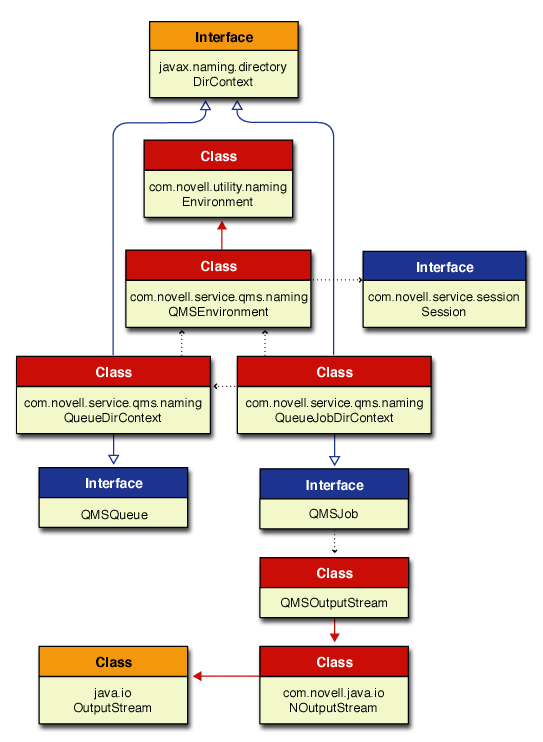
In this diagram of interfaces and classes a solid blue line ending with a hollow arrow represents an implementation of an interface. A solid red line ending with a solid arrow represent an extension of a class. The dotted black lines ending with a small solid arrow imply some relationships between the different interfaces and classes. Links are provided to the Reference Guide documentation for each of these important Server interfaces and classes.
- QMSQueue interface is implemented by the QueueDirContext class.
- QMSJob interface is implemented by the QueueJobDirContext class, and it writes data to the QMSOutputStream.
- DirContext interface is implemented by QueueDirContext and QueueJobDirContext via the AtomicDirContext. It is the directory service interface containing methods for examining and updating attributes associated with objects, and methods for searching the directory.
- QueueDirContext class implements both the JNDI DirContext interface (via the AtomicDirContext) and the QMSQueue interface.
- QueueJobDirContext class implements both the JNDI DirContext interface (via the AtomicDirContext) and the QMSJob interface.
- QMSOutputStream class extends the NOutputStream class and received data written to it by the QMSJob interface.
- QMSEnvironment class extends the Environment class and is associated with both the QueueDirContext and QueueJobDirContext classes.
- Environment class provides constants for environment variables associated with Novell JNDI providers.
- Session class provides a communication channel between the object that creates a session and the target object and provides methods that are common to all sessions.