4.1 HTTP Client Services Concepts
An HTTP client is an object that sends HTTP requests and receives HTTP replies. This section describes the following features of the HTTP client interfaces:
4.1.1 Requirements
NLMs using the HTTP client functions have the following requirements:
- NetWare 6.5 or later
- CLib or LibC functions to manage the NetWare resource tags
- The nwerror.h file from CLib for NetWare server error codes
4.1.2 HTTP Resources
The NetWare Remote Manager follows the HTTP/1.1 specification. For more information about this protocol and its specification, see Hypertext Transfer Protocol — HTTP/1.1.
4.1.3 Granular Requests
A granular request gives you complete control of the content of the request header, body data, and response handling. This process is illustrated in the following graphic and then explained in the following paragraphs.
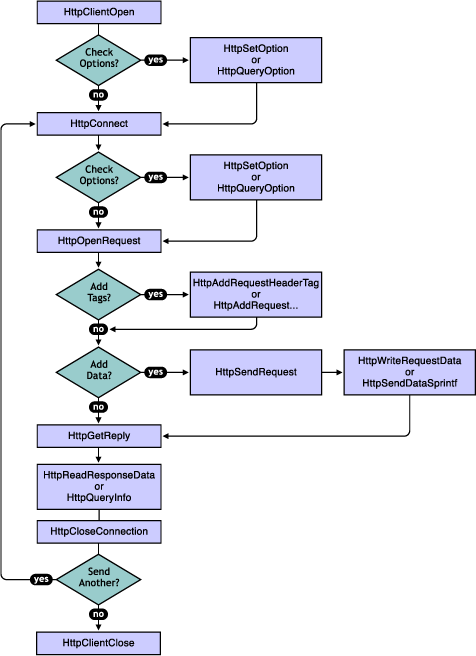
Starting the request. All granular requests start with calling the following functions in the order listed:
After HttpClientOpen or HttpConnect, you can call HttpSetOption to set the connection timeout for the connection or globally for the client, but this isn't required. You can also call HttpQueryOption to determine the current connection timeout for the handle.
What you call after HttpOpenRequest depends upon whether the request is complete or whether you need to add header tags or data. If the request is complete, you call the following function:
Adding to the request. If you have additional header tags to add after calling HttpOpenRequest, you call HttpAddRequestHeaderTag or one of the specialized header tag functions. If you have no data to add, you call the following function:
If you have data to add to the request, you call the following functions after you have added your request header tags:
Handling the reply. You call the following functions when the reply is received:
If you have additional requests, the client does not need to be closed, just the connection. You can reuse the client handle to open the connection again to send another request. However, HttpCloseConnection must be called after a reply has been received and the information digested. If the process errors out before receiving a reply, the HttpCloseConnection must be called to release the handle allocated with the HttpConnect call.
4.1.4 Synchronous or Asynchronous Mode
The HTTP client functions that actually send the request and receive the reply (such as HttpGetReply) can be used synchronously or asynchronously. If used synchronously, the function blocks until the reply is received. The synchronous mode should be used when sending a single request at a time and when blocking (sometimes for a long time for a busy of downed server) is not a problem. If used asynchronously, the function returns immediately with a return code that indicates that the request has been sent or that an error occurred. If an error occurred, the callback function is never called. If the request was handled successfully and sent, the callback function is called when the reply returns.
If your application handles lots of connections, you need to use the asynchronous mode of the functions. An application which handles multiple connections should not be designed to have a dedicated thread for each connection. Such a design uses too many resources. The asynchronous mode allows you to share the threads among the connections, and these functions provide a pContext parameter for you to pass any type of context data that you need to resume processing the reply.
The following functions support both a synchronous and an asynchronous mode:
4.1.5 Header Request Tag Functions
Currently, the HTTP client interface supports only a few functions for adding tags to the request header. Most tags can be added by using the generic function, HttpAddRequestHeaderTag. The following are available to add specialized tags: