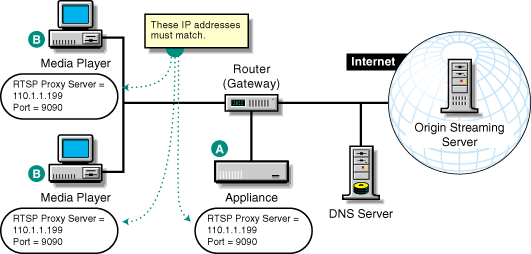
Figure 31 provides a visual map for the information in this section.
NOTE: The letters in Figure 31 are referenced in the table that follows. The addresses shown are for illustration purposes only. You will need to substitute actual addresses for your network.
Figure 31
Set up forward proxy services as follows:
| To | Do This | Notes |
|---|---|---|
Ensure your basic network configuration is complete |
|
|
Set up the appliance to work around firewall limitations |
For guidelines and more information, see Getting QuickTime Streaming Content Through Firewalls. |
The choices you have depend on whether the players on your network will use HTTP tunneling or UDP, RTSP. |
Enable streaming forward proxy services on the appliance |
|
See A in Figure 31. IMPORTANT: Enabling streaming forward proxy services is required even if HTTP tunneling is employed. For more information, see Forward Streaming Services (RTSP). |
(Optional) Enable HTTP tunneling support |
|
When using HTTP tunneling, the appliance uses RTSP to communicate with the origin streaming server. Because RTSP traffic can't pass through most firewalls, you must configure the appliance to work around this issue. For more information, see Getting QuickTime Streaming Content Through Firewalls. |
Enable the client players to use RTSP unless a firewall separates the player from the appliance (See the Important in the Notes column.) |
Player setup procedures vary slightly, depending on the version of QuickTime you are using. For example, in QuickTime 5, you do the following:
|
See B in Figure 31. Use the appliance's checked IP address as the address for the forward proxy server. Be sure to specify port 9090, as configured on the appliance. IMPORTANT: If the appliance is on the other side of a firewall, you must configure the player to use HTTP. |
Enable the client players to use HTTP |
Player setup procedures vary slightly, depending on the version of QuickTime you are using. For example, in QuickTime 5, you do the following:
|
See B in Figure 31. Use the appliance's checked IP address as the address for the forward proxy server. Be sure to specify port 8080, as configured on the appliance. IMPORTANT: This option is required when the player and appliance are separated by a firewall. |