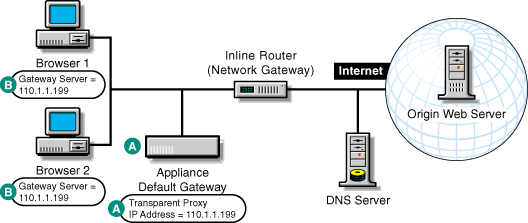
Figure 16 provides a visual map for the information in this section.
NOTE: The letters in Figure 16 are referenced in the table that follows. The addresses shown are for illustration purposes only. You will need to substitute actual addresses for your network.
Figure 16
| To | Do This | Notes |
|---|---|---|
Ensure your basic network configuration is complete |
|
|
Set up transparent proxy services on the appliance |
|
See A in Figure 16. For more information, see Transparent Handling Tab. |
Set up the appliance as a router |
|
See A in Figure 16. For more information, see Router Capabilities and Router Options Dialog Box. |
Configure the client workstations to use the appliance as their gateway |
Refer to setup instructions for the system. The procedure is different for each platform. On a Windows 95/98/NT workstation, for example, right-click the Network Neighborhood icon on the desktop. |
See B in Figure 16. Use the transparent proxy IP address as the gateway IP address. |