Path: Cache > Web Server Accelerator
Figure 107
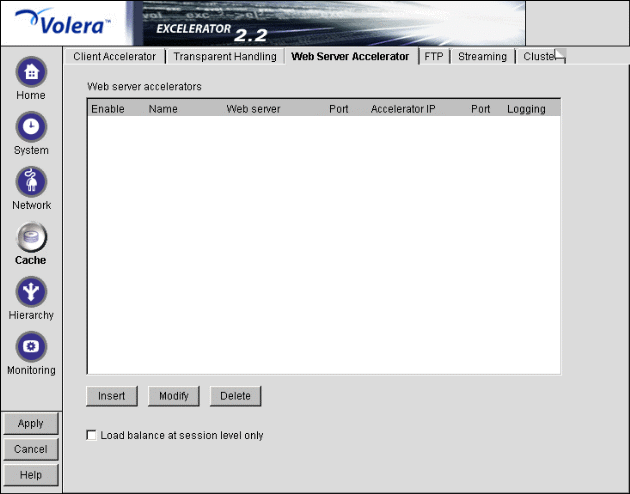
The Web Server Accelerator tab lets you add one or more Web server (reverse proxy) accelerators. The appliance acts as the front end to Web servers on your Internet or intranet and off-loads frequent requests, thereby freeing up bandwidth. Using a Web server accelerator also increases security because the IP addresses of your Web servers are hidden from the Internet. For more information, see Overview of Web Server Acceleration.
Field names shown in the Web Server Accelerators list are explained in Web Server Accelerator Dialog Box.
Load Balance at Session Level Only: Checking this box causes the appliance to use the same Web server for all fills during a session. This prevents e-business users from having to log in multiple times. This setting affects all Web server accelerators configured on the appliance.
Path: Cache > Web Server Accelerator > Insert
Figure 108 
The Web Server Accelerator dialog box lets you create Web server accelerator services for handling requests to Web servers.
IMPORTANT: Accelerators and tunnels are incompatible. You can either configure an accelerator (includes multiple multihoming accelerators) on an IP address and port or configure one tunnel on an IP address and port.
Enable This Accelerator: Specifies whether to enable the defined Web server accelerator after you have configured it. The default is Enabled.
Name: Name of the Web server accelerator service. Each Web server accelerator service requires a name you create. For example, you can select a name that indicates which Web server is being serviced by the appliance, or alternately, a set of browsers configured to access the Web server accelerator as a proxy server. A valid name consists of a DOS-style, eight-character name with no special characters or spaces.
If logging is enabled, the appliance uses the Web server accelerator name as the name of the directory in which the log files are kept.
DNS Name: The contents of this field depend on the type of accelerator you are using.
If you are accelerating multiple Web servers for multiple Web sites on the same IP address, you must create a Web server accelerator definition for each DNS name that is used in browser requests. This name must exactly match one of the names in the requests. See Standard Multihoming for Multiple Web Sites.
If you are accelerating multiple Web servers for a single Web site and plan to use path-based multihoming, you must use the same DNS name in every accelerator definition.
If you specify one or more DNS names in the Web Server Addresses list and those names are different than this DNS name, the system creates an automatic DNS name override that replaces those names with the service's DNS name in all object references that point to Web server's accelerated by the service. For more information, see Understanding When Automatic URL Overrides Are Created.
This name is also used if the appliance is part of an ICP hierarchy that needs to resolve relative URLs.
Enable Logging for This Accelerator: Causes log files to be kept for this Web server accelerator.
Web Server Port: The port number that the origin Web server is listening on for incoming connections. The default for HTTP is 80. The valid port range is 1 through 65535.
Accelerator Proxy Port: The port number that the proxy server is listening on for incoming connections. The default for HTTP is 80. The valid port range is 1 through 65535.
IMPORTANT: Configuring both a tunnel and an accelerator on the same IP address and port is not supported.
Web Server Addresses: The IP address or local DNS name of each Web server from which the appliance fills the cache for this Web server accelerator. The cache must be able to fill all requests through any of these names or addresses unless path-based multihoming is being used, in which case the device will refer first to the parent accelerator and then to the appropriate child accelerator based on the Sub-Path Match String entered in the Path Rule Options Dialog Box.
Accelerator IP Addresses: For normal accelerator situations, non-path-based multihoming configurations, and accelerators configured as multihoming masters, this is the appliance's IP addresses to which DNS resolves the Web server's (or Web site's) DNS name and on which the Web server accelerator listens for incoming connections from the Internet.
For child accelerators in path-based multihoming configurations, this is the IP address or addresses to which the multihoming master forwards browser requests that match the specified path rule.
URL Override: This dialog box lets you create additional URL overrides for the accelerator service you are configuring.. For details, see URL Override Dialog Box.
Use Hostname Sent by Browser (Multi-homing Web Server): When selected, this option preserves the hostname in the HTTP header exactly as it came in the browser request. This disables any DNS name URL overrides that would normally apply.
Act as a Tunnel: Lets you create one or more accelerator services for the specific purpose of tunneling non-HTTP traffic through the appliance to the origin Web server. Normally an accelerator service processes HTTP requests in order to fill them. However, it is not unusual that some of the traffic coming through the appliance is not HTTP-based.
Web servers often handle SSL connections, and less frequently they might need to let Telnet, FTP, chat, or other kinds of traffic through without attempting to process it.
When the Act as a Tunnel option is checked, the accelerator sets up a tunnel for all incoming traffic. Because tunnels are already limited (they can only connect to the fill Web server on the specified fill port), they are much more secure than connections to forward or transparent services that use the CONNECT method. For more information on CONNECT security concerns, see Managing HTTP CONNECT Method Support.
When you check the Act as a Tunnel option, you have the additional option of having the accelerator service tunnel only SSL traffic.
IMPORTANT: Configuring both a tunnel and an accelerator on the same IP address and port is not supported.
Tunnel Only SSL Traffic: If you decide to have the accelerator act as a tunnel, you can elect to have it tunnel only SSL traffic. The service will then verify that the address and port being accessed are actually an SSL Web site. If verification fails, the service will tear down the connection.
Alternate Hostname: Checking this option causes the string specified to be substituted for the hostname in the HTTP header before the request is forwarded to the Web server.
This field is required in two circumstances:
Enable X-Forwarded-For: Headers used to pass browser ID information along with browser request packets. If the headers are included, Web servers can determine the origin of browser requests they receive. If the headers are not included, browser requests have anonymity.
Checking the X-Forwarded-For option causes the appliance to either add information to an existing X-Forwarded-For or Forwarded-For header, or to create a header if one doesn't already exist.
Leaving the option unchecked causes the appliance to remove X-Forwarded-For headers from any Web accelerator requests passing through the appliance.
You must weigh the desires of browser users to remain anonymous against the desires of Web server owners (e-commerce sites, for example) to collect data about who is accessing their site.
Return Error If Hostname Sent by Browser Does Not Match Accelerator DNS Hostname: Checking this option causes Excelerator to match the hostname in the DNS header that came from the browser against the DNS name specified in this accelerator definition. If the names don't match, the request is not forwarded to the Web server. Instead, Excelerator returns an error to the requesting browser.
Enable Authentication: Checking this box causes the appliance to require authentication of users wanting to use its Web server accelerator services. Clicking Authentication Options displays the Add Authentication Profiles dialog box. For more information, see Add Authentication Profiles Dialog Box.
Enable Secure Excelerator: If you have installed Secure Excelerator on this cache device, you can check this option to enable the service to work with Secure Excelerator. Click Secure Excelerator Options to configure the Secure Excelerator options. For more information, see the Volera Secure Excelerator 1.1 Administration Guide.
SSL Listening Port: The port on which the appliance listens for authentication requests.
IMPORTANT: Each service (including authentication) must use a unique IP address and port combination. The default authentication port is 443. Attempts to enable authentication for more than one service on the same IP address and port will result in a TCP bind error.
Certificate: This drop-down list displays any certificate you have stored on your appliance. System-generated certificates do not appear in the list.
Use this field to select the certificate you created specifically for the Web server accelerator you are creating. This will prevent browsers from receiving certificate confirmation messages each time they access the appliance. For more information, see Managing Appliance Certificates.
Enable Path-Based Multihoming: Allows you to create child accelerators for path-based multihoming configurations. This option is enabled only when you have created another accelerator definition and have not created a standard multihoming relationship between previously defined accelerators on the appliance. In other words, it is enabled if you don't have multiple accelerators sharing the same accelerator IP address and port.
When you enable path-based multihoming for the accelerator you are defining, you must also click the Path-Based Options button and specify a path rule that the multihoming master can use to route traffic to the accelerator you are defining.
You will also notice that if you have created multiple accelerators that can function as multihoming masters, when you select a name in the Multihoming Master drop-down list, the DNS Name, Accelerator Proxy Port, and Accelerator IP Addresses selections dynamically change to match the accelerator whose name you have selected. For more information regarding path-based multihoming, see Multihoming and Path-Based Support.
Multihome Master: This drop-down list contains the names of accelerators you have defined that can function as multihoming masters, meaning they are not configured as child accelerators to other multihoming masters.
Enable Custom Cache Control Header: Checking this option and clicking Header Options provides access to the Custom Cache Control Header dialog box.
For more information, see Custom Cache Control Header Dialog Box.
Enable Access Control: <>. For details, see Access Control Options Dialog Box.
Advanced Options: Lets you control the TCP receive window size for cache device fills from origin Web servers, the caching of objects on the cache device that would not normally be cached, and the filling and vending of browser no-cache requests by the cache device. For details, see Advanced Options (Tuning) Dialog Box.
Path: Cache > Web Server Accelerator > Insert > URL Override
Figure 109 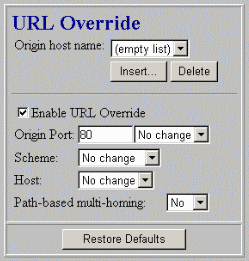
This dialog box lets you create additional URL overrides for the accelerator service you are configuring. For more information regarding URL overrides, see Transforming Content for Internet Delivery.
Origin Host Name: The internal DNS name of the origin Web server for which you are creating the override.
IMPORTANT: The Origin Host Name cannot be a DNS name listed in the Web Server Addresses list of the service. Automatic DNS name overrides are already created for these names. However, if the entry in the Web Server Addresses list is an IP address, this name could be the internal DNS name associated with that address since an automatic DNS name override would not be created for the address entry.
Enable URL Override: Selecting this option enables the override for the service.
Origin Port: The internal port number you want to change.
Scheme: You use this option only in connection with Secure Excelerator. For more information see, the Volera Secure Excelerator 1.1 Administration Guide and Understanding URL Overrides.
Host: You select this option to create additional DNS name overrides. For more information, see Understanding URL Overrides.
Path-Based Multihoming: You use this option to create additional child accelerator service overrides. For more information, see Understanding URL Overrides.
Path: Cache > Web Server Accelerator > Insert > Enable Path-Based Multihoming > Path Rule Options
Figure 110 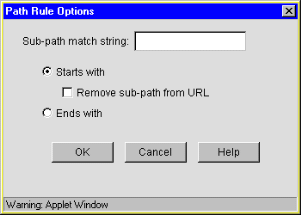
This dialog box lets you specify a string that, if present in the browser request, will cause the multihoming master accelerator to route the request to the child accelerator being defined.
The string match can occur immediately following the DNS name (the Starts With option) or at the end of the URL (the Ends With option).
Sub-Path Match String: The string the multihoming master will compare against the browser request. If the string is not found at the beginning of the URL path, the multihoming master accelerator attempts to fill the request through the Web server addresses in its accelerator definition. If the string is found, the multihoming master accelerator routes the request to the child accelerator defined for the matching string. For more information on path-based multihoming, see Multihoming and Path-Based Support. For more information on creating additional match strings for other child accelerators whose objects references also need to be transformed, see Understanding URL Overrides.
Starts With: When checked, this option indicates to the multihoming master that the Sub-Path Match String field contains a path that might immediately follow the DNS name in the browser request. If the string matches the path in the request, the multihoming master forwards the request to the child accelerator being defined.
IMPORTANT: The initial forward slash (/) must not be included in the string because Excelerator automatically inserts it into the rewritten path.
Remove Sub-Path from URL: Check this option if the path string doesn't actually appear at the root of the Web server. If this option is checked, the string is stripped from the request before the request is sent to the Web server. This probably indicates that the object is at the root of the Web server. If this option is not checked, the matched string is retained in the request sent to the Web server.
Ends With: When checked, this option indicates to the multihoming master accelerator that the Sub-Path Match String field contains a file extension, such as gif, jpg, mpg, or cgi. If a match is found at the end of the browser request, the multihoming master will route the request to the child accelerator being defined.