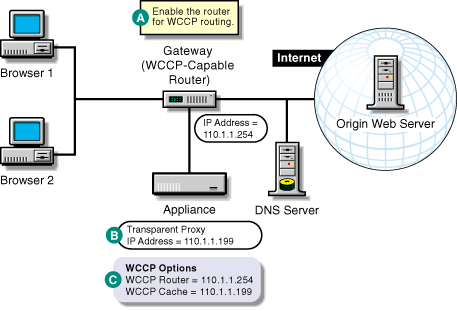
Figure 15 provides a visual map for the information in this section.
NOTE: The letters in Figure 15 are referenced in the table that follows. The addresses shown are for illustration purposes only. You will need to substitute actual addresses for your network.
Figure 15
| To | Do This | Notes |
|---|---|---|
Ensure your basic network configuration is complete |
|
|
Enable WCCP routing on the router |
|
See A in Figure 15. A WCCP-capable router can service more than one transparent proxy server. |
Set up transparent proxy services on the appliance |
|
See B in Figure 15. When transparent proxy is enabled, it is active for all IP addresses on the appliance, except those addresses configured for origin Web server acceleration services on the same port. For more information, see Transparent Handling Tab. |
Register the appliance with a WCCP version 1 router if the routers on your network use WCCP version 1 |
|
See C in Figure 15. The Proxy Name and Farm Name fields on the WCCP options form are text strings for your reference. They have no other function. The appliance needs the WCCP Router IP address in order to register with the router. The router needs the WCCP Cache IP address to know where to send browser requests. An appliance can register with only one WCCP-capable router. If WCCP routing isn't working, try entering the get stats wccp command on the command line. Check the configuration for problems. For more information, see WCCP Version 1.0 Options Dialog Box. |
Register the appliance with the WCCP version 2 routers if the routers on your network use WCCP version 2 |
|
See C in Figure 15. The router needs the WCCP Cache IP address to know where to send browser requests. Excelerator needs one or more WCCP router IP addresses in order to register with the routers. An appliance can register with multiple WCCP version 2 routers. If WCCP routing isn't working, try entering the get stats wccp command on the command line. Check the configuration for problems. For more information, see WCCP Version 2.0 Options Dialog Box. |