Path: Hierarchy > ICP/CERN Configuration
Figure 152
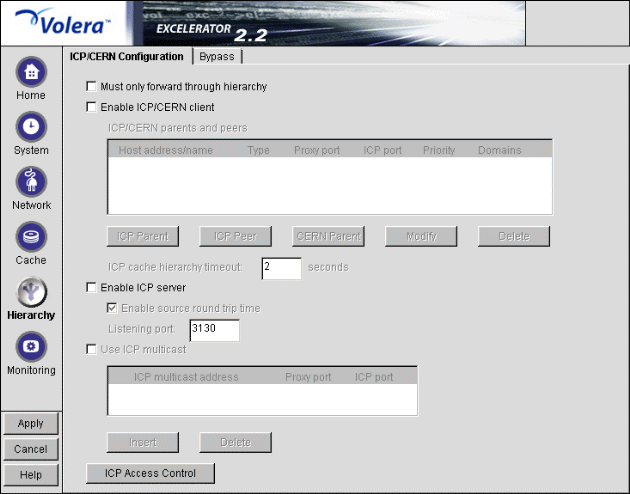
The ICP/CERN Configuration tab lets you configure the appliance to participate in ICP and CERN hierarchies.
Must Only Forward through Hierarchy: Forces the appliance to always forward requests through the hierarchy. This is required in cases where the appliance would normally bypass the hierarchy. For example, the appliance would not normally access the hierarchy to get a non-cachable object. However, if its only path through the firewall is through the hierarchy, this box must be checked.
Additionally, you can make the appliance more secure behind a firewall by configuring it with a CERN parent that does DNS resolution and by checking this option. Otherwise, the appliance always attempts DNS resolution.
IMPORTANT: Enabling this option can potentially disrupt appliance-based filtering. For more information, see Critical Information about Filtering in CERN and ICP Hierarchies.
Enable ICP/CERN Client: Enables the appliance to function as a child to both CERN and ICP parents and as a peer to other ICP servers in the hierarchy. This box must be checked for the appliance to request and accept data from hierarchies.
ICP/CERN Parents and Peers: A list of other proxy servers you define as peers or parents of the appliance using the ICP Parent Dialog Box, the ICP Peer Dialog Box, and the CERN Parent Dialog Box.
By creating this list, you link the appliance into hierarchical relationships with other members of the hierarchy. You create hierarchical peer and parent relationships between the appliance and other members of the hierarchy.
The appliance's ICP client supports both ICP and CERN access and is dynamically configured, depending on the types of peers and parents (ICP or CERN) defined for the appliance.
NOTE: As you create the list, remember that in ICP you can configure another proxy server as either a peer or as a parent to the appliance, but not both. Only one relationship in the hierarchy is allowed.
ICP Cache Hierarchy Timeout: Specifies how long the appliance waits for a response from ICP servers (parents and peers) before directly requesting that the ICP parent or origin server fill the request. Valid field values range from 0 through 3600 seconds.
Enable ICP Server: Enables the appliance to be accessed as an ICP parent or ICP peer by other appliances in an ICP hierarchy. (A CERN parent is simply a forward proxy serving a second forward proxy [its child] and requires no special configuration.)
IMPORTANT: ICP and CERN servers must also be configured as forward proxy (HTTP) servers. The ICP service locates a URL; the forward proxy service returns the data. For this reason, an appliance that is an ICP server must have forward proxy services activated and IP addresses checked in the Proxy IP Addresses list. (See Client Accelerator Tab.)
Enable Source Round Trip Time: Enables the appliance to measure entire ICP hierarchy aggregate times for the routes it uses and to determine which routes to pursue first when seeking data. If this box is unchecked, the appliance chooses routes based strictly on local ICP hierarchy round-trip times sorted by priority.
Source round-trip time is an ICP function and is not available in CERN hierarchies.
Listening Port: The port that the appliance listens on for ICP traffic. The industry standard port number for ICP traffic is 3130.
Valid port numbers are 0 through 65535.
Use ICP Multicast: Enables each multicast-enabled appliance in a multicast group to accept multicast requests transmitted to the group's multicast address. A multicast group is a group of ICP peers that communicate with each other about caching information by using a single multicast address you designate.
You can create a multicast group composed of ICP peers by completing the following steps for each member of the group:
Check both the Enable ICP Client and Enable ICP Server options.
Check Use ICP Multicast > specify the multicast address you have assigned to the group > specify the ports on which the multicast group handles HTTP proxy and ICP traffic.
Multicast addresses are Class D addresses (the first decimal number in the dotted decimal notation is in the range of 224 to 239, inclusive).
This setting must be identical for each member of the group.
Click Apply.
Repeat the process on each appliance that is a member of the multicast group.
For more information on multicasting, see the Web.
ICP Access Control: Clicking this button opens the ICP Access Control dialog box. See ICP Access Control Dialog Box.
Path: Hierarchy > ICP/CERN Configuration > Enable ICP/CERN Client > ICP Parent
Figure 153 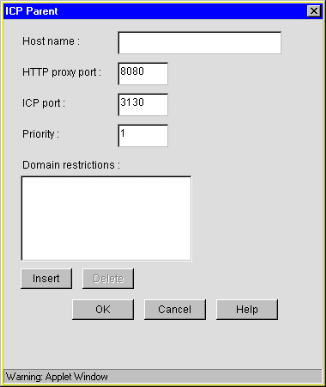
The ICP Parent dialog box lets you define an ICP parent for the appliance.
Hostname: The IP address or DNS name of the ICP parent.
HTTP Proxy Port: The port on which the parent services HTTP request.
ICP Port: The port on which the parent services ICP requests.
Priority: The priority the appliance should follow when evaluating which ICP parent to access after the initial request has timed out. Parents with lower priority numbers are accessed first, assuming their source round-trip times are relatively equal.
Domain Restrictions: Determines whether the appliance requests data through this ICP parent. If the request is to one of the domains in this list, the client considers this parent when selecting a server. If the requested domain is not listed, this parent is not considered.
If the list is empty, the client considers the parent for requests to all domains.
A domain can be a fully qualified domain name (FQDN). If it is, the client considers using the parent only for requests to a specific host. Domain restrictions are used to create virtual hierarchies for expediting request resolution.
Virtual hierarchies should contain parents without domain restrictions (for default request resolution) in addition to the more restrictive hierarchies defined by domain restrictions.
Path: Hierarchy > ICP/CERN Configuration > Enable ICP/CERN Client > ICP Peer
Figure 154 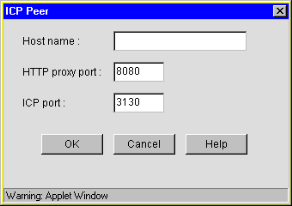
The ICP Peer dialog box lets you define an ICP peer for the appliance.
Hostname: The IP address or DNS name of the ICP peer.
HTTP Proxy Port: The port on which the peer services HTTP requests.
ICP Port: The port on which the peer services ICP requests.
Path: Hierarchy > ICP/CERN Configuration > Enable ICP/CERN Client > CERN Parent
Figure 155 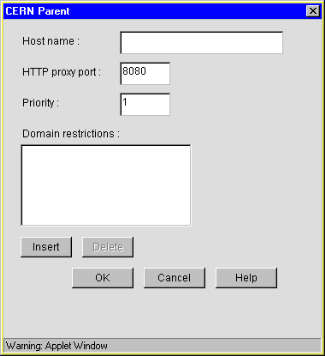
The CERN Parent dialog box lets you define a CERN parent for the appliance.
Hostname: The IP address or DNS name of the CERN parent.
HTTP Proxy Port: The port on which the parent transmits HTTP requests.
Priority: The priority that the appliance should follow when evaluating which CERN parent to access. Parents with lower numbers are accessed first as the primary route.
If you are creating hierarchical routes using domain restrictions and you define the same route (domain restrictions) for multiple CERN parents, you must ensure that one of these parents is the primary parent for these restrictions. The primary parent has the lowest (meaning the first) priority number.
Domain Restrictions: Determines whether the appliance requests data through this parent. If the request is to one of the domains in this list, the client considers the parent when selecting a server. If the requested domain is not listed, the parent is not considered.
If the list is empty, the client considers the parent for requests to all domains.
A domain can be a fully qualified domain name (FQDN). If it is, the client considers using the parent only for requests to a specific host. Domain restrictions are used to create virtual hierarchies for expediting request resolution.
Hierarchy routes consist of one hierarchy route for parents without domain restrictions and a route for each restricted domain.
Virtual hierarchies should contain parents without domain restrictions (for default request resolution) in addition to the more restrictive hierarchies defined by domain restrictions.
Path: Hierarchy > ICP/CERN Configuration > Access Control
Figure 156 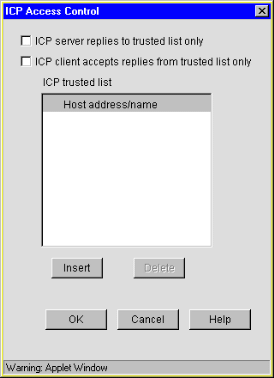
The ICP Access Control dialog box lets you define the ICP proxy servers with which the appliance will communicate.
ICP Server Replies to Trusted List Only: If this boxed is checked, the appliance will allow only those child and peer proxies listed in the ICP Trusted List to access and use its forward proxy services.
If the box is not checked, the appliance will allow access by all ICP neighbors.
ICP Client Accepts Replies from Trusted List Only: If this box is checked, the ICP client will only accept responses from the appliances listed in the ICP Trusted list.
If the box is not checked, the client will accept responses from any of its ICP neighbors.
ICP Trusted List: This list contains the unicast addresses of ICP neighbors and ICP multicast neighbors.