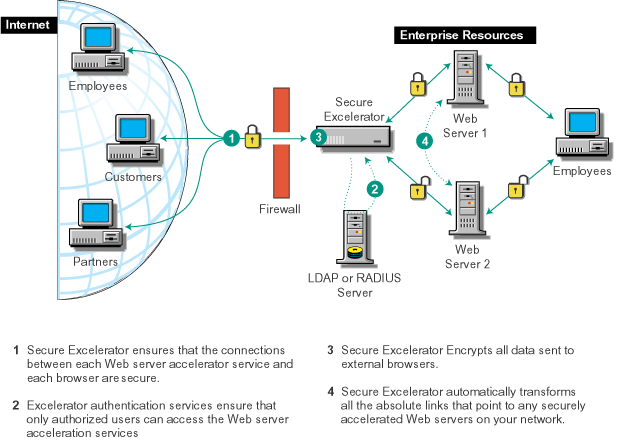


By adding the Secure Excelerator module to your Excelerator appliances, you can:
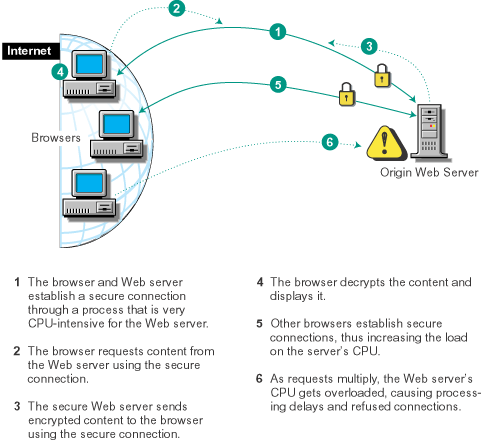
Establishing and maintaining secure connections between a Web server and the browsers it services takes more processing power than any other Web server tasks. The work required to encrypt and decrypt data is especially taxing.
As additional browsers request connections, the Web server's processor load increases. When the upper limits of processing resources are reached, requests bog down as they wait their turn. Eventually, as illustrated in Figure 2, the Web server has to refuse browser requests.
Figure 2
Much of the content sent through secure connections is the same for each browser request. This means that a secure Web server must use its processing cycles to repeatedly encrypt the same content.
Just as Excelerator appliances cache content and offload redundant content requests from Web servers, Secure Excelerator offloads the repeated encryption of the content.
As a result, the Web server's processor is freed up for one-time, non-cacheable events, such as finalizing online purchases and providing account or credit balance information.
Secure Excelerator also works with multiple processors on a single appliance. This means that you can scale the appliance to handle very heavy secure-connection loads as the demand for secure content increases.
Figure 3 illustrates how Secure Excelerator offloads the secure connection overhead from the Web server.
Figure 3 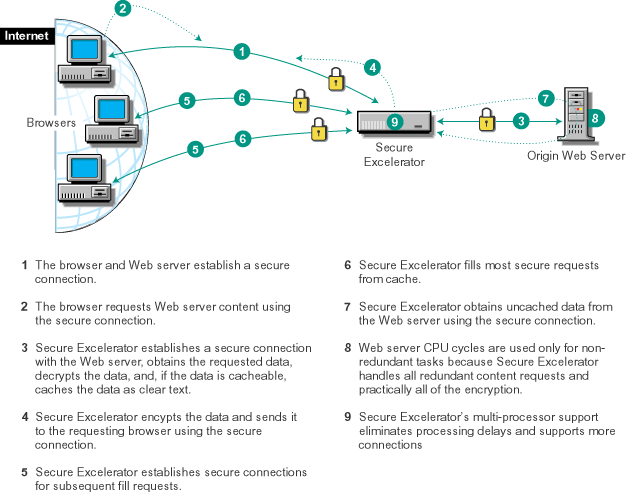
Companies with enterprise networks have traditionally erected strong firewalls to protect the data on their network.
However, changes in business dynamics have created a need to provide access through the firewall (see Figure 4).
Figure 4 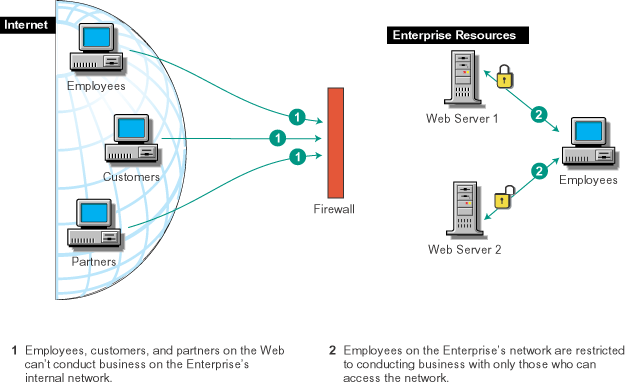
Opening access through the firewall usually requires that you address the following issues:
Authentication: Ensuring that each secure connection is with someone who is authorized to access the network.
Each Web server must ensure that every user seeking access is verified by a trusted authentication source. Also, each Web server must work with all the authentication sources that are used.
Encryption: Encrypting all content passing through the firewall.
All data must be encrypted before it is transmitted on the Internet. This ensures that only the intended receiver can decrypt and view the content.
Secure Connections: Obtaining SSL certificates for each of the Web servers being accessed from the Web, including any servers that are cross referenced in any content being served.
Link Modifications: Enabling the protocol schemes in all content links to work with SSL.
This requires one of the following actions:
Or
DNS Modifications: Accommodating the use of internal and external DNS hostnames.
For security and other reasons, organizations normally use internal DNS hostnames for their intranet Web servers. They use different DNS hostnames for the same servers when they expose intranet content to the outside world.
Using different hostnames for internal and external access requires two things:
Volera Secure Excelerator doesn't require you to change your existing Web servers or their content to provide secure access through a firewall.
Streamlining Authentication: You can leverage Excelerator's authentication services so that users log in once for your entire domain.
You enable Excelerator's authentication services by defining one or more authentication profiles and enabling each Web Server Acceleration service to use an authentication profile.
This ensures that only those who are authorized can access your secure content. For more information, see Identifying Authentication Sources for Users and Setting Up Authentication Profiles .
Transforming Links: In addition to encrypting and securing all content that is sent to browsers on the Web, Secure Excelerator can eliminate the manual rewriting of URL links within the content on your Web servers. For more information, continue with the next section, How Secure Excelerator Transforms Links .
If you understand the process Secure Excelerator uses to determine which links to transform, you can ensure that:
Only absolute links that include the protocol scheme (HTTP) and a full DNS hostname can be transformed.
For example, Secure Excelerator would rewrite the following link if all other conditions for transforming links are met:
<A HREF="http://Inhouse1.foo.org/products/describe.htm">Click here.</A>
NOTE: Relative links do not need to be transformed.
If an absolute link references content on a Web server that the Excelerator appliance is securely accelerating, the link can be transformed.
For example, the following table shows which links to Web servers on a given network could be transformed:
If the requirements in Only Absolute Links Are Transformed and Links Must Reference Content on Accelerated Web Servers are met, Secure Excelerator will transform non-secure links that meet the requirements illustrated in Figure 5.
Figure 5 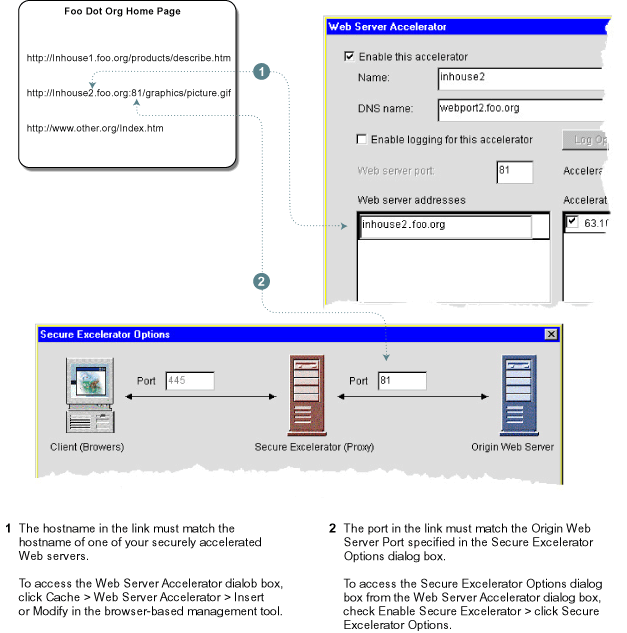
Information on setting the Web Server Address and Port shown in Figure 5 is contained in Configuring the Web Server Acceleration Services .
Secure Excelerator does the following to qualified absolute URLs:
For example, the DNS hostname inhouse1.foo.org might be changed to webport1.foo.org.
HTTP becomes HTTPS.
Figure 6 illustrates the Secure Excelerator content transformation process.
Figure 6 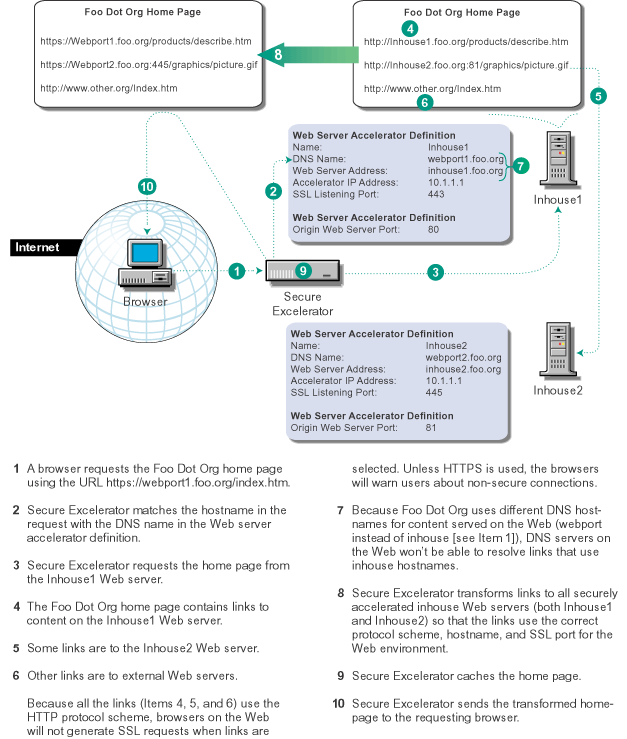
Figure 7 is a visual summary of how Secure Excelerator can connect your internal network to the Web.
Figure 7