


How to create a bean reference in the deployment descriptor and look it up at runtime.
See the part on developing Enterprise JavaBeans in the Programmer's Guide |

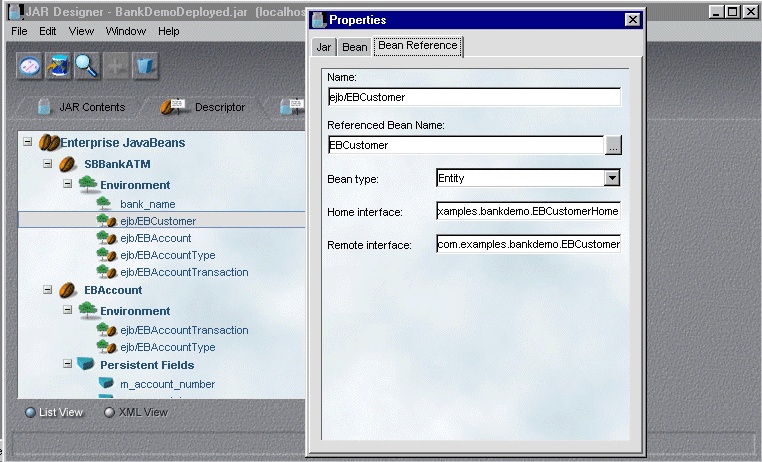
To use the JAR Designer to add a bean reference to the deployment descriptor, you add the reference entry and specify its properties as shown here:
The information in the deployment descriptor includes the following:
The SBBankATMBean finds out about the entity beans that it manages in the initializeSessionBean() custom method. To get the bean references, the intializeSessionBean() method does the following:
If it is not able to get find one of the bean references, the method throws an EJBException which is an unrecoverable error.
Here's the code that does a lookup for the EBCustomer bean and the EBAccount bean:
  try
    {
     m_initialContext = new javax.naming.InitialContext();
     Context contextEnv =
       (Context) m_initialContext.lookup("java:comp/env");
     }
  // The Environment name specified in the EJB jar must match the //name below.
     Object objEntityBeanLookup = (Object)    contextEnv.lookup("/ejb/EBCustomer");
     m_EBCustomerHome = (EBCustomerHome)
       PortableRemoteObject.narrow(objEntityBeanLookup,
        com.examples.bankdemo.EBCustomerHome.class);

  // Then, get our EBAccountHome
      objEntityBeanLookup = (Object) contextEnv.lookup("/ejb/EBAccount");
      m_EBAccountHome = (EBAccountHome)
      PortableRemoteObject.narrow(objEntityBeanLookup,      com.examples.bankdemo.EBAccountHome.class);
  }
  catch (Exception e)
  {
       String sErrorMessage = e.toString();
  //This is an unrecoverable error, so throw an EJBException
     throw new EJBException(sErrorMessage);}
  }
 Related reading