Understanding Kerberos Integration with eDirectory
In a Kerberos system, the entities in a network are called principals and a logical grouping of principals is called a realm.
In Novell Kerberos KDC, the realms and principals of Kerberos are mapped to eDirectory as shown in the following table:
Table 2. Kerberos Mapping With eDirectory
You can create realms in eDirectory and add principals to these realms.You can associate these realms and principals to one or more eDirectory users. For information on creating realms, adding principals and managing them, refer to Managing Novell Kerberos KDC.
You need to create the realms under the Kerberos container that can be located anywhere in the eDirectory tree. This helps you to administer the Kerberos objects easily.
Figure 2Kerberos Integration with eDirectory
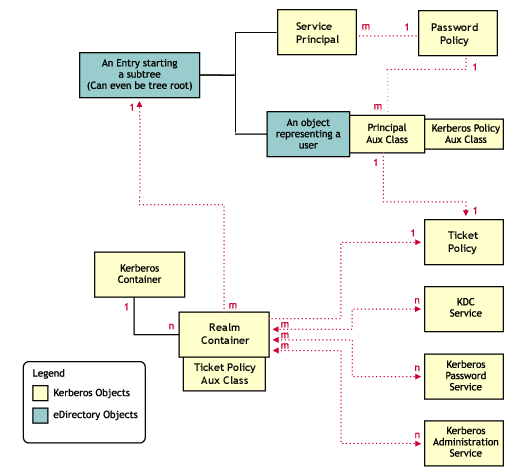
The following diagram illustrates how the Kerberos data is mapped in eDirectory:
Figure 3eDirectory and Kerberos Mapping
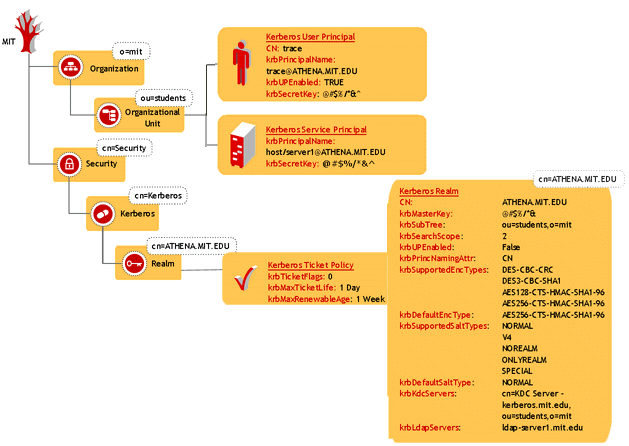
This section provides information on:
- Kerberos Container
- Realm Container
- Principal Objects
- Kerberos Service Objects
- Ticket Policy Object
- Password Policy Object
- Administrative Considerations While Integrating Kerberos with eDirectory
Kerberos Container
Kerberos container contains only the realm objects. All the realm objects in the tree are placed in this container. This makes the Kerberos administration easier. The Kerberos container can be located anywhere in the tree but the location of the container is stored in the security container.
The Kerberos container can be
- In the security container under the root (default); or
- Under any sub-tree or container
IMPORTANT: Make sure that Kerberos container is replicated on all eDirectory servers that Kerberos services (KDC, Administration, and Password services) are configured with.
Realm Container
The realm container stores the realm name and related realm information for Kerberos authentication and administration, password management servers to process requests. This object contains krbtgt, kadmin/admin, kadmin/changepw, kadmin/history, internal principals, and any other service principal.
Realm Container Attributes
The following table describes the realm container attributes:
Table 5. Description of the Realm Container Attributes
Realm Container Associations
The following table describes the objects and servers you can associate the realm container to:
Table 6. Realm Container Associations
Principal Objects
A Principal is a fundamental entity in Kerberos. All the services, clients, and users are represented as principals in Kerberos. Principals are associated with keys.
Principal Attributes
The following table describes the principal attributes:
Table 7. Principal Attributes
Principal Associations
The following table describes the object you can associate a principal to:
Table 8. Principal Associations
Kerberos Service Objects
This represents the Kerberos services namely KDC, Administration, and Password services.
Each service of Novell Kerberos KDC (KDC server, Administration server, and Password server) uses a representative object in eDirectory. This has two purposes:
- To treat the service as a client of eDirectory and provide necessary authorization
- To store any configuration related to the service
When each service comes up, it makes an LDAP bind to eDirectory as the corresponding service object, using the stashed password or stored certificate on the local system. All subsequent operations happen based on the rights provided to that object.
Ticket Policy Object
This is a Kerberos ticket policy object. This object can be located anywhere in the eDirectory tree.
Ticket Policy Attributes
The following table describes the policy attributes:
Table 11. Policy Attributes
Password Policy Object
This is a Kerberos password policy object. This object can be located anywhere in the eDirectory tree.
Password Policy Attributes
The following table describes the password policy attributes:
Table 12. Password Policy Attributes
Administrative Considerations While Integrating Kerberos with eDirectory
Administrators are advised to consider the following points while deploying Novell Kerberos KDC, as it involves an integration between Kerberos and eDirectory paradigms:
- Multiple realms can be configured in a single tree.
- Multiple Kerberos identities can be associated with a single user identity. This follows the preferred way of managing eDirectory data, that of storing all data pertaining to the user object on itself.
- Overall, the need for more than one administrator is avoided. The benefits of having such a single point of management are ease of administration and reduced administrative costs.
- In case separate eDirectory container administrators being present, each will have an additional responsibility of administrating the Kerberos data.