Scanning Process Flowchart
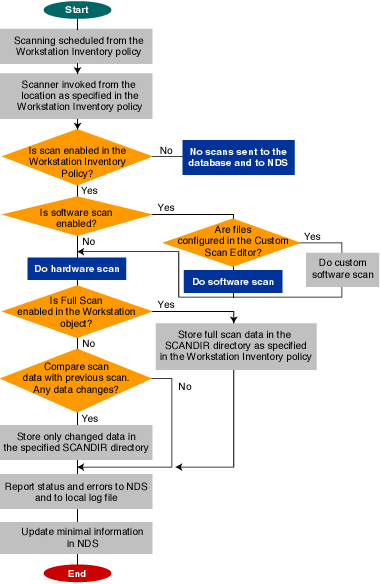
The following flowchart illustrates the hardware and software scanning process:
ZfD uses the following platform-dependent scanners to collect workstation hardware and software information:
The scanners collect hardware details such as: floppy disk drive, hard disk drive, BIOS, bus, mouse, keyboard, display adapters, network adapter cards, modems, Jaz* drives, Zip* drives, sound cards, memory cards, serial ports, and parallel ports. The software scanning includes checking for applications on the workstations and reporting the information about the scanned software, such as the vendor name, and the product name and version.
The scan information collected by the scanners is stored as scan data files (.STR) in the scan directories (SCANDIR). A minimal set of scan data is also stored in the NDS Workstation object.
The following sections contain detailed information about the Inventory scanners:
Also, see Customizing the Software Scanning Information of Vendors and Products.
The scanning process is as follows:
Software Scanning Option: By default, the scanner collects the hardware information of the workstations. If the Enable Software Scan option is enabled in the Workstation Inventory policy, the scanner collects information about software applications.
Custom Scan Editor: If the Software Scanning option is enabled, the scanner reports the software information of all .EXE files on the scanned workstations. You configure the applications that you want the scanner to collect information for using the Custom Scan Editor. See Customizing the Software Scanning Information of Vendors and Products for more information.
Full Scan: When scanning the workstation for the first time, the scanner collects the complete inventory of the workstation, referred to as a full scan. After the workstation is scanned, the next time the scanner compares the current inventory data to the history data that it maintains. If there are any changes to the workstation, the scanner reports the delta scan data, which contains only the changes in inventory since the last scan was reported. The Delta Scan setting is the default scan operation for each successive scan after the first scanning of the workstation.
Enable Scan of Workstation: The scanner collects the inventory information of the workstations associated with the Inventory Service object when this option is enabled.
Location of the SCANDIR Path: The scanner stores the scan information of the workstations in the scan data files (.STR) located in the scan directory (SCANDIR) on the inventory server.
Start Full Scan: The scanner enforces a complete scanning of the workstation and this setting overrides the option set in the Inventory Service Object property page associated with the workstation.
See Setting Up Workstation Inventory for more information.
If the workstation is instrumented for DMI, the scanner also queries the DMI Service Layer. See DMI-Compliant Scanners for more information.
The scanner tracks the changes in scan data by storing the scan data in the HIST.INI history file. For subsequent scans, the scanner compares the history scan data with the actual collected data and generates the .STR file.
The scanner updates the NDS object with the scan data contained in MINFO.INI.
The following flowchart illustrates the hardware and software scanning process:Scanning Process Flowchart
| Filename | Description | Location |
|---|---|---|
filename.STR |
Contains the scan data of each workstation. |
Scan directory (SCANDIR). |
HIST.INI |
Contains the history of scan data for each workstation. |
WINDOWS\TEMP on Windows 95/98 workstations, or TEMP on Windows NT/2000 workstations. |
ZENERRORS.LOG |
Contains the error and status information for the latest scan of the workstation. |
WINDOWS\TEMP on Windows 95/98 workstations, or TEMP on Windows NT/2000 workstations. |
The scanners follow this process for software scanning:
By default, the software scanning includes collecting information of files with .EXE file extensions. See Customizing the Software Scanning Information of Vendors and Products for information on the list of software applications you can scan for.
If the software applications on the workstation are installed using Microsoft* Installer, the scanners use the information from Microsoft Installer (MSI). Otherwise, the scanner collects the software information from the header of the software application files. See the Microsoft documentation for more information.
After the scan data is stored in the database, you can view, query, or generate reports of the software information.
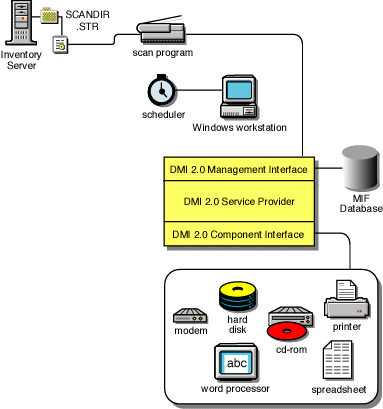
The scanners for scanning workstations (Windows 95/98 and Windows NT/2000) also include scanning based on the industry-standard Desktop Management Interface (DMI) specification 2.0. These programs use the Management Interface (MI) of DMI to look for the hardware components installed on the workstation. The scanners will scan for specific components that are instrumented on the workstation through DMI. The scanners will query the DMI service layer to retrieve this information.
The MI allows the DMI-compliant scanners to probe the Service Provider within the Service Layer. The Service Provider collects information from the manageable components and stores the collected information in the Management Information Format database. The Component Interface (CI) communicates with the manageable components and the Service layer.
The following figure shows the DMI-compliance architecture of the inventory scanners:
See the DMTF Web site for more information on DMI standards.
To scan the DMI data of the managed workstations, you need to instrument the workstation by installing the vendor-specific components. To install the DMI 2.0 Service Layer on the workstations, use the DMISLSnappshot.AOT file located in the \PUBLIC\ZENWORKS\DMISNAPSHOT directory to create a NAL Application Object.
HINT: If the workstations are DMI compliant, the scanners will collect hardware data by querying the DMI Service Layer. Otherwise, the scanners probe the workstations.
We recommend that you instrument DMI and also install DMI components that are supplied by the vendors.
For example, if you have a Compaq* Family Deskpro EN Model-SFF6500 workstation running under Windows 98, download the Management Product software - Compaq Insight Management Desktop Agents software for Windows 95/98/NT from the Compaq Web site.
For Dell* workstations, access the DM/Desktop Management Utilities software from the Dell Web site.
The Scanners collect the following hardware information. The list also contains the DMI components that are addressed in the DMI information.
| Scan Data | DMI Class and Attribute |
|---|---|
System.Type |
Not applicable |
System.MachineName |
Not applicable |
System.AssetTag |
DMTF|System Enclosure|001.2 |
System.Model |
Not applicable |
System.ModelNumber |
Not applicable |
System.DNName |
Not applicable |
System.TreeName |
Not applicable |
IP.Address |
Not applicable |
IP.Subnet (Subnet Mask) |
Not applicable |
IP.HostName |
Not applicable |
NetworkAdapter.MACAddress |
Not applicable |
Model.Description |
Not applicable |
Model.Name |
Not applicable |
Model.Vendor |
Not applicable |
NetworkAdapter.DriverDescription |
DMTF|Network Adapter Driver |001.Driver Software Name |
NetworkAdapter.DriverName |
DMTF|Network Adapter Driver |001.Driver Software Name |
NetworkAdapter.DriverVersion |
DMTF|Network Adapter Driver |001.Driver Software Version |
NetworkAdapter.Speed |
DMTF|Network Adapter 802 Port|001.5 |
NetworkAdapter.Name |
DMTF|Network Adapter Driver|001.Driver Software Description |
NetworkAdapter.PermAddress |
DMTF|Network Adapter 802 Port|001.2 |
Login.LoginName |
Not applicable |
Login.DomainName |
Not applicable |
NWClient.Version |
Not applicable |
Processor.stepping |
DMTF|Processor|004.4 |
Processor.DeviceID |
Not applicable |
Processor.Family |
DMTF|Processor|004.3 |
Processor.MaxClockSpeed |
DMTF|Processor|004.5 |
Processor.Role |
DMTF|Processor|004.2 |
Processor.Upgrade |
DMTF|Processor|004.7 |
Processor.OtherFamily |
Not applicable |
BIOS.Manufacturer |
Not applicable |
BIOS.BIOSDate |
Not applicable |
BIOS.BIOSIDBytes |
Not applicable |
BIOS.Copyright |
Not applicable |
BIOS.SerialNumber |
Not applicable |
BIOS.BIOSType |
Not applicable |
BIOS.PrimaryBIOS |
Not applicable |
BIOS.Size |
Not applicable |
Bus.Version |
Not applicable |
Bus.Type |
DMTF|Bus Port|001.Protocol |
Mouse.DeviceType |
Not applicable |
Mouse.Type |
DMTF|Mouse|004.Mouse Interface |
Mouse.NumberOfButtons |
DMTF|Mouse|004.Mouse Buttons |
Mouse.DriverName |
DMTF|Mouse|004.Mouse Driver Name |
Mouse.DriverVersion |
DMTF|Mouse|004.Mouse Driver Version |
Mouse.IRQ |
DMTF|Mouse|004.Mouse IRQ |
Keyboard.Layout |
DMTF|Keyboard|003.Layout |
Keyboard.Subtype |
Not applicable |
Keyboard.Type |
DMTF|Keyboard|003.Keyboard.Type |
Keyboard.Fkeys |
Not applicable |
Keyboard.Delay |
Not applicable |
Keyboard.TypematicRate |
Not applicable |
Monitor.NumberOfColorPlanes (NEW) |
Not applicable |
Monitor.HorizontalResolution |
DMTF|Video|004.Current Horizontal Resolution |
Monitor.VerticalResolution |
DMTF|Video|004.Current Vertical Resolution |
Monitor.DisplayType |
DMTF|Video|004.Video Type |
Monitor.MemoryType |
DMTF|Video|004.Video Memory Type |
Monitor.MaxMemorySupported |
DMTF|Video|004.Video RAM Memory Size |
Monitor.Bitsperpixel |
DMTF|Video|004.Current Number of Bits per Pixel |
Monitor.ControllerDescription |
DMTF|Video|004.Video Controller Description |
Monitor.MaxRefreshrate |
DMTF|Video|004.Maximum Refresh Rate |
Monitor.MinRefreshrate |
DMTF|Video|004.Minimum Refresh Rate |
Monitor.VideoBIOSManufacturer |
DMTF|Video BIOS|001.BIOS Manufacturer |
Monitor.VideoBIOSVersion |
DMTF|Video BIOS|001.Video.BIOS Version |
Monitor.VideoBIOSReleaseDate |
DMTF|Video BIOS|001.Video.BIOS Release Date |
Monitor.VideoBIOS.IsShadowed |
DMTF|Video BIOS|001.Video.Shadowing State |
ParallelPort.Name |
DMTF|Parallel Ports|003.Logical Name |
ParallelPort.DMASupport |
DMTF|Parallel Ports|003.DMA Support |
ParallelPort.IRQ |
DMTF|Parallel Ports|003.IRQ Used |
SerialPort.Name |
DMTF|Serial Ports|004.Logical Name Pointing Device Port Name |
SerialPort.Address |
DMTF|Serial Ports|004.Serial Base I/O Address |
SerialPort.IRQ |
DMTF|Serial Ports|004.IRQ Used |
FloppyDrive.Dummy |
Not applicable |
FloppyDrive.DriverName |
DMTF|Logical Drives|001.Logical Drive Name (when DMTF|Logical Drives|001.Logical Drive Type=Floppy Drive(7)) |
FloppyDrive.Vendor |
Not applicable |
FloppyDrive.Description |
DMTF|Disks|003.Interface Description (when DMTF|Disks|003.Storage Type=Floppy Disk(4)) |
FloppyDrive.MaxNumberofCylinders |
DMTF|Disks|003.Number of Physical Cylinders |
FloppyDrive.NumberOfHeads |
DMTF|Disks|003.Number of Physical Heads |
FloppyDrive.Sectors |
DMTF|Disks|003.Number of Physical Sectors Per Track |
FloppyDrive.Size |
DMTF|Disks|003.Total Physical Size |
CIM_CDROMDrive.Dummy |
Not applicable |
CDROMDrive.Name |
DMTF|Logical Drives|001.Logical Drive Name |
CDROMDrive.Vendor |
Not applicable |
CDROMDrive.Description |
DMTF|Disks|003.Interface.Description (when DMTF|Disks|003.Storage Type=Compact Disk Disk(8)) |
CDROMDrive.DeviceID |
DMTF|Disks|003.DeviceID |
HardDrive.Dummy |
Not applicable |
HardDrive.Vendor |
Not applicable |
HardDisk.Description |
DMTF|Disks|003.Interface Description (when DMTF|Disks|003.Storage Type=Hard Disk(3)) |
HardDisk.Cylinders |
DMTF|Disks|003.Number of Physical Cylinders |
HardDisk.Heads |
DMTF|Disks|003.Number of Physical Heads |
HardDisk.Sectors |
DMTF|Disks|003.Number of Physical Sectors per Track |
HardDisk.Capacity |
DMTF|Disks|003.Total Physical Size |
Storage.Type |
DMTF|Disk|003.Storage Type |
HardDisk.PartitionName |
DMTF|Partition|002.Partition Name |
HardDisk.PartitionSize |
DMTF|Partition|002.Partition Size |
HardDisk.PartitionFileSystemType |
DMTF|Partition|002.FileSystem |
LogicalDrive.Name |
DMTF|Logical Drives|001.Logical Drive Name (when DMTF|Logical Drives|001.Logical Drive Type=Fixed Drive(3)) |
LogicalDrive.Size |
DMTF|Logical Drives|001.Logical Drive Size |
LogicalDrive.VolumeSerialNumber |
Not applicable |
LogicalDrive.Volume (Volume Label) |
Not applicable |
LogicalDrive.Type |
DMTF|Logical Drives|001.Logical Drive Type |
Operating System.Name |
DMTF|Operating System|001.Operating System Name |
OperatingSystem.Version |
DMTF|Operating System|001.Operating System Version |
OperatingSystem.Codepage |
Not applicable |
OperatingSystem.InstallDate |
Not applicable |
OperatingSystem.TotalSwapSpaceSize |
DMTF|System Memory Settings|001.Total Size of Paging Files |
OperatingSystem.Description |
DMTF|Operating System|001.Operating System Description |
VirtualMemory.TotalVirtualMemorySize |
DMTF|System Memory Setting|001.Total Virtual Memory |
InventoryScanner.Version |
Not applicable |
InventoryScanner.LastScanDate |
Not applicable |
InventoryScanner.InventoryServer |
Not applicable |
SoundCard.Description |
Not applicable |
SoundCard.Name |
Not applicable |
SoundCard.Manufacturer |
Not applicable |
Scsidrive.Description |
Not applicable |
Scsidrive.Manufacturer |
Not applicable |
Scsidrive.Name (mapped drive) |
Not applicable |
Memory.Size |
DMTF|System Memory Settings|001.Total Physical Memory |
Cache.Level |
DMTF|System Cache|003.System Cache Level |
Cache.WritePolicy |
DMTF|System Cache|003.System Cache Write Policy |
Cache.ErrorCorrection |
DMTF|System Cache|003.System Cache Error Correction |
Cache.Type |
DMTF|System Cache|003.System Cache Type |
Cache.LineSize |
DMTF|System Cache|003.Line Size |
Cache.ReplacementPolicy |
DMTF|System Cache|003.Replacement Policy |
Cache.ReadPolicy |
DMTF|System Cache|003.Read Policy |
Cache.Associativity |
DMTF|System Cache|003.Associativity |
Cache.Speed |
DMTF|System Cache|003.System Cache Speed |
Cache.Size |
DMTF|System Cache|003.System Cache Size |
Motherboard.Verify |
Not applicable |
MotherBoard.BoardRev |
Not applicable |
MotherBoard.Slots |
DMTF|Motherboard|001.Number of Expansion slots |
Battery.Name |
DMTF|Portable Battery|002.Portable Battery Device Name |
Battery.Chemistry |
DMTF|Portable Battery|002.Portable Battery Device Chemistry |
Battery.Capacity |
DMTF|Portable Battery|002.Portable Battery Design Capacity |
Battery.Voltage |
DMTF|Portable Battery|002.Portable Battery Design Voltage |
Battery.Version |
DMTF|Portable Battery|002.Portable Smart Battery Version |
Battery.Manufacturer |
DMTF|Portable Battery|002.Portable Battery Manufacturer |
Battery.ManufacturerDate |
DMTF|Portable Battery|002.Portable Battery Manufacturer Date |
Battery.SerialNumber |
DMTF|Portable Battery|002.Portable Battery Serial Number |
PowerSupply.InputVoltageDescription |
DMTF|Power Supply|002.Power Suppy Input Voltage Capability Description |
PowerSupply.Power |
DMTF|Power Supply|002./Total Output Power |
DMA.Number |
DMTF|DMA|001.DMA Number |
DMA.Description |
DMTF|DMA|001.DMA Description |
DMA.Availability |
DMTF|DMA|001.DMA Channel Availability |
DMA_BurstMode |
DMTF|DMA|001.DMA BurstMode |
UCS.PrimaryOwnerContact |
DMTF|General Information|001.3 |
UCS.PrimaryOwnerName |
DMTF|General Information|001.4 |
IRQ.Number |
DMTF|IRQ|002.IRQNumber |
IRQ.Availability |
DMTF|IRQ|002.Availability |
IRQ.TriggerType |
DMTF|IRQ|002.TriggerType |
IRQ.Shareable |
DMTF|IRQ|002.Shareable |
CIM_Card.Description |
DMTF|System Slots|003.Description |
CIM_Slot.MaxDataWidth |
DMTF|System Slots|003.MaxDataWidth |
CIM_Slot.ThermalRating |
DMTF|System Slots|003.Tr |
HINT: PCMCIA modems are connected to the computer through the PCMCIA slots on the workstations. The Scanner detects PCMCIA modems that are active on the computer. If you want to know which modem is installed on the computer, use the Windows System Device Manager on the Windows workstation.
Non-PCMCIA modems are connected to the computer through the external ports. For example, some non-PCMCIA modems are connected through the serial ports. The Scanner detects Non-PCMCIA modems that are installed on the computer.
Non-PCMCIA modems may not be active at the time of scanning. Also, these modems may not be connected, though configured on the computer. In this case, the Scanner detects the modem and reports the scan information of the modem.