Inventory Sites
A single site consists of a simple network environment of workstations and at least one server. A site is typically a geographical location.
The following illustration depicts a single site and multiple sites:
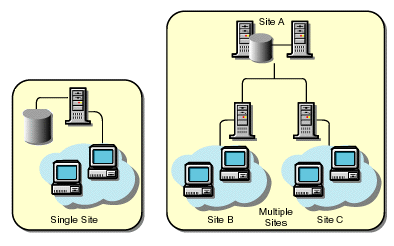
Workstations to be scanned are connected to the inventory server in a LAN environment. The scanners send the scan data to the attached inventory server, which should be the nearest inventory server. In ZfD, you identify an inventory server for each workstation in the network using the Workstation Inventory policy based in NDS®. The Intermediate Server is a staging server for moving the data from the lower-level servers up the server hierarchy. Inventory database stores the scan information of the workstations at a site. At any site, a server that has an Inventory database is a database server. A database on a server has scan information for all the workstations attached to that server and also the scan information of all the workstations attached to its lower-level servers, if any. The Inventory database is maintained in Sybase* or Oracle.ZfD contains ten database files. Each file can grow to 2 GB on the database server. The total database size can be a maximum of 20 GB. The Root Server is the highest-level server in the inventory tree hierarchy. This server has an Inventory database that contains the inventory information of all lower-level servers. At the Root Server level, you can view complete inventory information for the entire enterprise. The Novell® Directory Services tree consists of NDS objects such as multiple levels of organizational units, users, groups, and other network resources. This hierarchical structure is referred to as the NDS Tree in this document. See the NDS documentation Web site for more information.Inventory Server
Intermediate Server
Database Server
Root Server
NDS Tree