
The NDSTM Directory allows for easy, powerful, and flexible management of network resources. It also serves as a repository of user information for groupware and other applications. These applications access your NDS Directory through the industry-standard Lightweight Directory Access Protocol (LDAP).
NDS ease-of-management features include a powerful tree structure, an integrated management utility, and single login and authentication.
NDS organizes objects in a tree structure, beginning with an object called [Root].
Whether your NDS servers are running NetWare, UNIX*, or Windows NT*, all resources can be kept in the same NDS tree. You won't need to access a specific server or domain to create objects, grant rights, change passwords, or manage applications.
The hierarchical structure of the NDS tree gives you great management flexibility and power. These benefits are primarily the result of two features: container objects and inheritance.
Container objects allow you to manage other objects in sets, rather than individually. There are three common classes of container objects:
 [Root] is the first container object in the tree. It usually contains your company's Organization object.
 Organization is normally the first container class under [Root]. The Organization object is typically named after your company. Small companies keep management simple by having all other objects directly under the Organization object.
 Organizational Unit objects can be created under the Organization to represent distinct geographical regions, network campuses, or individual departments. You can also create Organizational Units under other Organizational Units to further subdivide the tree.
A fourth class of container object is the Country object, which is seldom used.
You can perform one task on the container object that applies to all objects within the container. Suppose you want to give Amy complete management control over all objects in the Accounting container.
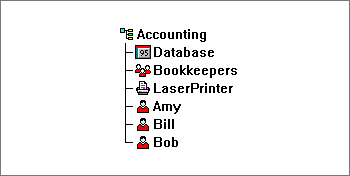
All you need to do is drag the User object named Amy onto the Organizational Unit object named Accounting. Then you select the rights you want Amy to have and click OK. Now Amy has rights to manage the Database application, the Bookkeepers group, the LaserPrinter printer, and the User objects Amy, Bill, and Bob.
For more information on NDS objects, see Object Classes and Properties.
Another powerful feature of NDS is rights inheritance. Inheritance means that rights 'flow down' to all containers in the NDS tree. This allows you to grant NDS rights with very few rights assignments. For example, suppose you want to grant management rights to the NDS objects shown below:
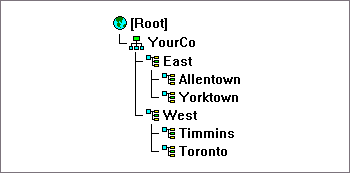
You could make any of the following assignments:
For more information on assigning rights, see NDS Rights.
NWAdmin (shown below) is the management console for the entire network.
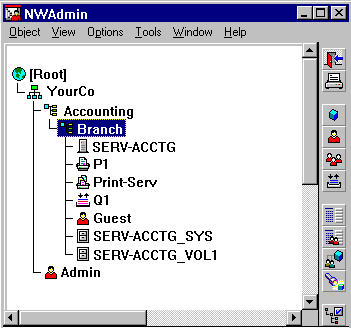
NOTE: NWAdmin incorporates all the functions available in Novell's DOS command line utilities FILER, NETADMIN, PARTMGR, and PCONSOLE.
Users log in to a global directory, so you don't need to manage multiple server or domain accounts for each user, and you don't need to manage trust relationships or pass-through authentication among domains.
A security feature of the Directory is authentication of users. Before a user logs in, a User object must be created in the Directory. The User object has certain properties, such as a name and password.
When the user logs in, NDS checks the password against the one stored in the Directory for that user and grants access if they match.